





APD189
Members
-
Joined
-
Last visited
-
Hi All, I was wondering if someone could help me with a "Machine Check Events detected on your server - Your server has detected hardware errors. The output of mcelog has been loggeg. Post your diagnostics and ask for assistance on the Unraid forums" error that came up in Fix Common Problems. I've attached the diagnostic file. unraid-1-diagnostics-20250331-1711.zip
-
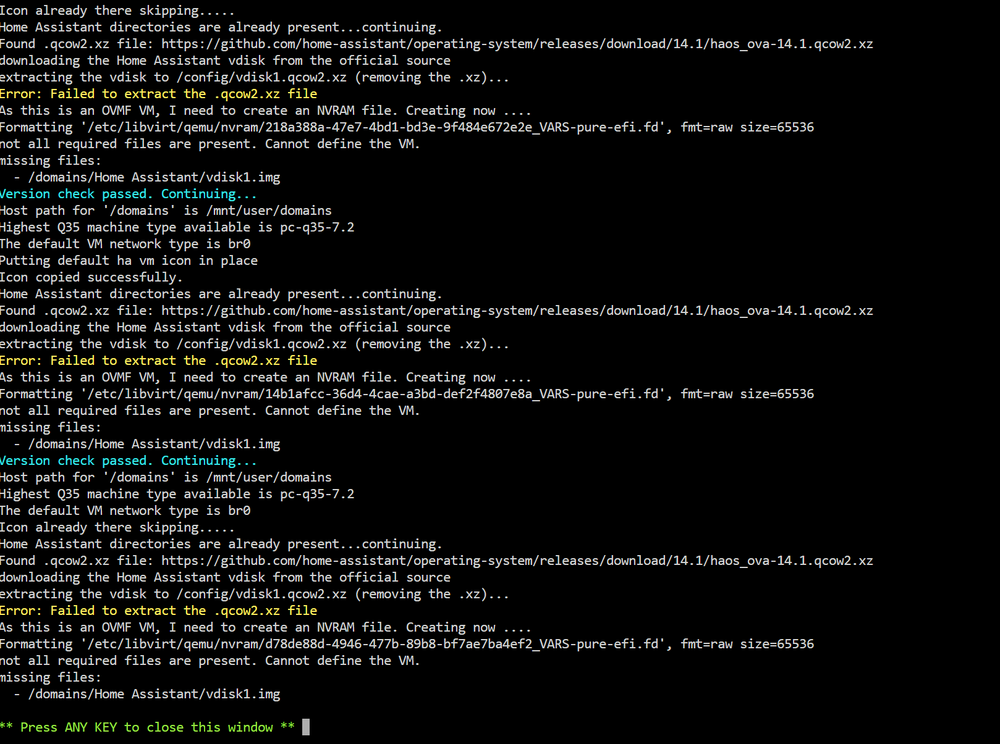
I downloaded Spaceinvader One's Docker app, Home Assistant, and it is unable to create the VM necessary. I keep getting "Error: Failed to extract the .qcow2.xz file". Can anyone help?
-
I'm getting this same error message. What needs to be done to resolve this?
-
Apologies if this was asked, but is this the latest version of this application? v2022.12.30 Thanks
-
Anyone else have an issue with this Plex Docker? Every now and then I need to restart this Plex docker because it goes offline while I'm watching a video to tv show. It is now consistent, but it does have quite frequent. After I restart the docker container, it works just fine. Thanks
-
I just got this alert on my system: Machine Check Events detected on your server Your server has detected hardware errors. You should install mcelog via the NerdPack plugin, post your diagnostics and ask for assistance on the Unraid forums. The output of mcelog (if installed) has been logged More Information Looks like NerdPack is no longer available and was replaced with NerdTools (please correct me if I'm wrong). How can I see what the hardware issues are. unraid-1-diagnostics-20230424-0726.zip
-
Hi @trurl and all, Looks like I have resolved the issue. I believe the issue is from having two network cards with 2 different IP addresses. With this and using the certificate from unraid.net, I believe my unraid server was the cause. SSH to unraid server use_ssl no sets the SSL use to no /etc/rc.d/rc.nginx start Start the web server /etc/rc.d/rc.nginx status Check the status of the web server Access WebGUI Stopped Docker Removed the second IP address on the second network card Go to Settings -> Management Access Set SSL to yes Provisioned new SSL certificate Set SSL to auto Accessed WebGui again. Rebooted to test All is working now.
-
What I've found is that Nginx is not starting up after reboot. I found this article (https://forums.unraid.net/topic/121072-unable-to-reach-gui/#comment-1106035) and I was able to get it to work (with including the removal of the certificates), but after a reboot, Nginx is not starting up. Now I tried to start up Nginx and I'm getting the following response: root@UNRAID-1:~# /etc/rc.d/rc.nginx start Starting Nginx server daemon... nginx: [emerg] invalid number of arguments in "return" directive in /etc/nginx/conf.d/servers.conf:36 Any idea on how to fix this?
-
Hi All, I'm in need of assistance. I rebooted my unraid server and now I cannot connect to the GUI. unRAID is running 6.10.0-rc4 I'm able to SSH into the server I'm not able to access the GUI It is connected to unRAID.net so that it changes the URL to *************.unraid.net I'm able to ping it's gateway, but nothing outside of it's local network I did try another internal VLAN gateway and I'm getting "Destination Host Unreachable" I believe I'm having a routing issue and need some assistance. Here is the routing table root@UNRAID-1:~# route Kernel IP routing table Destination Gateway Genmask Flags Metric Ref Use Iface default ubnt.local 0.0.0.0UG 0 0 0 br0 default 172.16.30.10.0.0.0UG 2 0 0 br4 10.0.1.00.0.0.0255.255.255.128 U 0 0 0 shim-br0 10.0.1.00.0.0.0255.255.255.0 U 0 0 0 br0 10.0.1.1280.0.0.0255.255.255.128 U 0 0 0 shim-br0 172.16.30.00.0.0.0255.255.255.128 U 0 0 0 shim-br4 172.16.30.00.0.0.0255.255.255.0 U 0 0 0 br4 172.16.30.128 0.0.0.0255.255.255.128 U 0 0 0 shim-br4 172.17.0.00.0.0.0255.255.0.0U 0 0 0 docker0 root@UNRAID-1:~# ping ubnt.local PING ubnt.local (10.0.1.1) 56(84) bytes of data. 64 bytes from ubnt.local (10.0.1.1): icmp_seq=1 ttl=64 time=0.171 ms 64 bytes from ubnt.local (10.0.1.1): icmp_seq=2 ttl=64 time=0.148 ms ^C --- ubnt.local ping statistics --- 2 packets transmitted, 2 received, 0% packet loss, time 1002ms rtt min/avg/max/mdev = 0.148/0.159/0.171/0.011 ms This was working prior to the reboot I performed today. So I just re-added my default gateway back in (route add default gw 10.0.1.1) and I'm now able to ping outside of the local network, but I'm still unable to get to the Web GUI. root@UNRAID-1:/boot/config# route add default gw 10.0.1.1 root@UNRAID-1:/boot/config# ping 4.2.2.2 PING 4.2.2.2 (4.2.2.2) 56(84) bytes of data. 64 bytes from 4.2.2.2: icmp_seq=1 ttl=56 time=4.30 ms 64 bytes from 4.2.2.2: icmp_seq=2 ttl=56 time=4.09 ms ^C --- 4.2.2.2 ping statistics --- 2 packets transmitted, 2 received, 0% packet loss, time 1000ms rtt min/avg/max/mdev = 4.092/4.195/4.299/0.103 ms root@UNRAID-1:/boot/config# route Kernel IP routing table Destination Gateway Genmask Flags Metric Ref Use Iface default ubnt.local 0.0.0.0 UG 0 0 0 shim-br0 default ubnt.local 0.0.0.0 UG 0 0 0 br0 default 172.16.30.1 0.0.0.0 UG 2 0 0 br4 10.0.1.0 0.0.0.0 255.255.255.128 U 0 0 0 shim-br0 10.0.1.0 0.0.0.0 255.255.255.0 U 0 0 0 br0 10.0.1.128 0.0.0.0 255.255.255.128 U 0 0 0 shim-br0 172.16.30.0 0.0.0.0 255.255.255.128 U 0 0 0 shim-br4 172.16.30.0 0.0.0.0 255.255.255.0 U 0 0 0 br4 172.16.30.128 0.0.0.0 255.255.255.128 U 0 0 0 shim-br4 172.17.0.0 0.0.0.0 255.255.0.0 U 0 0 0 docker0
-
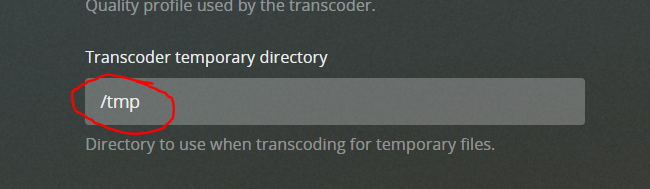
Hey @binhex...I'm looking to see if this is the correct setting within Plex.
-
@binhex...Thanks for the info. Just for clarification, within Plex, what should I have in the "Transcoder temporary directory"?
-
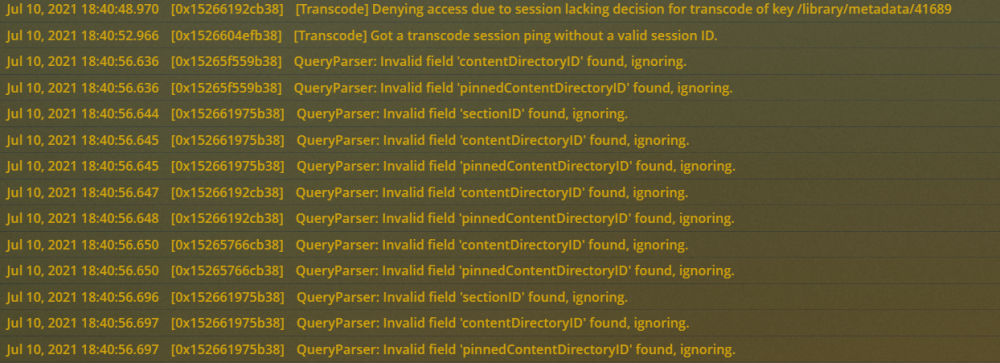
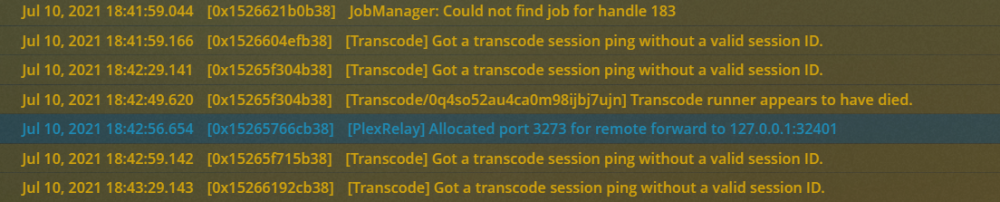
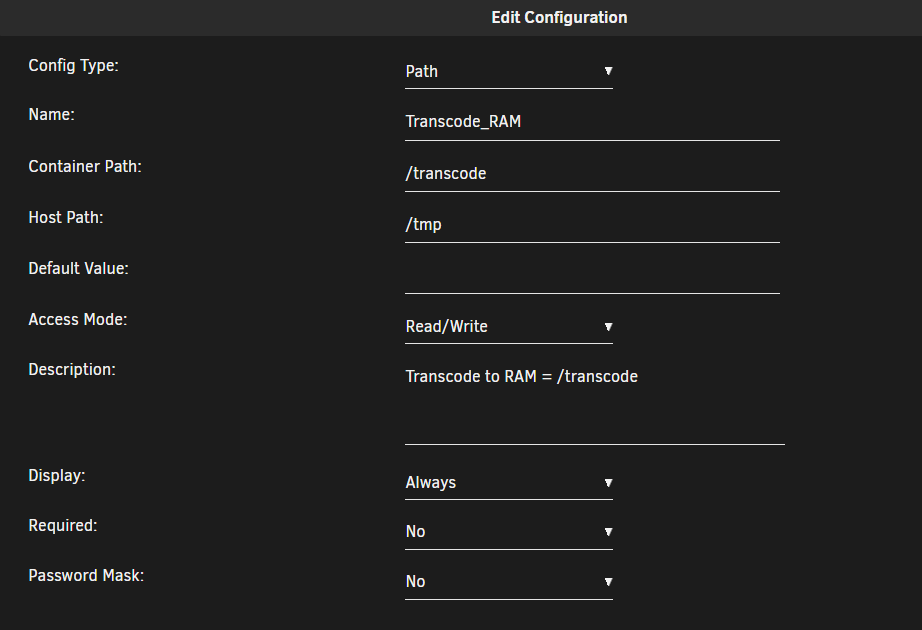
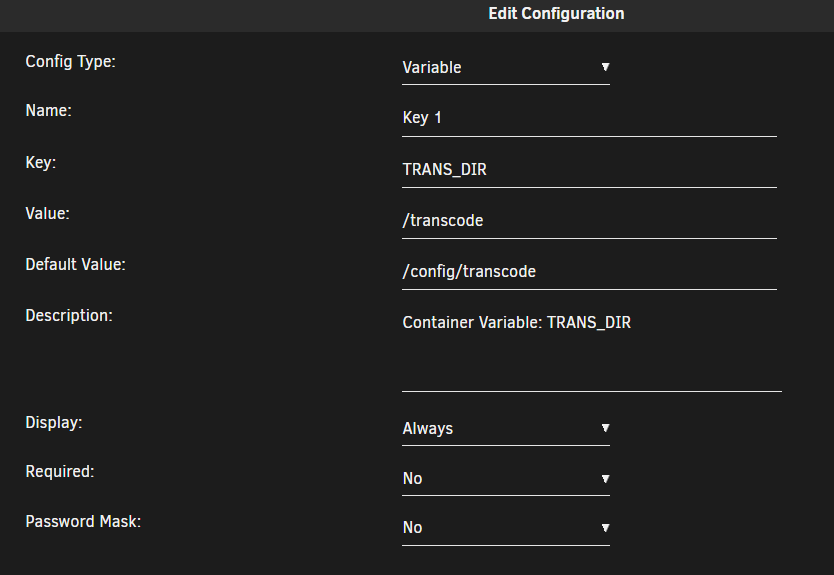
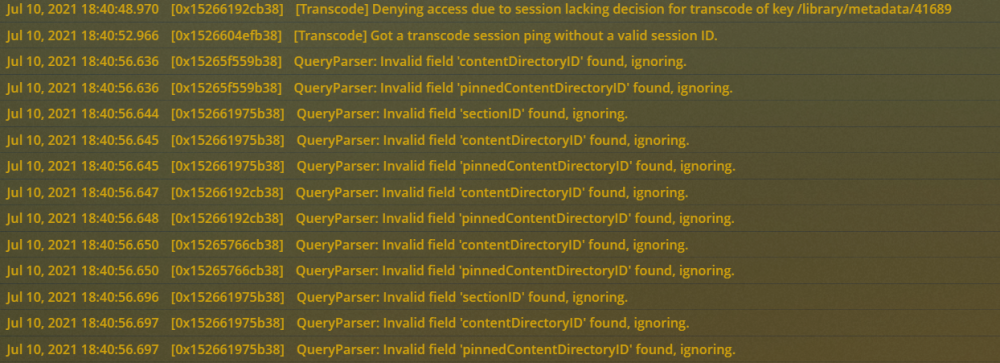
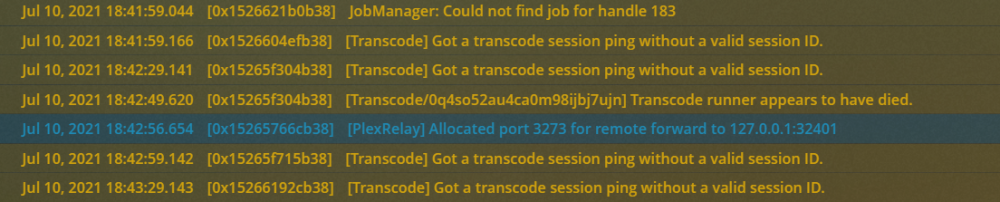
Hi All, I know that this has been answered, but I'm still a bit confused. It looks like I'm still having transcoding problems when I'm trying to transcode to RAM. I did follow @binhex FAQ on transcoding to RAM: I'm just a bit loss in Plex... Do I need to set the transcoder temporary directory to a path? I currently have /transcode as the path. I'm also using a P2000 and have hardware transcode enabled and that seems to be working fine when the transcode start for the beginning. If I were to change the quality manually it just spins and never changes the transcode. Also I'm getting these warnings in my logs: This is the messages when I change quality on a stream from chrome. I think I might be over thinking this too. Thanks in advance...
-
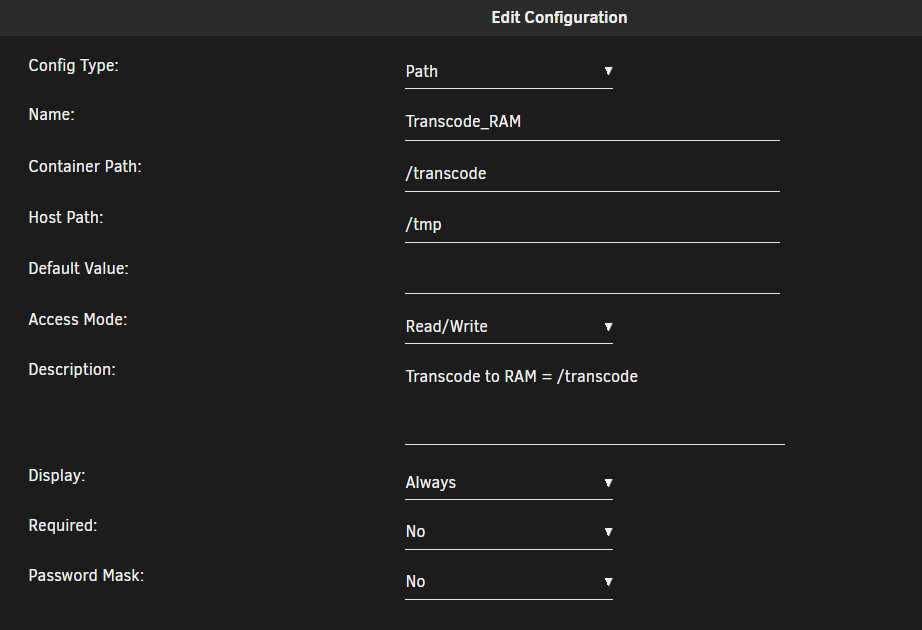
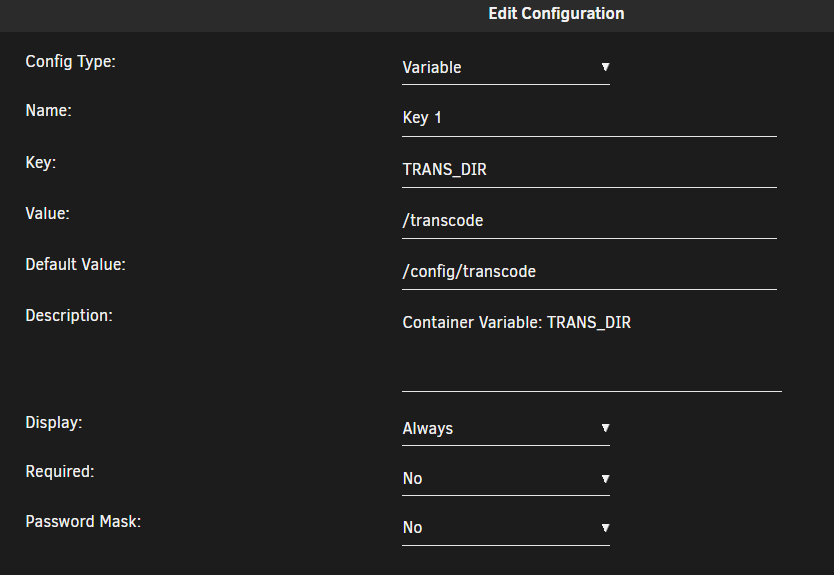
Hi All, I know that this has been answered, but I'm still a bit confused. It looks like I'm still having transcoding problems when I'm trying to transcode to RAM. I did follow @binhex FAQ on transcoding to RAM: I'm just a bit loss in Plex... Do I need to set the transcoder temporary directory to a path? I currently have /transcode as the path. I'm also using a P2000 and have hardware transcode enabled and that seems to be working fine when the transcode start for the beginning. If I were to change the quality manually it just spins and never changes the transcode. Also I'm getting these warnings in my logs: This is the messages when I change quality on a stream from chrome. I think I might be over thinking this too. Thanks in advance...
-
-
I was trying to test my transcoding and I'm having issue with changing the quality to force transcoding within a web browser. If I go to Settings -> Plex Web -> Quality -> turn off "Use recommended settings" under Home Streaming and then choose a video quality...that works. But if I change the quality from within the video, it stops playing. I'm on binhex-plexpass (1.23.0.4497) and I'm using a nVidia p2000 with driver 465.27 on Unraid 6.9.2. Any help would be great.


