






carltonb
Members
-
Joined
-
Last visited
-
Can you explain if this setting was changed without my input, or if I accidently changed it when increasing my docker size last month. Thank you. I will see what happens tonight.
-
Thank you for the information on what I should do. For the two days after I posted this it worked fine, now it is acting up again. Atatched are the two files that you mentioned to post. I hope that this is what you need. Thank you. micah-diagnostics-20230826-0735.zip syslog-192.168.1.90.log
-
For the last six nights my UnRaid Server has gone off line at some point. The only way to get it back is to shut down and reboot. When I do this I loose all the logs that might have been created that would tell me why. How might I diagnose what the problem might be. Are there any logs that do not refresh when the server is restarted. Thanks for the help
-
I just purchased a new UPS "CyberPower OR500LCDRM1U Smart App LCD UPS, 500VA/300W, 6 Outlets, AVR, 1U Rackmount" and plugged my Unraid server into it. I have it setup just like my old one but am running into some strange issues. When I do a Docker update, or compile a new device in ESPHOME, it starts to beep. It seems that the output on the UPS display goes from changes dramatically and that the Settings>UPS in Unraid hanges. What might my problem be and any recommendations to fix it. Thanks
-
I tested the IP from outside of my local network using my cell phones mobile data and got the same message that it could not connect.
-
Thank you for sticking with me. I might have missed understood what you asked me to do. Where should I have put in the public ip, I just did it in my Firefox browser. But from the reply you gave it looks like I may have done it wrong.
-
I tried the http://xxx.xx.xxx.232 (http://<publicIP> ) and it says This site can’t be reached.
-
I am lost at the folloing statement you made "What happens if you open your public IP? You should see the NPM proxy welcome page." Can you please explain how I would do this. Thank you.
-
It goes to http://192.168.1.90:4743 and does open.
-
I am back again to ask for help with a problem that I never figured out (probably due to my understanding) of Cloudflare and NPM. I created a Cloudflare account and NPM in unraid. I got my Nextcloud up and running thanks to the great tutorials online. But my problem still lies if I try to add more than one proxy in NPM. If I add Vaultwarden and click on it it opens up Nextcloud and not Vaultwarden. I am attaching a picture of what I have setup. I tried to follow the suggestions that everyone provided about 5 months ago but failed. I need to see if I can get this figured out for at least my own learning experience. Please let me know what other information may be needed.
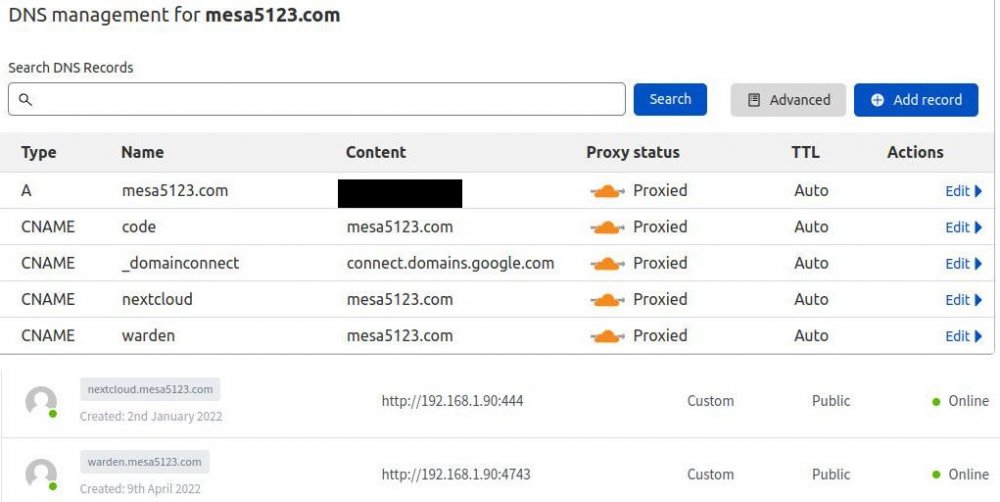
-
Yesterday I started to update my sensors in ESPHome. After the first unit started to update my UPS started to beep for about 10 seconds, then after it updated the beeping stopped. I thought something was loose on my UPS so I double checked it, but after updating 6 more items in ESPHome they all did the same thing. Here is a before and after screen shot of the UPS readings. I searched the forums but found nothing. When I do a docker update or update anything else on my server this does not happen. Can anyone point me in a direction that I can figure this out. Thanks


-
Thanks so much @Michael_P Worked like a charm.
-
Yesterday I could not access my next cloud install. It game me the following error. I am also unsure as to what server log to look at! Can someone point me in a direction. Also Maria DB is giving me the following error as well. Thanks
-
I have no clue if this is the correct area to post this but I need some help with Bitwardenrs. I have it installed for the last 3 months and is working well. Got all my family tied into it so we are all happy. Now my problem comes with using 2FA. I use a YubiKey for 90% of all my 2FA, but it seems that it does not play nice with Bitwardenrs. It will not recognize certain aspects odf the YubiKey, like otp. And as well it it gives me time sync errors. I did find a piece of docker code they said that needs to be installed but I do not know how to do it on unRaid. docker run -d --name bitwarden \ -e YUBICO_CLIENT_ID=12345 \ -e YUBICO_SECRET_KEY=ABCDEABCDEABCDEABCDE= \ -v /bw-data/:/data/ \ -p 80:80 \ bitwardenrs/server:latest Can anyone shed some light on this for me. Thanks so much


