





French-Guy
Members
-
Joined
-
Last visited
-
Hello I have a Ryzen 5 1600 CPU that I don't use anymore I was thinking to upgrade my very old Athlon XII 250 that I use on my Vanilla server (works just fine though) is there any specific AM4 motherboard I should look for, or at least a specific chipset I should avoid? Thanks
-
Quick question though: is a 6TB WD Elements (external drive) a decent deal for $80, even though it's most likely a SMR drive inside?
-
Well, it's most likely SMR, so I will pass.....
-
Well, I found someone selling a still sealed WD Elements 6TB external drive for $100....Opening the enclosure should not be an issue
-
Hello I would like to replace an old 1.5TB HDD in my array....My parity drive is 8TB, so ideally I would like to get a 8TB or 6TB drive But prices are crazy right now......Do you have any recommendations for places where to buy HDD for a "decent" price? Thanks
-
No RAID controllers..... I have an "old" Ryzen 5 1600 that I'm trying to sell. Maybe I should keep it and try to find a used AM4 motherboard (B450M?) and 8GB RAM.....
-
Hello I just realized that I'm running Unraid as a Vanilla server using a quite old config: Biostar A785GE with Ahtlon XII 250 and 2 x 2GB RAM It works fine, no specific issues But I were to upgrade to something more recent (used market ideally), what should I look for? Will it be as simple as swapping old by new, and that's it? Thanks
-
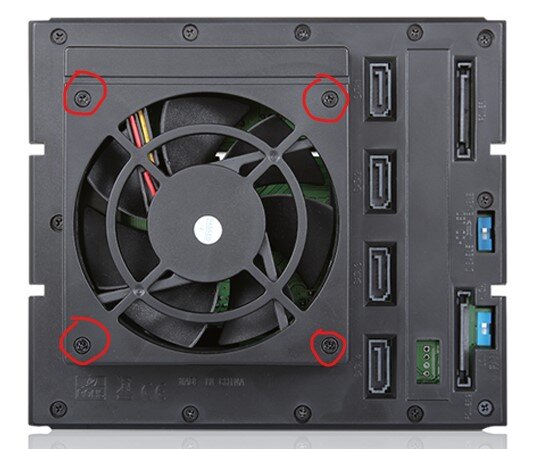
Hello all I'm using this drive cage from iStar: BPN-DE340SS I want to replace the 2 fans by something more quiet (Noctua) Can someone tell me the exact size of the screws used to attach the fan housing to the cage itself (highlighted in red)? Thanks
-
Hello My parity drive is 8TB I have a 1.5Tb data drive that needs to be replaced...what would be your recommendations for a decent 8TB drive at a fair price? Any good deal with Black Friday approaching? Thanks
-
I did a quick test, and it seems to work perfectly without having to install any plugins Thank you for your help
-
But how does the server know it's running on battery? But how does the server know it's running on battery?
-
Yesterday, we had a power outage around midnight, and my server was on I have a UPS to power my modem, router and switch as well as the server But the server drained it quite fast, and I realized I didn't have internet anymore because of that How do I configure the server (plugin?) to automatically shut down when it's powered by the UPS (CyberPower 1350VA from Costco) Thanks
-
Oh, OK.....thank you
-
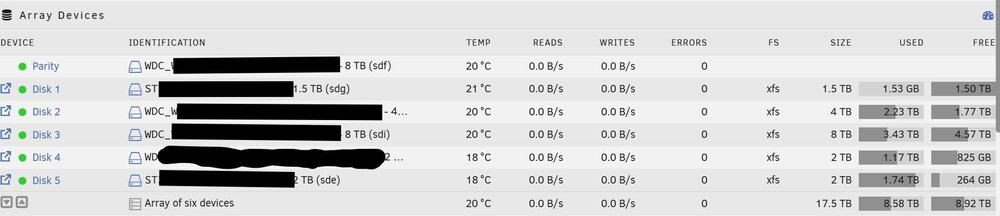
Hello I have an array of 5 drives (1,5TB / 2TB / 2TB / 4TB / 8TB) The 1,5TB drive remains empty, even though I changed the allocation method to Most free What should I be looking for?
-
Looks like it works.....I can't guarantee it shutdown at 1:00am, but it was off this morning What should I do with the go file? Keep it as is or completely delete it? Thank you
