





pieman16
Members
-
Joined
-
Last visited
Everything posted by pieman16
-
Update. My server (unraid) is not going online. It says it’s connected to the switch but that isn’t true. My ubiquiti dream machine doesn’t see it. The dream machine isn’t passing the internet to my switch. So there is problem 1. I’m gunna delete the network.cfg file later tonight.
-
Okay got some good news. I found a monitor. But no keyboard. I’m getting a cheap one today. Anyway unraid says it’s at 192.168.100.105. But it’s not. I think it might be a switch issue. The switch is 102.168.1.1.
-
Got some good news. I got it to boot on my laptop. I reinstalled unraid then moved my backup over. But now I gotta find a monitor, keyboard and mouse. She isn’t coming on to the network :(.
-
I’ll give it a shot Thx
-
How would start removing plugins?
-
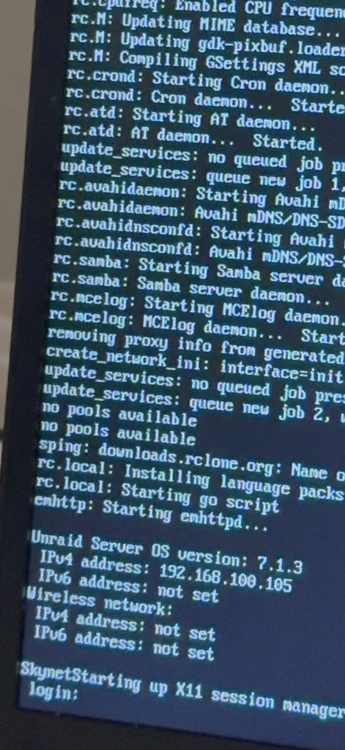
Here is the image it shows for 1/2 a second.
-
Just moved and got my network back up. Unraid doesn’t want to behave. I took the usb stick out and put it in my laptop. I selected gui os. It goes all the way to the login screen then shows it for 1/2 a sec then clears the screen and freezes. If I boot in gui os safe mode it has no issues. It boots fine in safe mode.
-
-
-
I changed them all to read/write to test it. Because honestly I don’t remember what user the laptop is signed in on and don’t know how to sign that user out. I looked in windows under credentials and deleted the server in there but no luck.
-
Nope no luck still says I need permission.
-
Hello, I am using ver 6.1.1.5 and the problem I'm running in to is none of my computers can add files or folders (inside shared folders), to the server I get from windows 11 that I'm pretty much not autherized. I made my 5 users have read/write access to every folder to test it but still no luck. Any suggestions?
-
I had a longer post but I think it’s best to say good bye. Not going to ask or say anything this guy. Good bye.
-
He's not responding and looking like this is a dead project
-
@Unmax Any new updates?
-
Got ya. It just went quiet so I was like “did he give up?” Glad to see you’re still going strong.
-
Is this still being monitored?
-
okay is this normal. I changed the port number on the container and 3 other containers in /var/lib/docker/containers updated. Is that normal?
-
nope I use qbitt but now I can't get it off my server. Honestly I just want the thing off my server.
-
Got a weird docker problem. I downloaded the container called flexget (don't get it). It was suppose to make sonarr, radarr, and qbitt all be in one simple screen. Well big mistake it did not. Now its doing a weird thing the container ID keeps changing between 2 numbers and it says rebuilding. I did the following. 1. Tried to uninstall flexget. It did uninstall. 2. Confirmed in the server it was gone. It was 3. Stopped and started the Docker program. Didn't fix the issue. 4. Checked the logs. It just keeps saying e":"No such container: 403db14eab59"}. 5. Rebooted the server. No luck 6. Reinstalled the container but it only installed a folder for that app nothing in it. 7. went to the terminal and looked for the container there. It's not there. 7. SSH in to the server (/var/lib/docker/containers) 8. Found the container and deleted it. No luck it's still on the docker list and messing up. 9. Reinstalled it just incase and it just installed a folder nothing in there and not seeing it in /var/lib/docker/containers Any ideas?
-
I was going to try this on my unraid server. Now it's stuck inside the docker showing 2 containers and will not uninstall. I tried to manually uninstall it. But it keeps trying to rebuild your container.
-
Found a glitch. If the container is downaloading a big tv show with alot of seasons it do it for a few hrs then just stop downloading.
-
May of found the issue. It updated and here is the error in the log for that second account. 13:08:26 [Warning] [PlexApiClient.SendRequestAsync] => Waiting 2 seconds before retrying again. 13:08:26 [Error] [PlexApiClient.SendRequestAsync] => Error Response URI: - (0) 13:08:26 [Error] [PlexApiClient.SendRequestAsync] => Error Message: The request timed-out. 13:08:29 [Warning] [PlexApiClient.SendRequestAsync] => Waiting 1 seconds before retrying again. 13:08:29 [Error] [PlexApiClient.SendRequestAsync] => Error Response URI: - (0) 13:08:29 [Error] [PlexApiClient.SendRequestAsync] => Error Message: The request timed-out. 13:08:38 [Error] [PlexApiClient.GenerateResult] => PlexApi Error: Error on request to (0) - : 13:08:38 [Error] [PlexApiClient.GenerateResult] => : 13:08:38 [Error] [PlexApiClient.GenerateResult] => StatusCode - 0: 13:08:40 [Warning] [PlexApiClient.SendRequestAsync] => Waiting 2 seconds before retrying again. 13:08:40 [Error] [PlexApiClient.SendRequestAsync] => Error Response URI: - (0) 13:08:40 [Error] [PlexApiClient.SendRequestAsync] => Error Message: The request timed-out. 13:08:52 [Error] [PlexApiClient.GenerateResult] => PlexApi Error: Error on request to (0) - : 13:08:52 [Error] [PlexApiClient.GenerateResult] => : 13:08:52 [Error] [PlexApiClient.GenerateResult] => StatusCode - 0:
-
Only way I know how to update containers is through unraid. And plexripper still says 0.8.6. Tv shows works if your on your friends friend list. But not if you have a separate account you sign in to plexripper gets stuck. Plexripper has been stuck trying to get tv shows on this second account since yesterday.
-
Okay 2 issues. I use unraid and I just looked no update. But I have the bug fixes from the newest update. Weird. second. I tried to add another library from a different Plex account and I get Retrieving library from PlexRipper database! For tv shows. But the movies work just fine. The link just hangs there.

