





Paul_Ber
Members
-
Joined
-
Last visited
-
Still waiting for this Nvidia RTX A400 to arrive. Once my HBA moves from a x4 to a x8 slot the parity checks should be faster.

-
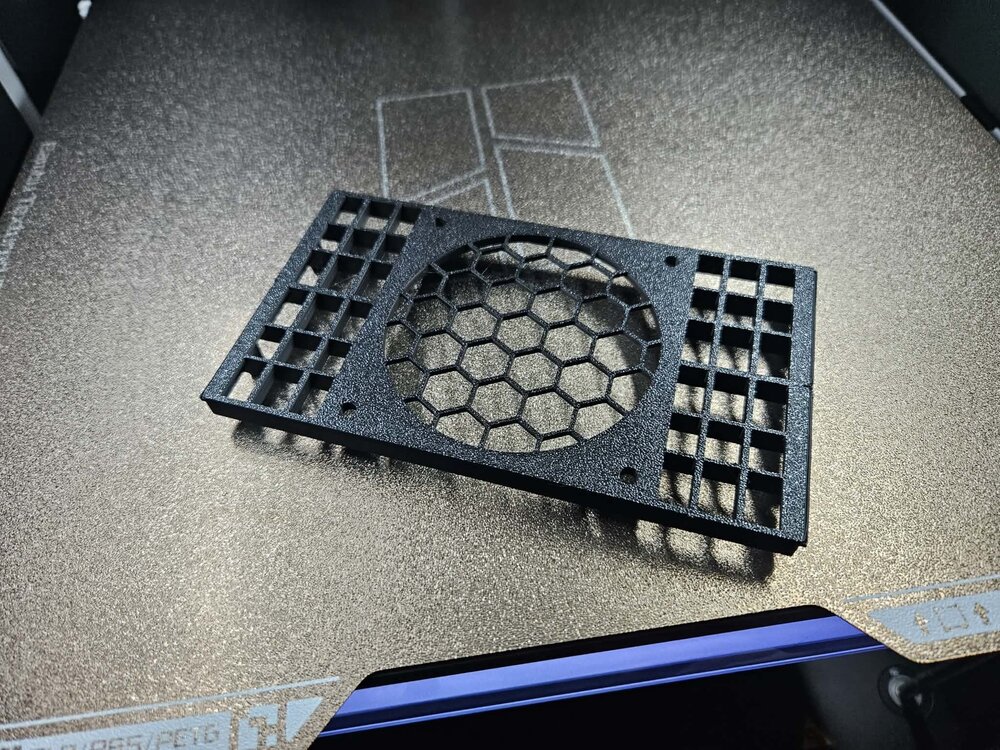
This what I decided to do: Remove 1660 super GPU from slot 1, one less power cable Move Nvidia RTX 3050 GPU from slot 2 to slot 1 for Linux VM passthru Move HBA from slot 3 x4 to slot 2 x8 to get full data out of the HBA New Nvidia RTX A400 into slot 3 for Unraid boot/transcode single slot GPU Upgrade Ryzen 7 1700 to Ryzen 7 5800XT Remove a 6 SSD ICY Dock and go to open SSD frame and direct connection of Sata/power and install an 80mm fan using a 3d printed 2 x 5.25 baycover that the 80mm fan connects to with filter in front and another printed piece to pass bolts thru the pieces to mount the fan. It is my daughter's 3d printer so asking her to fill in the outside holes. Still have a Gigabyte GA-AX370-Gaming 5 motherboard with excellent IOMMU groups from December 2017 I had Timetec 4 x 16GB DDR4 ECC 2666 ram that I had to go back to 2 sticks, hoping the Zen3 has a better memory controller and can go back to 4 sticks of ram.

-
I actually haven't even done the CPU swap yet. Will ask questions later and watch SpaceInvaders video too.
-
I bought a Timetec premium 256GB SSD only because it would arrive sooner than the 128GB model. What do you use the rest of the SSD for and does a partition become a separate pool? Still not sure about trying this right now? I only bought this new SSD because i am in the middle of a big hardware shuffle. So while I was working on this I would add an SSD for future internal boot so not switching to internal boot right away.
-
What about when you change CPUs, Gemini said upon boot with new CPU the bios will ask to do new keys for fTPM, it said to select Y?
-
What newer CPU & Motherboard will work with Timetec 4 x 16GB DDR4 ECC? Have a x370 Motherboard & Ryzen 7 1700 Zen 1 generation. AI said the ASUS Pro WS X570-ACE and the 5950X but the Asus board is from 2019 and no one sells it. I could switch to Intel?
-
Is this why my trying to update the docker fails? docker: Error response from daemon: failed to create task for container: failed to create shim task: OCI runtime create failed: runc create failed: unable to start container process: error during container init: error running createContainer hook #4: exit status 1, stdout: , stderr: 2025/12/18 12:30:33 Error updating ldcache: error running pivot_root: pivot_root .: invalid argument exit status 1: unknown.
-
These cause "resolve" issues in Flexget that uses the container network of Delugevpn: NAME_SERVERS'='84.200.69.80,37.235.1.174,1.1.1.1,37.235.1.177,84.200.70.40,1.0.0.1 Changed to just 1.1.1.1 All good now. What like this for a long time. It was using next-episode.net with the calendar ics link for TV shows
-
No new Hardware errors since the last one
-
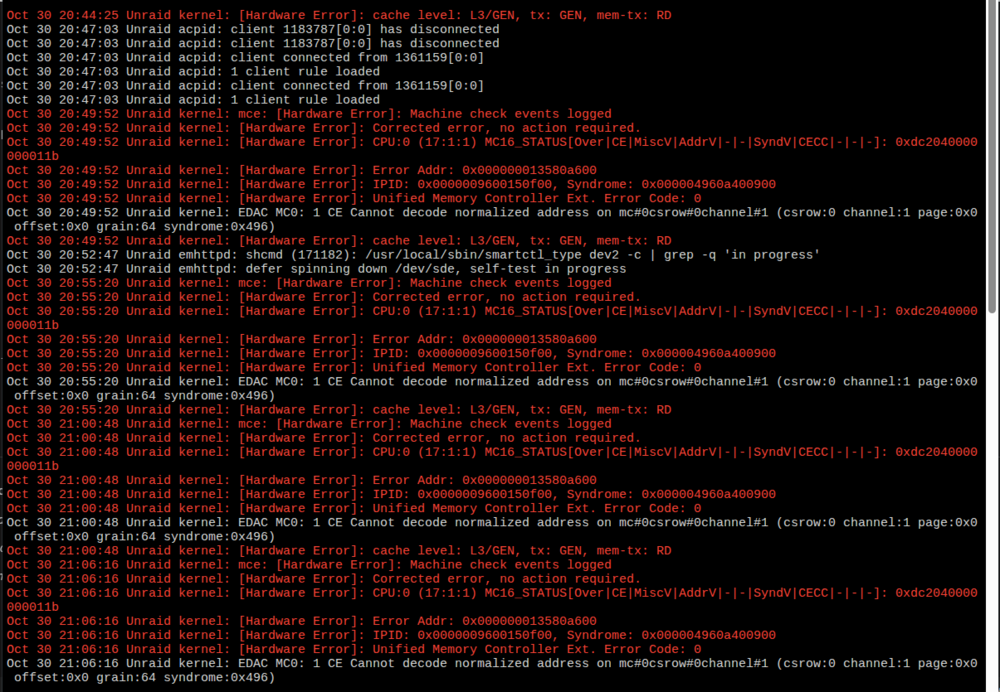
It always says error corrected after. It started when I stopped pinning CPUs in a VM and just selected use 8 out of 16 CPU. I could go back to pinning CPUs and see if that makes the error go away?
-
I also saw it in the console, something saying a hardware error and that it has been corrected. Something about memory, I do have ECC ram. unraid-diagnostics-20251030-2124.zip
-
No issues upgrading from 7.1.4 to 7.2.0. Why is Unraid still using Firefox? Firefox is not your Dad's Firefox anymore. Unraid should switch to Brave, and apply the same privacy settings that Zorin OS did for version 17.3 and 18?
-
Everything seems ok on my Unraid server. Sep 28 22:17:44 Unraid root: Fix Common Problems Version 2025.08.07 Sep 28 22:17:47 Unraid root: Fix Common Problems: Warning: Docker Application binhex-plexpass has an update available for it Sep 28 22:17:47 Unraid root: Fix Common Problems: Warning: Docker Application flexget has an update available for it Sep 28 22:17:47 Unraid root: Fix Common Problems: Warning: Docker Application MakeMKV has an update available for it Sep 28 22:17:55 Unraid root: Fix Common Problems: Error: Machine Check Events detected on your server Sep 28 22:17:55 Unraid root: mcelog: ERROR: AMD Processor family 23: mcelog does not support this processor. Please use the edac_mce_amd module instead. Sep 28 22:17:55 Unraid root: CPU is unsupported Sep 28 22:17:57 Unraid root: Fix Common Problems: Other Warning: dynamix.unraid.net Support Updated ** Ignored Sep 28 22:18:09 Unraid emhttpd: read SMART /dev/sdm Sep 28 22:18:20 Unraid emhttpd: read SMART /dev/sdk Sep 28 22:18:20 Unraid emhttpd: read SMART /dev/sdh Sep 28 22:18:20 Unraid emhttpd: read SMART /dev/sdn Sep 28 22:18:20 Unraid emhttpd: read SMART /dev/sdl Sep 28 22:18:20 Unraid emhttpd: read SMART /dev/sdi Sep 28 22:22:39 Unraid ool www[1973575]: /usr/local/emhttp/plugins/recycle.bin/scripts/rc.recycle.bin 'empty' Sep 28 22:22:41 Unraid recycle.bin: User: Recycle Bin has been emptied Sep 28 22:23:08 Unraid root: Fix Common Problems Version 2025.08.07 Sep 28 22:23:18 Unraid root: Fix Common Problems: Error: Machine Check Events detected on your server Sep 28 22:23:18 Unraid root: mcelog: ERROR: AMD Processor family 23: mcelog does not support this processor. Please use the edac_mce_amd module instead. Sep 28 22:23:18 Unraid root: CPU is unsupported unraid-diagnostics-20250928-2223.zip
-
Too hard to do, make part of settings.
-
Then you have something miss configured, something pointing to RAM instead of a share. SSH shouldn't increase RAM usage.



