





tessierp
Members
-
Joined
-
Last visited
-
Thanks for the explanation. I heard TrueNAS was bad for anything else but storage.. I don't use TrueNAS to host any VMs or apps. I have Proxmox for that in my case. I use TrueNAS purely for storage. One of the reasons why I'm considering UNRAID is because with TrueNAS your drives are always active right, always spinning. Now, I only use this in my homelab so I don't have any excessives writes or reads per day. A lot of people told me that it is way better to have a HDD spinning than having it power down and up depending on how much you use it. So probably I'm a bit too paranoid about drives wearing on TrueNAS? The other reasons are well, UNRAID is obviously the flexible and you can reshape your pool size easily. With ZFS and VDEVs that can be painful if you have a lot of files to move somewhere and, destroy the pool, rebuild it just to grow it (unless you are adding additional VDEVs of the same size obviously).
-
Hi, One of the reasons writes are slow in UNRAID when not using a cache pool is the parity calculation done each time we write.. Is there a way to do that work later like every two hours or something where Unraid would keep track of what was written and calculate the parity at a later time? Or is the use of cache drives the only way to achieve faster writes?
-
Just out of curiosity why did you switch from TrueNAS to UNRAID? I'm considering changing over and was just curious as to why you're migrating.
-
Network is not an issue in my case. I'm a 2.5G network with a switch have 10G ports and those particular servers are on 10G so data exchange between them is fast.. Limit would be for the clients limited to 2.5G but that is more bandwidth than a HDD can handle. The reason why I don't have my media in one place is because I prefer to have all my files at one place there is also the cost of having two machines. But I suspect my biggest issue would not be streaming movies but more my gitea server as I did see a lot of people having issues unless the data is put on a NVME/SSD cache pool. And investing in new SSDs at the moment with those prices would be tough.
-
Hi there, yeah I meant MB/s, thanks for noting that I just fixed it. In my case Jellyfin is in VM on another server. I never used my NAS to host apps, they just serve files and I prefer to create VMs on Proxmox or use my Docker stack depending on the app. In this case, Jellyfin sits on a VM on a Proxmox server and Truenas is on a BARE METAL on its on but on the same network. So access to the files would have to be done through a NFS share.
-
I'm contemplating the idea of switching from TrueNAS to UNRAID and I have a few questions before I do. If you are wondering why the switch, lets just say that drives wear out a bit faster (every 3 to 5 years) on TrueNAS and I just can't keep up with that rhythm. I have a proxmox server with Jellyfin from which I stream movies I own and they all reside on my TrueNAS server. From TrueNAS I have a NFS share that my Jellyfin server has access to. Streaming two places at the same time isn't an issue. Now I know TrueNAS is very efficient on read/writes because of ZFS but if I go with UNRAID I do not intend to continue with ZFS because it is more limiting, you have to think about VDEVs, etc.... So my question is, going UNRAID with BTRFS and sharing content from UNRAID via NFS, should I expect performance issues when streaming with Jellyfin? I mean I sort of know the answer to all this.. Unraid reads data from one disk at a time. If we are talking of a HDD @ 5400 rpm, typically you get 100-150 MB/s read performance. And I guess the only way to maybe get better performance would be to create a ZFS pool for things that I need but then I lose the flexibility to grow that pool if I need to. Are there any other solutions I'm not thinking about?
-
Thank you!
-
Hi, I was wondering how upgrades I handled. I did some research but I just want to make sure. Lets say I have a need for two licenses, one for STARTER (49$) and another for UNLEASHED (109$).. I run those for a little over a year so it means I would only get updates for 1 year.. After a year and a half my needs change and decide to upgrade my two licenses to LIFETIME. Would I need to pay the full amount for both (249$ x 2) or just the difference? STARTER license to LIFETIME 200$ and UNLEASHED to LIFETIME 140$ ?
-
@Helmonder Yes I understood that, just wasn't expecting that much of a penalty on performance.
-
@Vr2IoThank you so much for your help. Unfortunately or I guess fortunately for me, I managed to find away around the TrueNAS USB thumb drive boot issue. UNRAID is definitely a great OS with many great options but I think for me to use it with the current hardware that I have, mainly those SMR drives, that will be a huge limitation factor which, TRUENAS is able to work around given how it works with ZFS. There is also the factor that I am so used to TrueNAS that I would have to learn a bunch of new things when, all I really need is to get up and running fast as I am out of a NAS at the moment. Again I really appreciate your help and just didn't want you to waste time on this since. Hopefully my luck holds up a bit longer with TrueNAS until I can upgrade my hardware to something more UNRAID friendly.
-
Here are the diagnostics ptr1-nas-1-diagnostics-20241103-1353.zip
-
I see.. this is strange though, not something that seems to affect performance on a TrueNAS system. But that being said, they may be slower for being SMRs but to take that long to copy things like large video files? Could be that the nature of ZFS is what accelerates everything. I wonder if my solution would be to go with a ZFS array then....
-
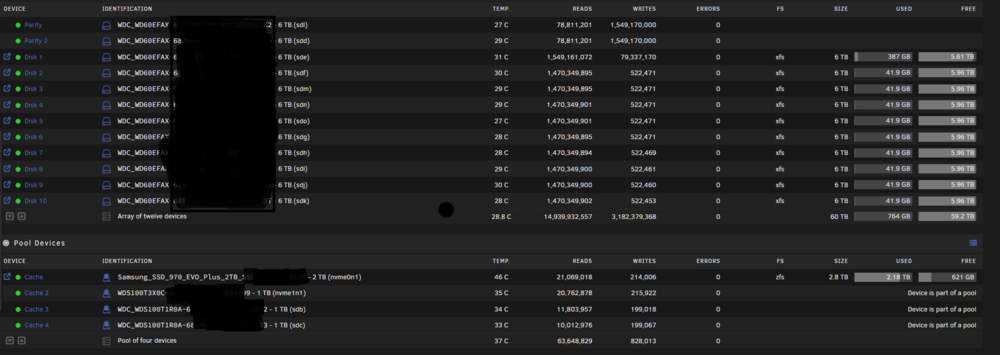
Hi, So I'm coming from the Truenas SCALE world to Unraid, given the installation process is broken with their latest build and my previous NAS suffered a failure requiring me to rebuild a NAS, I figured I would give Unraid a try for a second time. The two issues I faced with Unraid are : 1) Parity check upon system configuration took almost 1 day to complete. Is that normal? 2) I configured my system to have an array of ten 6 TB NAS drives with 2 parity and a ZFS pool of 3 TB.. The issue I'm facing at the moment is that, it takes forever to transfer 2.7 TB from the POOL to the ARRAY, in fact, since this morning (been 4 hours now), it managed to move only 600 GIGs worth of data which I find insanely slow. My system is configured as is : The 6 TB drives are WD 6TB SMR drives. Maybe my expectations are too high given I was used to very fast read / write speeds with TrueNAS but also, is it possible that there is something wrong with my configuration somewhere? Is this normal and to be expected? I hope it isn't because I can't imagine doing backups from 1 unraid server to another with 40 TB of data, it will take many days to complete....
-
Thanks for all your help everyone. I appreciate it. I wish I had more time to troubleshoot the various problems I was juggling with but I really needed to get my NAS up and running and for now I looked for an alternative. I really think it is a combination of hardware I'm using. Granted those flat ethernet cables are junk and the switch is flaky at times but until I have more time I have to move on. UNRAID is an amazing product which is meant to be very flexible and I'm sure I'll be back when I have more time to dedicate to this but for now I need a NAS up and running.
-
I understand that but that does not explain why when I try to override and change the users it doesn't update. Other folders reflect the exact users that should have access except for this one due to the action I performed and not it is locked as NOBODY but that is incorrect since I have set different permissions. I did try to turn off permissions and set them again, it just wont work. At this point this would force me to offload the content of this share, some 150 GB, somewhere else and recreate.


