




-
Having a weird issue with my filerun setup. /user-files is owned by nobody:users I run chown -R nobody:users /mnt/user/filerun-data so everything looks good. However, when I try to upload an image via WebDAV or directly to the website, it doesnt go throw. So clearly it doesnt have access to write, only read? I tried to create a text file via the website. It actually managed to create it, but it only created an empty text file. I double-checked, and container does have that extra flag --user 99:100 -- docker exec FileRun id nobody uid=65534(nobody) gid=65534(nogroup) groups=65534(nogroup) -- docker exec FileRun id uid=99 gid=100(users) groups=100(users) -- # ls -l total 0 drwxr-xr-x 1 nobody users 16 Jun 7 16:53 Adventure\ Capture/ -rw-r--r-- 1 nobody users 0 Jun 7 17:16 test.txt
-
Fixed, turns out my bios disabled LSI (for some reason) maybe bios battery is running out of juice. Thanks once again @JorgeB ❤️
-
I moved my server to new rack. Before mounting it I cleaned all dust inside, now that everything is back, it doesnt find my drives anymore. I wonder if my bios changed changed something, or something else. SAS cable seems bit loose, I have been shutdowning my server, moved cable another spot (moba got 3 sas port) and try boot again. No luck :/ Could someone please help me read my diagnoatics, if unraid still recoginze my backplate. tolppa-diagnostics-20260120-2027.zip
-
I just stopped array, now I cant no longer access to my server with ssh and ping not going throw. If array is stopped, will it shut ssh as well? EDIT: Seems like my server was just offline. Nothing to with stopped array.
-
Found it After I enabled LSI Onboard settings from BIOS, unraid found all of my drives. Advanced -> PCI Subsystem settings -> LSI Onboad OpRom -> Enable Thank you JorgeB so much <3
-
No problem I will have to go fetch VGA cable then. I will report back to you, when I have checked the bios
-
I think I posted diagnostic zip file (however it was anonymized) Not sure if that is the one you are looking for, here is the latest one just in case (this one without anonymized) EDIT: Now that I am trying feel my drives again, I think they are indeed spinning. Backplane also is alive as well, since two blue led is ON tolppa-diagnostics-20230711-1945.zip
-
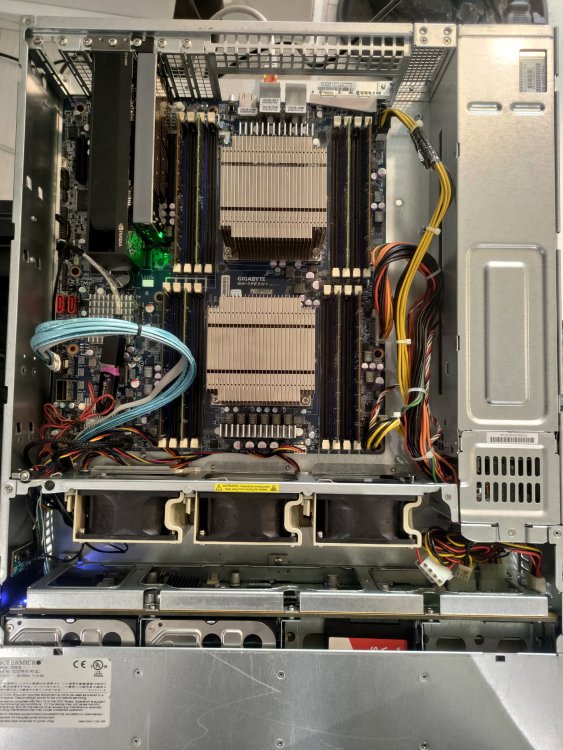
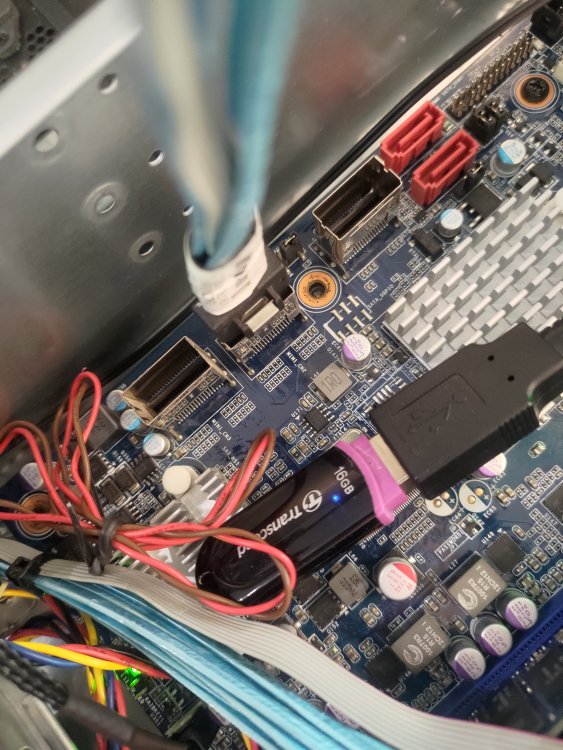
I switched from desktop tower case to server rack (Supermicro CSE-826BE16-R920LPB 2U) It came with BPN-SAS2-826EL1 backplane, from my understanding I just need connect SAS cable to my motherboard SAS port (Gigabyte GA-7PESH1) However, none of my drives show up. I am not sure if they are even spining. I am wondering if the issue is from backplane or motherboard sas ports? I already tried all three sas ports from motherboard. At least one of the sas port worked, since I used them on my case. Motherboard: https://www.gigabyte.com/Enterprise/Server-Motherboard/GA-7PESH1-rev-10#Specifications tolppa-diagnostics-20230711-1914.zip
-
Docker container seems to use older qBittorrent version (v4.2.1) is a there are reason for it? Can I update it, or do is it request to update container content?
-
In WebUI Options -> Advanced has qBittorent Section (first one) "Network Interface:" it is default set to "Any interface", should I change it to tun0?

View in the app
A better way to browse. Learn more.


