





TekDRu
Members
-
Joined
-
Last visited
Everything posted by TekDRu
-
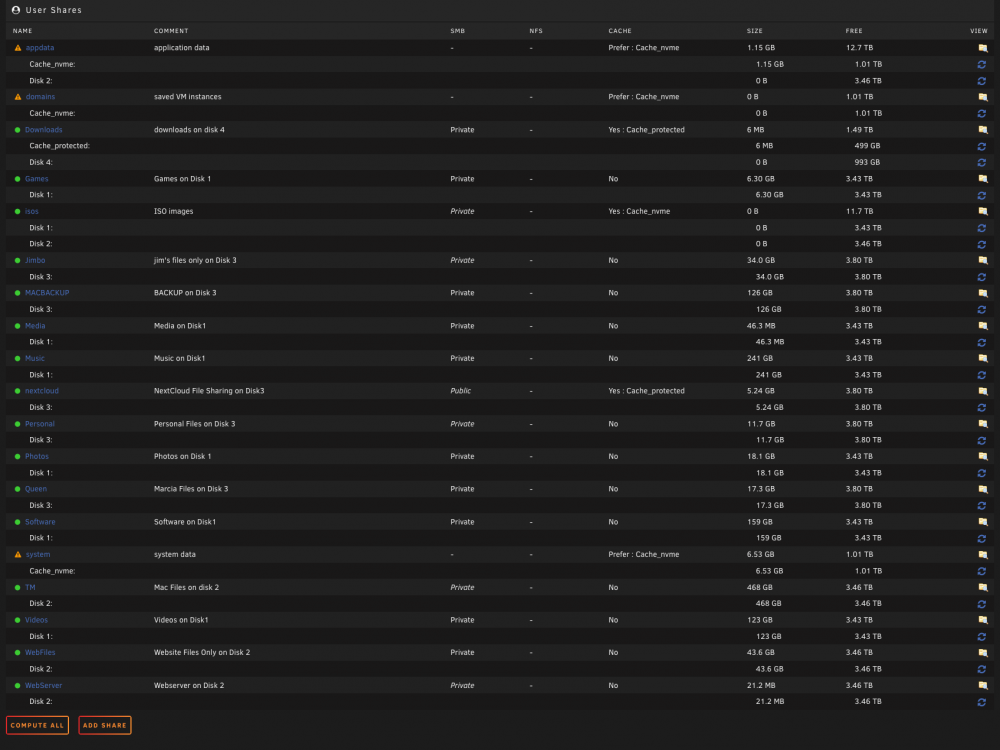
You are right. There is a isos folder on both disk 1 and disk 2. Both of those are empty. Yes I would like to keep them on one disk, disk 4. Attached is the screenshot of user shares.
-
When I had first setup the server, I didn't have a cache pool but had installed and used some docker containers. I recently upgraded and added cache pool. Currently I set the appdata, domains and system shares to Prefer:cache. I also set isos to Yes:cache. Is it normal to see empty isos and appdata shares on two of my array disks even after setting up cache pool? Disk 1: isos folder is empty Disk 2: appdata has subfolders: airsonic > transcode swag > keys Each of these subfolders are empty. Disk 3: fine, no isos or appdata folders Disk 4: fine, no isos or appdata folders I can change the setting for the isos to only include Disk 4 but I'm wondering about the appdata folder on disk 2. Should it be there even though I have a cache pool? Thanks tower-diagnostics-20211028-1551.zip
-
Just to give an update. After doing the google search like you suggested, I found this post relating to time machine. https://forums.unraid.net/bug-reports/stable-releases/691-time-machine-no-longer-works-after-upgrading-from-683-bad-talloc-magic-value-unknown-value-r1393/ I remembered that I did try connecting and setting up time machine yesterday but kept getting the beach ball. I stopped trying, thinking that I would get back to it some time later. I now realize that this was the cause of the log error. I followed the tip of removing "fruit:locking=netatalk" from the SMB config line. Time machine is working fine now. No log issues. Thanks again for the help!
-
Thanks! I'll give that a try
-
Thanks @trurl. What do I need to do to fix? Remove remote devices, restart server or is the solution something else?
-
I need help fixing this error. Server has uptime of 3 days but log is at 97%. Thanks tower-diagnostics-20211027-1935.zip
-
Ok thank you @JorgeB!
-
The only reason I used -X is because it was in the code used in this guide ( https://wiki.unraid.net/File_System_Conversion ). Can I exclude -X from the commands so that I can continue the process (without causing any parity issues)? I just want to make sure that I don't get any problems with files later and the parity remains valid.
-
It seems like the rsync -X option is preventing the files from being copied. When I remove that option, the files are copied. But when I run the command with -rcvPX, I still get the error. How important is the -X option in this process? Do I need keep the -X option in order for the File System Conversion to work properly and keep the parity valid?
-
Thank You @jonp, The attached diagnostics file named "tower-diagnostics-20211012-0908" was after my initial post of this issue. The files named "tower-diagnostics-20211018-1027" was done today after another attempt of conversion over this weekend of another set of drives but got same type of errors. tower-diagnostics-20211012-0908.zip tower-diagnostics-20211018-1027.zip
-
Hello All, I followed the instructions from (https://wiki.unraid.net/File_System_Conversion). At step #8 After runnning rsync, I saw this error at the end of the process: rsync error: some files/attrs were not transferred (see previous errors) (code 23) at main.c(1330) [sender=3.2.3] I moved on to step #9 and during that preocess i saw a lot of errors like these: rsync: [sender] get_xattr_data: lgetxattr("/mnt/disk6/Software/Software/Raspberry Pi/OSMC/iptv/iptv.m3u","user.com.apple.TextEncoding",15) failed: Input/output error (5) rsync: [sender] get_xattr_data: lgetxattr("/mnt/disk6/Software/Software/Raspberry Pi/OSMC/iptv/old/uk-english.m3u","user.com.apple.TextEncoding",15) failed: Input/output error (5) rsync: [sender] get_xattr_data: lgetxattr("/mnt/disk6/Software/Software/Raspberry Pi/OSMC/iptv/old/usalive.m3u","user.com.apple.TextEncoding",15) failed: Input/output error (5) rsync: [sender] get_xattr_data: lgetxattr("/mnt/disk6/Software/Software/Raspberry Pi/OSMC/iptv/old/iptv.m3u","user.com.apple.TextEncoding",15) failed: Input/output error (5) I continued going through the remaining steps up to #16 Then I went on to check the files mentioned in the errors and realized that they were not copied over to the swap drive. So I used mc to copy them over manually. I also noticed that there was at lead one file that was not copied to the swap drive but it was not mentioned in the rsync log. I'm not sure if this is the case for any other files. I checked a few files that were more important and did not find any missing files (yet). Looking at some lines in the syslog, I saw some lines like these: Oct 12 07:31:19 Tower kernel: REISERFS warning (device md1): jdm-20002 reiserfs_xattr_get: Invalid hash for xattr (user.com.apple.metadata:kMDItemScreenCaptureType) associated with [67429 67460 0x0 SD] Oct 12 07:31:24 Tower kernel: REISERFS warning (device md1): jdm-20002 reiserfs_xattr_get: Invalid hash for xattr (user.com.apple.metadata:kMDItemWhereFroms) associated with [208526 592879 0x0 SD] Oct 12 07:44:56 Tower kernel: REISERFS warning (device md1): jdm-20002 reiserfs_xattr_get: Invalid hash for xattr (user.com.apple.TextEncoding) associated with [592018 592025 0x0 SD] Oct 12 08:07:13 Tower kernel: REISERFS warning (device md1): jdm-20002 reiserfs_xattr_get: Invalid hash for xattr (user.com.apple.quarantine) associated with [677527 857126 0x0 SD] I figured I should ask at this point before I continue to #17 and #18 Questions: What does these errors indicate concerning drives, etc.? How can I fix these error? Is there something I should do now to avoid future issues before continuing to #17 and #18? Thanks
-
Ok Thank you. I have been able to use the GUI to make upgrades in past versions of Unraid 6 but this version is not working for me. I do need to upgrade my server though. I've had it for over 10 years. Thanks for the help.
-
I have 2 GB of Ram on the Server.
-
I have tried to update several times over a few weeks with the "Update OS" option and the "Install Plugin" option but got this error "plugin: https://s3.amazonaws.com/dnld.lime-technology.com/stable/unRAIDServer-6.9.2-x86_64.zip download failure (File I/O error)" Can you help?
-
I've been having problems running update for 17.0.2 to 18.0.3 through the automatic updater. I trie your steps for the manual updated but I keep getting stuck at the extracting step with the following error: [ ] Extracting ...PHP Warning: require(/config/www/nextcloud/updater/../version.php): failed to open stream: No such file or directory in phar:///config/www/nextcloud/updater/updater.phar/lib/Updater.php on line 658 PHP Fatal error: require(): Failed opening required '/config/www/nextcloud/updater/../version.php' (include_path='.:/usr/share/php7') in phar:///config/www/nextcloud/updater/updater.phar/lib/Updater.php on line 658 Can you help?

