





TekDRu
Members
-
Joined
-
Last visited
Everything posted by TekDRu
-
Hey @bigsing, Just following up to say thanks. Rebuilding the docker image solved my problem.
-
Ok. Thanks for the quick response. I will take a look.
-
hello @bigsing I tried updating the joplin server container today and got these errors: on first attempt: Error: failed to register layer: symlink ../is-docker/cli.js /home/joplin/packages/tools/node_modules/is-inside-container/node_modules/.bin/is-docker: no space left on device After deleting dangling images and trying the update again: Error: failed to register layer: rename /var/lib/docker/image/btrfs/layerdb/tmp/write-set-1037592548 /var/lib/docker/image/btrfs/layerdb/sha256/5d0ffcca6050b9c12db964453426d0c2bf06c4a53fb7754feeda08f53a3cf424: file exists Most recent error after restart of server Error: failed to register layer: stat /var/lib/docker/btrfs/subvolumes/86b495e8380343d3afecd0d824c96ac20aad70eb2b482b84d7b2084b184633ae: no such file or directory Any ideas for solution to this?
-
Anyone able to get "cdtext" option to work in abcde.conf? I would like to pull metadata from CDs if no results from musicbrainz. Thanks
-
Thanks @Gonesolo! I ran into this problem today. Appreciate you posting your solution. I had to use "cd /mnt/user/appdata".
-
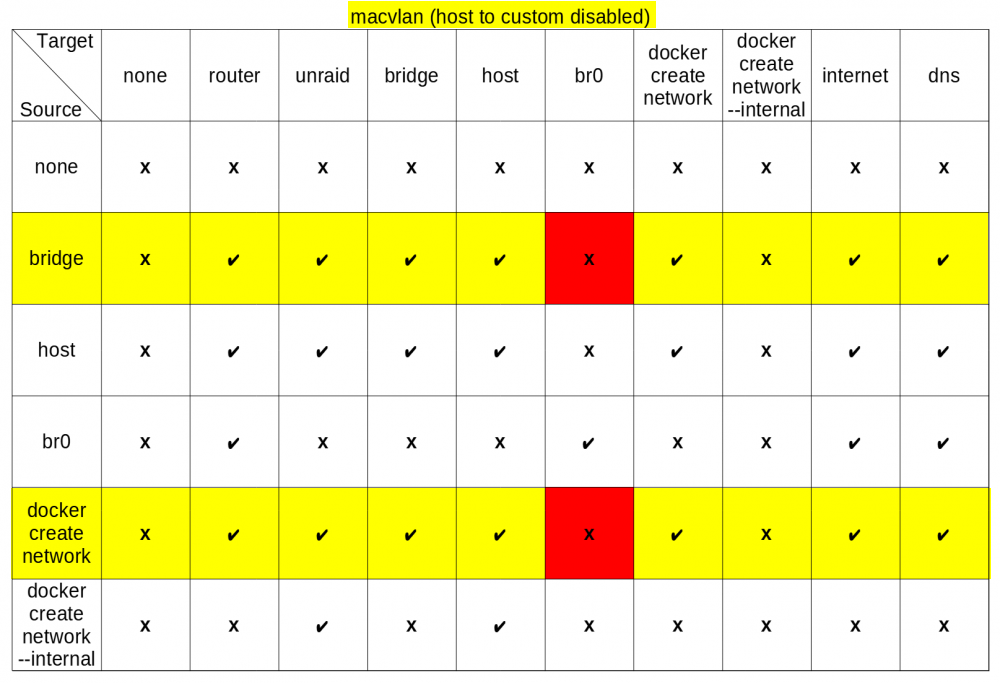
Hi @mgutt, I've been searching through the forum for help with this, but no replies yet. I came across your post (https://forums.unraid.net/topic/110245-support-nginx-proxy-manager-npm-official/#findComment-1011152) which I think is helpful in my situation but I am not so sure what changes I should make. The issue that I'm having is posted here: https://forums.unraid.net/topic/76460-support-djoss-nginx-proxy-manager/page/78/#findComment-1588569. My NPM is on a user created network and I need it to communicate with some containers on br1. Your chart below shows that I won't be able to communicate with anything on br0, does that apply to br1 as well? If so, what changes can I make to my docker network setup so that NPM can communicate to containers on br1 network? I'm not sure if I need to switch from ipvlan to macvlan or if its required to to allow host access to custom networks. Thanks!
-
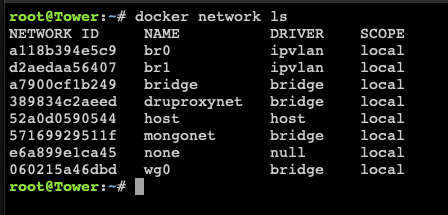
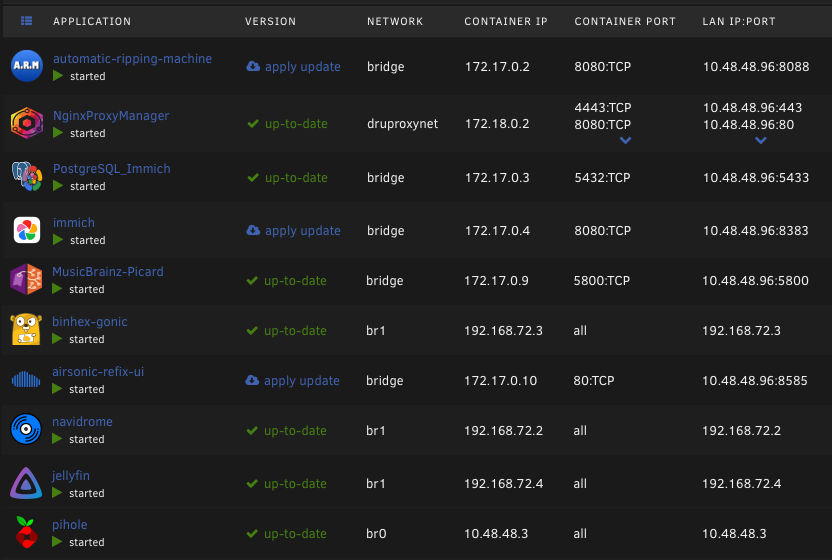
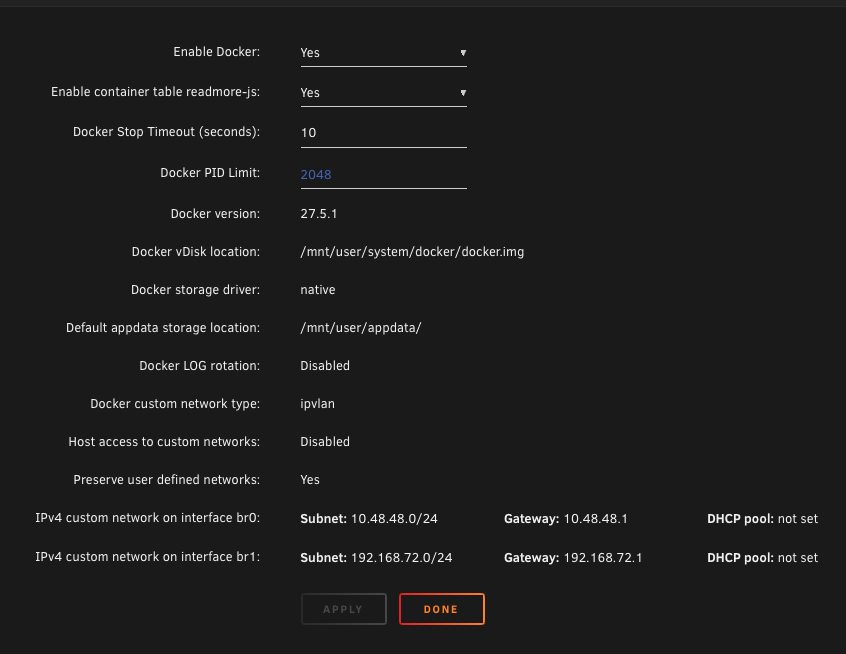
Hey @Djoss I'm having issues communicating from NPM to certain containers on different networks within unraid. Can you let me know what's the best network setup for NPM to communicate with any/all containers across different networks? I can successfully communicate from the following: NPM 10.48.48.96 (druproxynet) --> any container on (bridge) NPM 10.48.48.96 (druproxynet) --> 192.168.107 (on proxmox server) I can't ping from the following: NPM 10.48.48.96 (druproxynet) --> 192.168.72.3 (br1) NPM 10.48.48.96 (druproxynet) --> 10.48.48.3 (br0) Please see screenshots for the docker setting, network listings, container list. Thanks
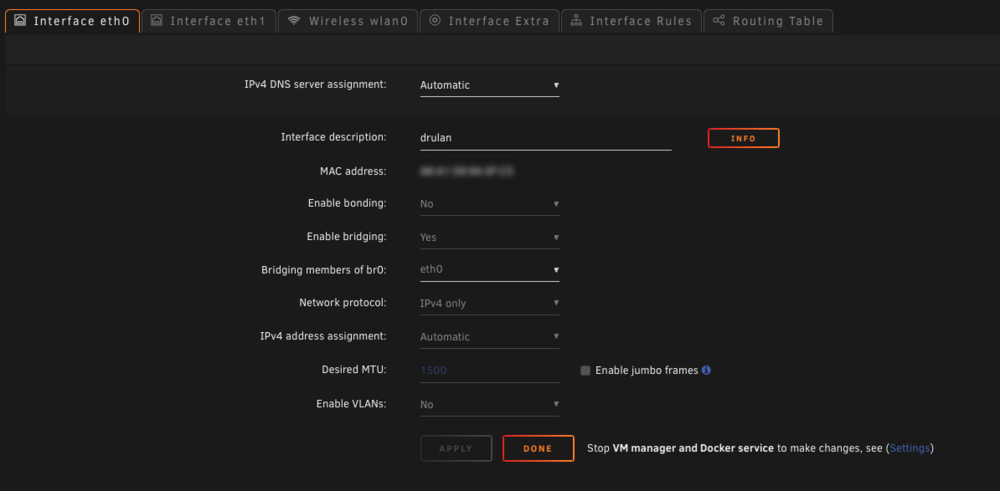
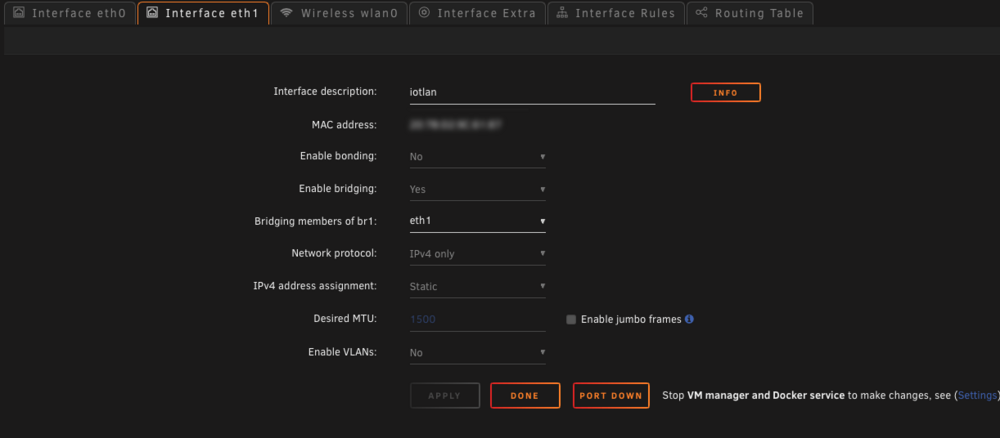
-
Hello, I have NPM container running on a custom docker network (Proxynet). I also have jellyfin and navidrome containers on a different network (br1). The (Proxynet) network is on the host interface (eth0). The (br1) network is on interface (eth1). I can ping from NPM to other ips that are outside of Unraid but within the same subnet as the one used for jellyfin and navidrome. I just can't do so for containers on (br1). What do I need to change, to be able to ping from NPM to jellyfin? See attached for docket settings. Thanks!
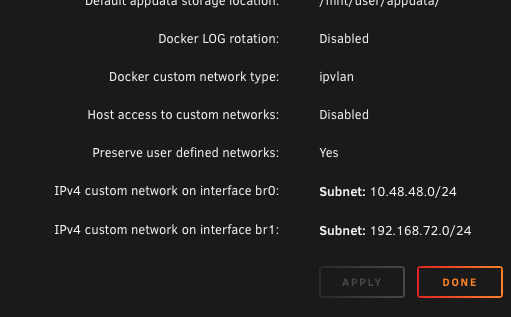
-
Great. Thanks!
-
Hi @binhex , I see that there is a new feature (in testing) that supports embedded album art covers. I would really like to try this feature but it requires the ":nightly" tag. I tried adding ":nightly" to the end of your repository path, but the container failed. Can you let me know what do I need to do to get this to work? see post: https://github.com/sentriz/gonic/pull/556 Thanks
-
Hi @Pducharme and @GordoPepper, I ran into the same problem earlier today and learned that a fix was available. After a force update, it worked again. See post:
-
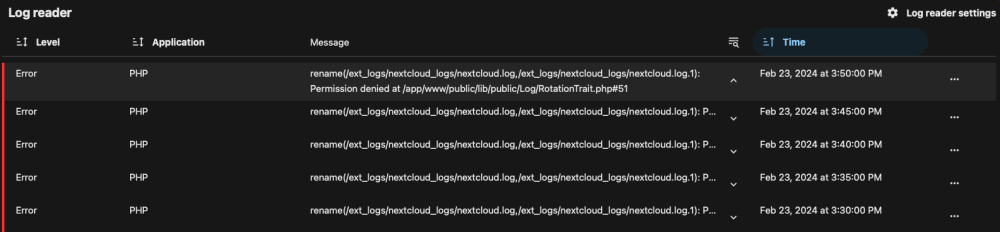
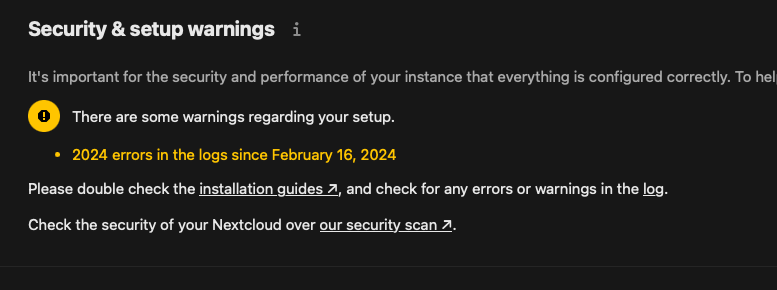
Getting log errors and not sure how to fix. rename(/ext_logs/nextcloud_logs/nextcloud.log,/ext_logs/nextcloud_logs/nextcloud.log.1): Permission denied at /app/www/public/lib/public/Log/RotationTrait.php#51 This is the setting in my config: 'loglevel' => 2, 'logfile' => '/ext_logs/nextcloud_logs/nextcloud.log', 'logfile_audit' => '/ext_logs/nextcloud_logs/audit.log', Any help is greatly appreciated. Thanks
-
Hey @TekWarren, the setup and screenshot shared on this post still works well for me. You can use it as a guide for the paths.
-
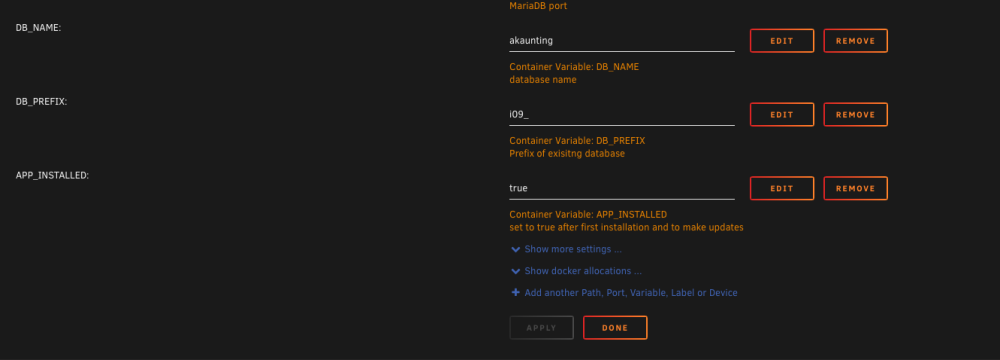
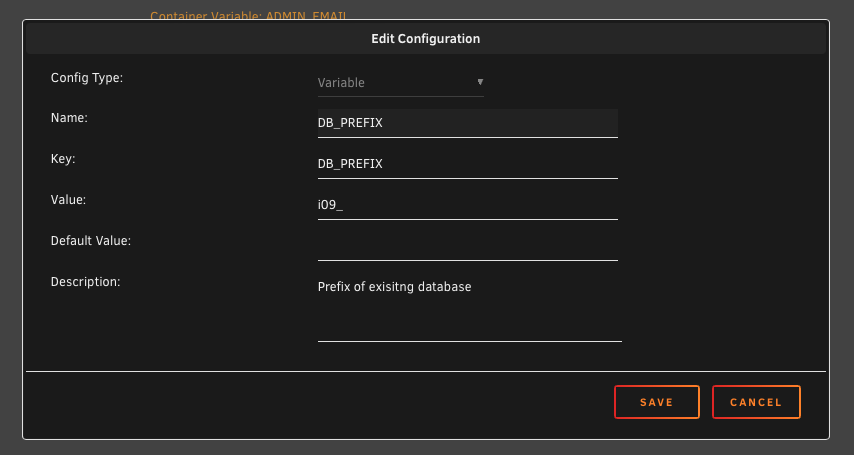
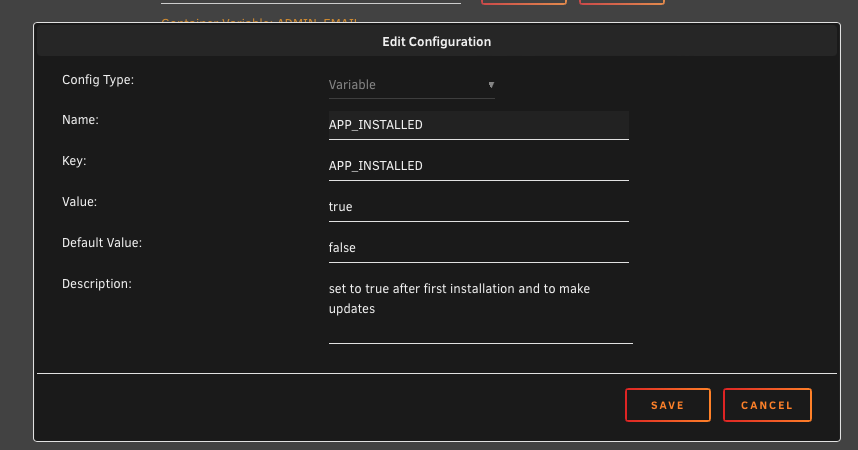
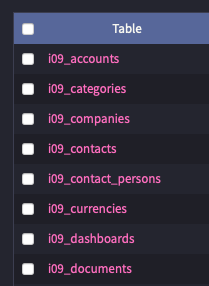
Discovered a solution to updating the container without issue. Adding variables for "DB_PREFIX" and "APP_INSTALLED=true" did the trick for me. Got some help from these posts: https://github.com/akaunting/docker/issues/61#issuecomment-1143664641 https://github.com/akaunting/docker/issues/107 For the DB_PREFIX variable, you will need to use the first 4 characters seen in your specific existing database tables names. I would advice backing up your database and appdata before making these edits.
-
Hey @marlouiegene18 can you share screenshot of settings, docker run or config?
-
hey @K1LLA_KING_KING, can you share a screenshot of your container or the docker run command to see If I notice any issues with the settings.
-
Did you already run the "php artisan install" script?
-
Thanks @xanatos. After changing my password to just alpha numeric and tried again, I was successful in getting the new unifi controller up and running. Thanks for the tip. Hope it helps others who may have this issue.
-
Thanks @xanatos. I double checked my password but there are no "@" symbols. There are some other characters that may be an issue so I will try recreating the container and try again later this evening/week.
-
hi @wgstarks, I tried following your steps but could not get it to work. Unifi Network Controller: This is what I get if I go to web URL for UNA: HTTP Status 404 – Not Found Logs for UNA: [custom-init] No custom files found, skipping... Docker Run: docker run -d --name='unifi-network-application' --net='mongonet' -e TZ="America/New_York" -e HOST_OS="Unraid" -e HOST_HOSTNAME="Tower" -e HOST_CONTAINERNAME="unifi-network-application" -e 'MONGO_USER'='unifi' -e 'MONGO_PASS'='********************' -e 'MONGO_HOST'='mongodb' -e 'MONGO_PORT'='27017' -e 'MONGO_DBNAME'='unifi' -e 'MEM_LIMIT'='4024' -e 'MEM_STARTUP'='1024' -e 'MONGO_TLS'='' -e 'MONGO_AUTHSOURCE'='' -e 'PUID'='99' -e 'PGID'='100' -e 'UMASK'='022' -l net.unraid.docker.managed=dockerman -l net.unraid.docker.icon='https://raw.githubusercontent.com/linuxserver/docker-templates/master/linuxserver.io/img/unifi-network-application-icon.png' -p '8446:8443/tcp' -p '3478:3478/udp' -p '10001:10001/udp' -p '8082:8080/tcp' -p '1900:1900/udp' -p '8843:8843/tcp' -p '8880:8880/tcp' -p '6789:6789/tcp' -p '5514:5514/udp' -v '/mnt/user/appdata/unifi-network-application':'/config':'rw' 'lscr.io/linuxserver/unifi-network-application' Mongo DB: This is what I get when I go to the web URL for mongodb: It looks like you are trying to access MongoDB over HTTP on the native driver port. Docker Run: docker run -d --name='MongoDB' --net='mongonet' -e TZ="America/New_York" -e HOST_OS="Unraid" -e HOST_HOSTNAME="Tower" -e HOST_CONTAINERNAME="MongoDB" -l net.unraid.docker.managed=dockerman -l net.unraid.docker.icon='https://raw.githubusercontent.com/jason-bean/docker-templates/master/jasonbean-repo/mongo.sh-600x600.png' -p '27017:27017/tcp' -v '/mnt/user/appdata/mongodb/db-data/':'/data/db':'rw' -v '/mnt/user/appdata/mongodb/mongo-init/init-mongo.js':'/docker-entrypoint-initdb.d/init-mongo.js':'ro' 'mongo:7.0-rc' Can you help figure out what I'm missing or doing wrong? Thanks
-
I can't get VM to start. Seeing this error in libvert log: 2023-10-09 04:00:26.944+0000: 20881: error : virNetDevSendEthtoolIoctl:3039 : ethtool ioctl error on vethed387a7: No such device Diagnostics attached. Thanks tower-diagnostics-20231108-1826.zip
-
solved this by changing https port number
-
solved this by changing port number.
-
Thanks @gremlica. Did you get the execution error when you first updated to 6.12.3? If so, what did you do to resolve the error? I'm trying to find a solution for the execution error I have been getting. I may try again tonight or next weekend.
-
Hi @gremlica, Are you using invoice ninja with Unraid 6.12.4? I am using the container from @Mihai and it was working fine on Unraid 6.11.5, but after updating to 6.12.3 or 6.12.4, I get an execution error.





