





Maximus01701
Members
-
Joined
-
Last visited
-
Just got this done today. Worked great thanks! As a note for anyone who finds this, you can also download your license file if you have UNRAID connect set up.
-
As the title says. I set up a completely new server using another USB w/ a trail of UNRAID. Id like to pull the thumb drive out of the old server, back it up, reset it, put on new server's config on it (Using the old server's registration). What's the best way to do that? Do just that, but just copy/past the new server's config onto it? I don't want to "transfer" the serials to the new USB, as I've already done that this year (I thought the USB was dieing). Thanks
-
I would also love the ability for multiple arrays. For me the want for NVME fast storage. I could have a small super fast array with parity, then a 2nd slower array with spinning disks. If I add an NVME drive to a normal array it's only going o be as fast as the slow parity disk. And I don't want to deal with RAID and cache pools, or cache pools and backup.
-
So i'm looking to move unraid (FS03) to a completely new server (FS04) and am wondering the best way to do that. I just upgraded the thumb drive this month (so keep that in mind when offering options). I'd like to have both servers (FS03 and FS04) up and running. So I can configure the new server (FS04) referencing (FS03) while I do so. Thumbdrive A - Pro Account Thumbdrive B - Trial Account Should I do the 30 day trail on (Thumb Drive B) for (FS04) and configure it. Then once i'm done with all that, take (Thumb Drive A) from (FS03) delete everything from it and past (Thumb Drive B)'s (FS04)'s content onto it? Is that the best way? From my understanding the trial version has NO LIMITATIONS (other than the 30 days). So I shouldn't run into any "feature" issues. Now, let's say i'm not able to do this in the 30 days and the trail period then expires... Id then have to buy a new thumb drive (since the GUID is linked to (Thumb Drive B) ) and pick up where i left off? Or would the trail not allow wheat i've already configured. Or - Upgrade the trail to a basic $50 "Starter" license and finish what i was doing (FS04 less than 6 drives). If i go this route, can I then take (Thumb Drive B with "starter" license) and stick it in (FS03)? granted it's got more than 6 drives but I could still look at some settings maybe? Also, what does "Attach up to 6 storage devices" mean? Is that just for the array or any and all drives? FS03 has 6 disks with an additional 2 in parity, 2 Cache drives, and 14 other drives not really being used. Thanks all!
-
So it errored out again... I then upped it to 10GiB - Thinking maybe there are some larger files in there; and got another error. I even looked and the file and it was 4.2GiB.
-
Ahhh, it was set to "0". I then looked into it and saw/skimmed your other post. https://forums.unraid.net/topic/123357-do-not-allow-minimum-free-space-to-be-0/ Yea, I think having the default not be "0" might be a good idea... (Unless i changed it from default by mistake). But, I just changed it to 5,000,000,000 (5GB) and tried the transfer again. If it all works, i will come back and "Mark as Solution". - Thanks again.
-
So i'm trying to transfer a lot of files from an external drive. The drive is plugged into the server via USB and mounted. I am using Krusader (open to other suggestions, but i've used that for years and it seems to work well) to transfer data from "Unraid_Unassigned" to "Archive" share which is set to "Yes : Cache". However the cache is filling up and causing the transfer to fail. Isn't it suppose to switch over writing to the array instead of the cache pool? Or is it not doing that because the files are "in use" during the transfer? About the data: - Bunch of files (not a single large file or anything) - I have selected about 58 folder and "dragged" them to the "archives" share. (It's a bunch of individual folders instead of one big folder). - Would it still do this if i did SMB? - Just looking for clarification on how it all works. I mean, it seems like a bad design if i have to go in and change the cache every time i need to transfer large quantities of data.. - Thanks!!
-
Just set this up. Had some issues but this helped.
-
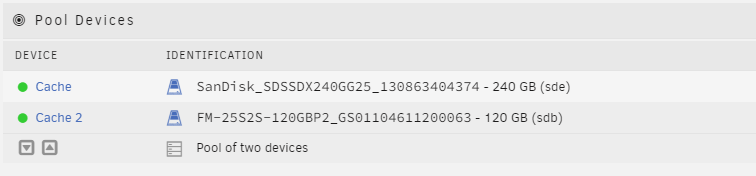
My apologies. Just did that and it seems to have worked! I'm uploading the diags just in case. I'm assuming i would run a parity check now. Any reason why this may have happened as well as why the name converted back? Was i on the right track with possible some bad RAM with "socket-memory-error-trigger" error i got? fs03-syslog-20240722-1816.zip
-
I did as you said. It it seems to work... in that if i browse the share via network i see the files again.. however it's saying I have two.. but one is encrypted... That was never the case... I've also posted the diags. fs03-syslog-20240722-1758.zip

-
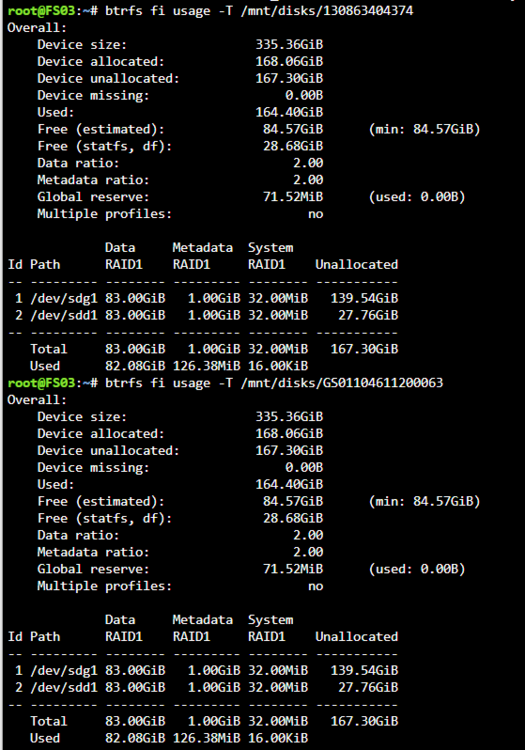
Sure thing. I did the command for both drives: root@FS03:~# btrfs fi usage -T /mnt/disks/130863404374 Overall: Device size: 335.36GiB Device allocated: 168.06GiB Device unallocated: 167.30GiB Device missing: 0.00B Used: 164.40GiB Free (estimated): 84.57GiB (min: 84.57GiB) Free (statfs, df): 28.68GiB Data ratio: 2.00 Metadata ratio: 2.00 Global reserve: 71.52MiB (used: 0.00B) Multiple profiles: no Data Metadata System Id Path RAID1 RAID1 RAID1 Unallocated -- --------- -------- --------- -------- ----------- 1 /dev/sdg1 83.00GiB 1.00GiB 32.00MiB 139.54GiB 2 /dev/sdd1 83.00GiB 1.00GiB 32.00MiB 27.76GiB -- --------- -------- --------- -------- ----------- Total 83.00GiB 1.00GiB 32.00MiB 167.30GiB Used 82.08GiB 126.38MiB 16.00KiB root@FS03:~# btrfs fi usage -T /mnt/disks/GS01104611200063 Overall: Device size: 335.36GiB Device allocated: 168.06GiB Device unallocated: 167.30GiB Device missing: 0.00B Used: 164.40GiB Free (estimated): 84.57GiB (min: 84.57GiB) Free (statfs, df): 28.68GiB Data ratio: 2.00 Metadata ratio: 2.00 Global reserve: 71.52MiB (used: 0.00B) Multiple profiles: no Data Metadata System Id Path RAID1 RAID1 RAID1 Unallocated -- --------- -------- --------- -------- ----------- 1 /dev/sdg1 83.00GiB 1.00GiB 32.00MiB 139.54GiB 2 /dev/sdd1 83.00GiB 1.00GiB 32.00MiB 27.76GiB -- --------- -------- --------- -------- ----------- Total 83.00GiB 1.00GiB 32.00MiB 167.30GiB Used 82.08GiB 126.38MiB 16.00KiB
-
I click mount for the two drives. It gives me the error above (FAIL). But it shows this and i click the GS01104.....(Link in blue) and browse a file structure. I assumed that what i was browsing was the contents on the pool... but you're leading me to believe that's not the case.

-
Sorry I may have misunderstood what i was doing. After manually mounting them by clicking the "Browse Disk Share". Is how to though i was looking at the contents. EDIT: If i browse the share normally the "Domains" folder is empty. However if i do it in the way i mentioned above the two ISOs are in there.

-
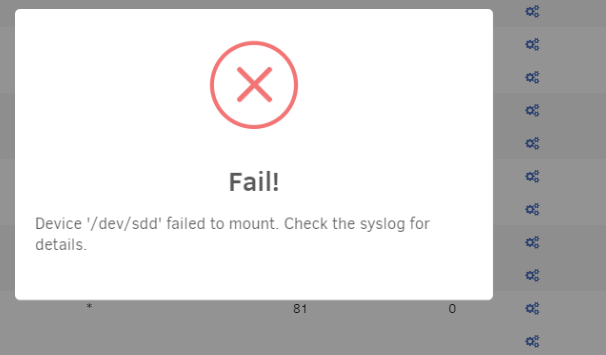
When you say "mount the pool" are you saying just clicking "Mount" on both of those drives? If so I get an error mounting, below: Here are the results to "btrfs fi usage -T /mnt/disks/UD_name" "ERROR: cannot access '/mnt/disks/UD_name': No such file or directory" Thanks for taking the time to help me with this!
-
Followed a space invader tutorial years ago, but yea i think it was btrfs and yes a pool of two drives. I can brows it on the drives if i try.



