





madmanx
Members
-
Joined
-
Last visited
Everything posted by madmanx
-
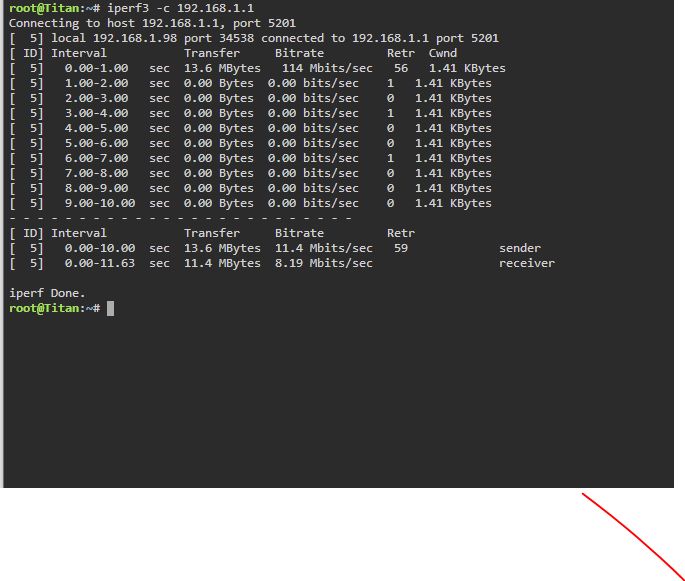
I am totally stumped as to the cause of the speed issues when I copy files or move files from the array to my PC, I have done some trouble shooting, using Iperf3 and when I set the server as the client the speed is attrocious see attached. I have tried this from my Pfsense box, android phones, windows 10 pc multiple places and all the same issue. What could be the cause I have tried changing the MTU, changing the NIC using an Intel NIC, turning off bonding. I am honestly stumped. If I change the unraid server to the server then the speed is totally fine.
-
HI I am trying to setup Swag to handle the reverse proxy for a VM running home assistant OS but I can't figure it out any help would be appreciated
-
Okay well I have followed your advice and setup the VM, the two problems I am facing are one RAM usage is considerably higher than previously I will upgrade ram but the bigger issue is how do I setup remote access using my own domain. I kind of figured its possible but i dont know how i can direct SWAG to direct any traffic that hits the subdomain to direct it to the VM IP address. I know I could use duckdns
-
Hi I have managed to get Home Assistant docker working with Swag docker and cloudflare so I can access via my domain however when I check the log it states I assume this is because the Yaml is not configured correctly which I have tried by adding reverse proxy line but that doesnt seem to work and just causes home assistant to go into safe mode. I have tried adding a line in the config file in the swag folder but that stops home assistant from running at all. I am newbie so any help would be appreciated.
-
Going to try one more time to see if someone can help me with this issue, I've enabled debugging would anyone be able to assist? See log file. nextcloud.log
-
Hi there I have searched and found two times where someone has had a similar problem but I cannot find the solution. I keep receiving this error in the log file 2020/09/01 19:36:33 [error] 372#372: *3 connect() failed (111: Connection refused) while connecting to upstream, client: 192.168.0.23, server: _, request: "GET / HTTP/2.0", upstream: "fastcgi://127.0.0.1:9000", host: "192.168.0.11:444" and when I tried to go into the GUI Internal Server Error The server encountered an internal error and was unable to complete your request. Please contact the server administrator if this error reappears multiple times, please include the technical details below in your report. More details can be found in the server log. I assumed this was due to IP address being incorrect so I went into the config and amended it to to match the below. However I still get an error trying to connect. I am now stuck. I have enabled debugging but cant seem to see a file. Appreciate any help. I am not sure if its potentially an issue with mariadb or nextccloud itself.

-
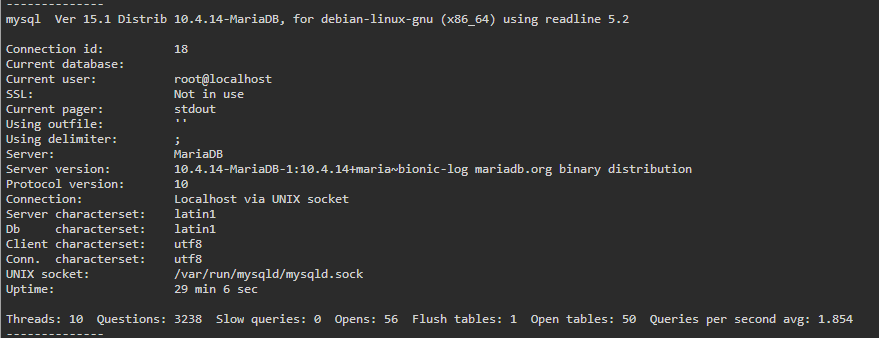
Hi all I have a larger issue but want to try and find out if I can work out what the error is, how could I tell what databases are currently running. Its related to an error I am receiving from Nextcloud. I have logged into Mariadb through the console and typed in status which states the below.
-
Hi I am having lots of issues with DelugeVPN, I have literally searche don here and everywhere but can't seem to find a solution. I am new to Unraid so please be patient, I seem to be gettting some really irratic speeds. I have configured ltconfig which seemed to help at first then the speed dropped but what seems to be even more of an issues is my upload speeds are terrible majority of the time i have zero upload speeds and for a brief moment I will get a few kb's and then it will drop to 0. I am using PIA and I have tried multiple torrents including the Ubuntu. I have turned on debugging, log attached supervisord.log
