





madmanx
Members
-
Joined
-
Last visited
Everything posted by madmanx
-
So I have lost my appdata due to some silly choices changing my cache to zfs forgetting to back it up and then it becoming corrupted. I have some old backups but tried to use the restore but it errors out saying it is invalid. I have seen you can extract the files but I am a little confused whether just to extract the tar.gz or do I need to also do something with the XML also I guess the .bak is just a backup do I need to do anything with those. Any help is appreciated
-
Merci good sir. Ill report back if it returns.
-
As you can see from the title my unraid server keeps causing all my network to crash, 0 connectivity across the network so I have to disconnect the unraid server and restart it for it to stop doing this. I can see a similar post which started 2017 with the same issue and people keep popping up with it. Any help attached is my diagnostic file titan-diagnostics-20231212-0817.zip
-
Yeah I tried different cables so I suspect its a NIC issue
-
There you go kind sir titan-diagnostics-20231205-1542.zip
-
I have isntalled an x540-t2 and even tried it in different PCIE but no matter how much I try I can see the NIC and both ports but whenever I connect the rj45 cable it stays as "Interface Ethernet Port 2 is down. Check cable!" I have changed it to eth0 and restarted a number of times but nothing. What could the cause of this other than faulty card?
-
Thank you
-
After following the instructions from the post on here I have the following results from using the memorystorager plugin. I am not sure if it is saying 31G for the 3 mnt mounts at the bottom also I can see that transcode is at 28g. Attached the diagnostic file 28G /tmp/Transcode 13M /tmp/fix.common.problems 48K /tmp/Mover 32K /tmp/user.scripts 4.0K /tmp/ca_notices 2.2M /tmp/pkg 12K /tmp/usb_manager 12K /tmp/unassigned.devices 12M /tmp/community.applications 8.0K /tmp/ca.turbo 804K /tmp/notifications 828K /tmp/plugins 4.0K /tmp/emhttp 29G /tmp 2.0M /usr/man 17M /usr/doc 2.5M /usr/include 35M /usr/libexec 5.0M /usr/src 103M /usr/share 46M /usr/sbin 221M /usr/local 1.1G /usr/lib64 342M /usr/lib 389M /usr/bin 2.2G /usr 23M /sbin 96K /run/libvirt 3.3M /run/docker 4.0K /run/avahi-daemon 12K /run/nut 8.0K /run/elogind 4.0K /run/dbus 356K /run/udev 8.0K /run/blkid 3.8M /run 4.0K /lib64/xfsprogs 12K /lib64/pkgconfig 1.5M /lib64/elogind 4.0K /lib64/e2fsprogs 1.5M /lib64/security 30M /lib64 87M /lib/modules 4.0K /lib/systemd 88K /lib/modprobe.d 32K /lib/dhcpcd 8.1M /lib/udev 255M /lib/firmware 349M /lib 20K /etc/snmp 76K /etc/nut 8.0K /etc/bash_completion.d 8.0K /etc/vulkan 4.0K /etc/OpenCL 4.0K /etc/nvidia-container-runtime 8.0K /etc/docker 4.0K /etc/rsyslog.d 4.0K /etc/netatalk 992K /etc/libvirt 332K /etc/libvirt- 4.0K /etc/pkcs11 144K /etc/lvm 8.0K /etc/libnl 8.0K /etc/ssmtp 24K /etc/samba 40K /etc/php-fpm.d 16K /etc/php-fpm 8.0K /etc/php 44K /etc/nginx 2.4M /etc/file 24K /etc/avahi 48K /etc/apcupsd 12K /etc/sysstat 48K /etc/security 252K /etc/ssl 568K /etc/ssh 48K /etc/mcelog 88K /etc/mc 48K /etc/logrotate.d 4.0K /etc/sensors.d 36K /etc/iproute2 9.1M /etc/udev 20K /etc/modprobe.d 104K /etc/pam.d 4.0K /etc/elogind 4.0K /etc/cron.monthly 4.0K /etc/cron.hourly 12K /etc/cron.daily 4.0K /etc/cron.d 4.0K /etc/cron.weekly 8.0K /etc/dbus-1 4.0K /etc/sasl2 72K /etc/default 380K /etc/rc.d 8.0K /etc/acpi 68K /etc/profile.d 16M /etc 12M /bin 215M /var/sa 129M /var/local 4.0K /var/kerberos 12K /var/state 13M /var/cache 16K /var/named 32K /var/tmp 16K /var/spool 4.0K /var/lock 22M /var/log 4.5M /var/lib 382M /var 8.0K /root 31G / 0 /mnt/rootshare 0 /mnt/addons 0 /mnt titan-diagnostics-20231118-0955.zip
-
as the title says my docker updating has become so unbeleivably slow and now its just not running properly would anyone be able to indicate what I need to do. I have also moved it to ssd cahce so its even more confusing why its so slow to update to even to open that tab. Daignostic attached. thanks titan-diagnostics-20231118-0955.zip
-
Will do, just in case I have to replace with something else, I was literally in the middle of building a backup server which I bought a LSI 9300 as truenas has better support for that, would you recommend something similar or can I use older generation LSI card?
-
Thank you. So if I were to replace the HBA would I have to worry about the order I have connected them. I can remmeber this being an issue a long while ago. Its a pretty old HBA so maybe its failing. As for the PSU i can replace that
-
Hi so just today I had a partiy check and noticed my system running extra slow and then I noticed some of my docker containers werent working then it finally just crashed and so I decided to restart the server to see if that helped. Docker came back but certain dockers like authelia wont start and also one of the discs was disabled. Here is my diagnostic. I was thinking to unassign my drive in maintenance mode and then reassign to build it back up but the amount of errors fix common problems is giving me I am worried this might cause more issues. Thanks for the assistance titan-diagnostics-20231105-1622.zip
-
Would anyone be able to point me in the right direction, my Unraid VM settings is unresponsive, so if I start my array and click on the VM tab it just displays a page without any VMs and if I try and go to the VM settings again a blank page. i think its related to an issue I had with the passed through NIC and somehow may have corrupted. What can I do to restore. I have backups of all the VM's so that isn't a particular issue. Just dont know where to start. I've attached my Diagnostics titan-diagnostics-20220312-0950.zip
-
I upgraded the ram and replaced the CUP the NIC went haywire no idea why. I now have a better idea. The dockers work however containers like swag are now refusing to work. I have literally tried everything including setting up traefik. I'm also seeing some weird behaviour from plex where it's connection is super unstable. As a whole its been a total nightmare.
-
As stated above can't connect to the internet with my dockers after upgrading server i restarted and the NIC had completely gone crazy a NIC which was passed through to my pfsense VM had managed to pull one of the ports and set it as eth0 then my onboard NIC has gone to two. After some amends via IOMMU groups I managed to get it working now I have an issue where none of my dockers will connect to the internet. Any idea what could cause this. Diagnostic attached titan-diagnostics-20220205-2226.zip
-
Found the solution it was the RAM for some reason the RAM ran at a higher speed than it was rated at, after reducing it down it's been working perfectly to parity checks and all good
-
I've just reseated the SAS card ill try the new RAM and if none of that works I'll just set the whole thing alight and start again
-
Just happened 8.4% although last night it clearly ran for at least 3hrs
-
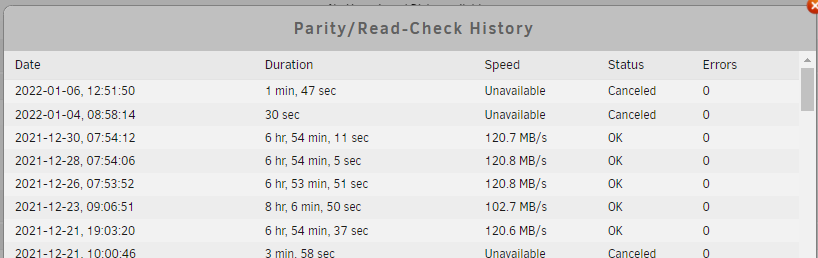
That makes sense, I am watching it quite closely and all are running. I am a little confused by the log, it shows that I have carried out parity checks does it only log the parity check when it is finished?
-
Well I did think about this but it ran fine after changing the motherboard previously it was a ryzen 1600x, could it be the SAS raid controller?
-
Yes that was one of them. I'm going to try it again but this time boot into SafeMode also forgot to say I have also put the memory through memtest and 2 passes with 0 errors. I'm going to drop some new RAM and see what happens
-
Hi thank you for the reply, forgot to say, I have already done that and sent it to flash as it wouldn't log anything when sent to the array as I assume the array is crashed until restart. Attached. I'm sure I replied to this using the quotes syslog
-
Hi thank you for the reply, forgot to say, I have already done that and sent it to flash as it wouldn't log anything when sent to the array as I assume the array is crashed until restart. Attached. syslog
-
Hi All I have been trying to identify the cuas eof constant crashes when carrying out parity checks it will get to around 1% then system will totally hang requiring a power cycle it has been left on for a whole night with the system never responding so I am confident it isn't just slow performance. I have carried out disk check, they provided no errors so I repaired anyway because I am hearing some strange things. In addition I have noticed my smart report showing errors but my drives showing healthy. I also have found that the disks with the exception of one refuse to run extended test, I click on it and it runs for like 1 second then stops. They also don't display drive capabilities these are all the same brand the 2 other disks are a different brand. Just some background on the system 5820k X99 mother board 8 SAS Drives with SAS controller 6x toshiba 3tb 2x hitachi 3tb (these are the owns which run the smart tesdt) I am a noob so I maybe be missing something so your help is much appreciated. I can see others have something similar but I can't see anyone given an actual solution. Diagnostic file attached titan-diagnostics-20220106-1309.zip
-
Hi please find my diagnostics. Thanks titan-diagnostics-20211023-1647.zip
