am3ncorn3r
Members
-
Joined
-
Last visited
Everything posted by am3ncorn3r
-
Does the recently added Slicer API work with this repo? I tried following the setup instructions provided by bambuddy directly and it doesn't work.
-
Interestingly I got my server back online. What I did was bypass the Switch and plugged directly into the MB ethernet port from my old ISP router/modem. So my new question is what the proper procedure to switch out the old router/modem?
-
So we recently got a new ISP. My current setup was I had a Cat 6 (C61) cable running from my downstairs Modem/router into a switch upstairs in my office. From here I had regular cat5 (C51) cable connected to the MB ethernet port. Then I had a NIC connected into the PCI-E slot running another cat6 (C62) cable between my server and my computer. When I got the new ISP hooked up I switched the C61 to the new router. When I went to connect to my server I could not find it. After doing some googling I found it had to do with having a static IP set under my previous ISP. I switched the cables back and was able to get back onto my server. I went into network settings and turn off static IP. When this was running the GUI froze. Now when I try to boot up the server I am not getting anything at all. The server will not load in. I've tried the Gui, safemode and gui safemode. I've updated my BIOS. But still nothing seems to be working. Not sure what next steps are. If you can help please let me know. I wasn't able to capture a Log unfortunately. I do have a video of the start procedure so you can see what I am seeing. https://imgur.com/a/0g5HrGU
-
Jake did you every figure this out? Wanting to do the same thing.
-
Hello, for awhile now I have been having an issue where my ASUS XG-C100C 10GBase-T PCIe Network Adapter keeps going down. The way my system is setup, main network is plugged into a switch, from switch its plugged into the Mobo ethernet port then the Nic is connected to my 10GBase-T dock, then to my regular computer. Oddly though every so often, sometimes a few days, the Unraid GUI shows the 10GBase-T eth-0 interface is down. The only way I can get it back up is by rebooting the server from the GUI. Does anyone have any inclination on what is causing this. Sounds almost like the nic is going idle and not coming back up. Does anyone have any idea on this? Let me know if you need any other info and I will provide it. syslog.txt
-
Just following up on this. My response is above
-
Hello so they were copied from my MBP running OS X Catalina 10.15.7 currently. The protocol I setup this share with is SMB.
-
Here is my screen recording showing my issue. There is audio https://www.loom.com/share/c706c2e7a9134f7ba9d4ec474e4829f9?from_recorder=1
-
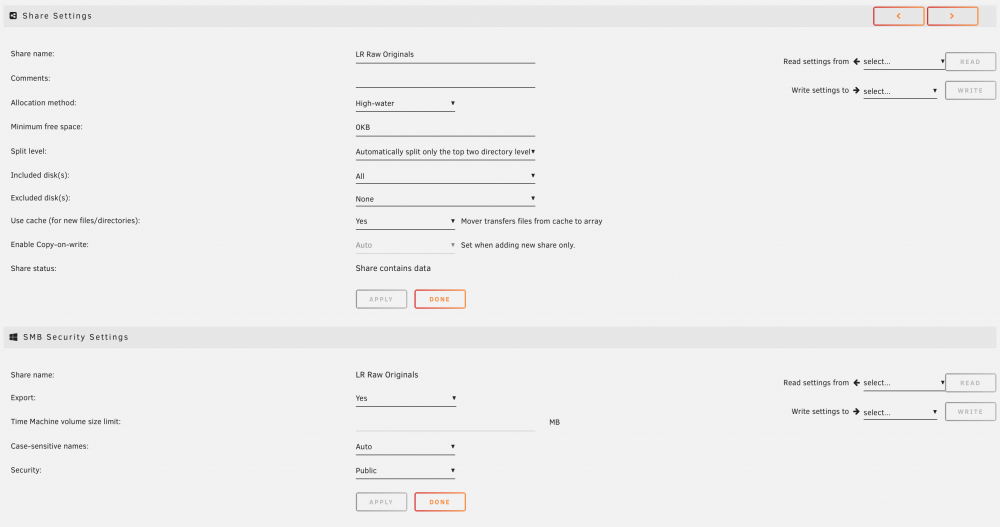
Hello I just started noticing that only recent folders I have added to my user share is propagating data within the finder window on OS X Catalina (10.15.7). But when I go into the Unraid GUI and look at the actual user share I can see all the data is there and am able to download it. What would cause this issue? Attached are screenshots of this share's setup and my recent log file. paphoto-diagnostics-20201022-0923.zip