





mr.x
Members
-
Joined
-
Last visited
-
i rebooted unraid and it gave me an alert that usb was in read only mode. guessing usb was failing. i replaced the usb and now i am able to update the plug in. sorry for the noise. strange i had to reboot the server to see the error with usb.
-
Here is the logs from the APPS tab install plugin: installing: unassigned.devices.plg Executing hook script: pre_plugin_checks plugin: downloading: unassigned.devices.plg ... done plugin: downloading: unassigned.devices-2024.04.22.tgz ... plugin: unassigned.devices-2024.04.22.tgz download failure: Generic error Executing hook script: post_plugin_checks I am using static IP and configured IPv4 DNS server as 1.1.1.1, 9.9.9.9, 8.8.8.8
-
I've tried multiple times and still getting same error. i just tried to delete and then reinstall from app store and getting same error. screwed myself now as i don't have the previous version running to use. is there a way to install from the plugins tab -> install plug in via url?
-
Hi, I get the following error, can someone please help plugin: updating: unassigned.devices.plg plugin: downloading: unassigned.devices-2024.04.22.tgz ... plugin: unassigned.devices-2024.04.22.tgz download failure: Generic error xecuting hook script: post_plugin_checks
-
Thanks @Kilrah. I opened the terminal in unraid and noticed I was unable to ping from unraid ip to the pihole ip assigned in docker. Is this a known issue that unraid can't ping pihole ip? Ideally I'd like to force all DNS on my network to pihole instead of allowing clients to manually override it.
-
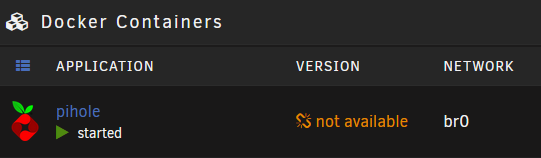
Hi, I installed pihole on unraid and it's working great to blocking ads. My gateway is unifi dream machine special edition (UDM SE). I set the dns ip as pihole IP in UDM SE. What I noticed is in unraid under DOCKER tab, all of the dockers version is "not available." Previously I would see a green check mark for up to date or update available. Any ideas what could be causing this and how to resolve this?
-
I bought a LSI card and migrated to a HP ProLiant ML310e. The drives connected to the LSI card show up in the boot screen however, the drives are not showing up in unraid. I have enabled in bios under sata controller AHCI and drive cache. See below for syslogs. Can someone please help? I disabled intel VDT in bios and unraid is now able to detect the drives and start the array. Any ideas? Unraid driver is interfering with intel VDT? Does this mean I won't be able to spin up any VM's? LSI Card: Supermicro AOC-S2308L-L8e DMAR: DRHD: handling fault status reg 2 kernel: DMAR: [DMA Write] Request device [07:00.0] PASID ffffffff fault addr ffc78000 [fault reason 12] non-zero reserved fields in PTE kernel: ata1: SATA link down (SStatus 0 SControl 300) kernel: ata2: SATA link down (SStatus 0 SControl 300) kernel: ata3: SATA link down (SStatus 0 SControl 300) kernel: ata4: SATA link down (SStatus 0 SControl 300) kernel: ata5: SATA link down (SStatus 0 SControl 300) kernel: ata6: SATA link down (SStatus 0 SControl 300) kernel: mpt2sas_cm0: config_request: manufacturing(0), action(0), form(0x00000000), smid(10129) kernel: mpt2sas_cm0: _config_request: command timeout kernel: mpt2sas_cm0: Command Timeout kernel: mf: kernel: kernel: 04000000 kernel: 00000000 kernel: 00000000 kernel: 00000000 kernel: 00000000 kernel: 09000000 kernel: 00000000 kernel: d3000000 kernel: kernel: kernel: ffffffff kernel: ffffffff kernel: 00000000 kernel: kernel: mpt2sas_cm0: sending diag reset !! kernel: mpt2sas_cm0: diag reset: SUCCESS kernel: mpt2sas_cm0: CurrentHostPageSize is 0: Setting default host page size to 4k kernel: DMAR: DRHD: handling fault status reg 2 kernel: DMAR: [DMA Write] Request device [07:00.0] PASID ffffffff fault addr ffc78000 [fault reason 12] non-zero reserved fields in PTE kernel: mpt2sas_cm0: config_request: manufacturing(0), action(0), form(0x00000000), smid(10129) kernel: mpt2sas_cm0: _config_request: command timeout kernel: mpt2sas_cm0: Command Timeout kernel: mf: kernel: kernel: 04000000 kernel: 00000000 kernel: 00000000 kernel: 00000000 kernel: 00000000 kernel: 09000000 kernel: 00000000 kernel: d3000000 kernel: kernel: kernel: ffffffff kernel: ffffffff kernel: 00000000 kernel: kernel: mpt2sas_cm0: _config_request: attempting retry (1) kernel: DMAR: DRHD: handling fault status reg 2 kernel: DMAR: [DMA Write] Request device [07:00.0] PASID ffffffff fault addr ffc78000 [fault reason 12] non-zero reserved fields in PTE kernel: mpt2sas_cm0: config_request: manufacturing(0), action(0), form(0x00000000), smid(10129) kernel: mpt2sas_cm0: _config_request: command timeout kernel: mpt2sas_cm0: Command Timeout kernel: mf: kernel: kernel: 04000000 kernel: 00000000 kernel: 00000000 kernel: 00000000 kernel: 00000000 kernel: 09000000 kernel: 00000000 kernel: d3000000 kernel: kernel: kernel: ffffffff kernel: ffffffff kernel: 00000000 kernel: kernel: mpt2sas_cm0: _config_request: attempting retry (2) kernel: DMAR: DRHD: handling fault status reg 2 kernel: DMAR: [DMA Write] Request device [07:00.0] PASID ffffffff fault addr ffc78000 [fault reason 12] non-zero reserved fields in PTE kernel: mpt2sas_cm0: config_request: manufacturing(0), action(0), form(0x00000000), smid(10129) kernel: mpt2sas_cm0: _config_request: command timeout kernel: mpt2sas_cm0: Command Timeout kernel: mf:
-
I disabled intel VDT in bios and unraid is now able to detect the drives and start the array. Any ideas? Unraid driver is interfering with intel VDT? Does this mean I won't be able to spin up any VM's?
-
I bought a LSI card and migrated to a HP ProLiant ML310e. The drives connected to the LSI card show up in the boot screen however, the drives are not showing up in unraid. I have enabled in bios under sata controller AHCI and drive cache. See below for syslogs. Can someone please help? LSI Card: Supermicro AOC-S2308L-L8e DMAR: DRHD: handling fault status reg 2 kernel: DMAR: [DMA Write] Request device [07:00.0] PASID ffffffff fault addr ffc78000 [fault reason 12] non-zero reserved fields in PTE kernel: ata1: SATA link down (SStatus 0 SControl 300) kernel: ata2: SATA link down (SStatus 0 SControl 300) kernel: ata3: SATA link down (SStatus 0 SControl 300) kernel: ata4: SATA link down (SStatus 0 SControl 300) kernel: ata5: SATA link down (SStatus 0 SControl 300) kernel: ata6: SATA link down (SStatus 0 SControl 300) kernel: mpt2sas_cm0: config_request: manufacturing(0), action(0), form(0x00000000), smid(10129) kernel: mpt2sas_cm0: _config_request: command timeout kernel: mpt2sas_cm0: Command Timeout kernel: mf: kernel: kernel: 04000000 kernel: 00000000 kernel: 00000000 kernel: 00000000 kernel: 00000000 kernel: 09000000 kernel: 00000000 kernel: d3000000 kernel: kernel: kernel: ffffffff kernel: ffffffff kernel: 00000000 kernel: kernel: mpt2sas_cm0: sending diag reset !! kernel: mpt2sas_cm0: diag reset: SUCCESS kernel: mpt2sas_cm0: CurrentHostPageSize is 0: Setting default host page size to 4k kernel: DMAR: DRHD: handling fault status reg 2 kernel: DMAR: [DMA Write] Request device [07:00.0] PASID ffffffff fault addr ffc78000 [fault reason 12] non-zero reserved fields in PTE kernel: mpt2sas_cm0: config_request: manufacturing(0), action(0), form(0x00000000), smid(10129) kernel: mpt2sas_cm0: _config_request: command timeout kernel: mpt2sas_cm0: Command Timeout kernel: mf: kernel: kernel: 04000000 kernel: 00000000 kernel: 00000000 kernel: 00000000 kernel: 00000000 kernel: 09000000 kernel: 00000000 kernel: d3000000 kernel: kernel: kernel: ffffffff kernel: ffffffff kernel: 00000000 kernel: kernel: mpt2sas_cm0: _config_request: attempting retry (1) kernel: DMAR: DRHD: handling fault status reg 2 kernel: DMAR: [DMA Write] Request device [07:00.0] PASID ffffffff fault addr ffc78000 [fault reason 12] non-zero reserved fields in PTE kernel: mpt2sas_cm0: config_request: manufacturing(0), action(0), form(0x00000000), smid(10129) kernel: mpt2sas_cm0: _config_request: command timeout kernel: mpt2sas_cm0: Command Timeout kernel: mf: kernel: kernel: 04000000 kernel: 00000000 kernel: 00000000 kernel: 00000000 kernel: 00000000 kernel: 09000000 kernel: 00000000 kernel: d3000000 kernel: kernel: kernel: ffffffff kernel: ffffffff kernel: 00000000 kernel: kernel: mpt2sas_cm0: _config_request: attempting retry (2) kernel: DMAR: DRHD: handling fault status reg 2 kernel: DMAR: [DMA Write] Request device [07:00.0] PASID ffffffff fault addr ffc78000 [fault reason 12] non-zero reserved fields in PTE kernel: mpt2sas_cm0: config_request: manufacturing(0), action(0), form(0x00000000), smid(10129) kernel: mpt2sas_cm0: _config_request: command timeout kernel: mpt2sas_cm0: Command Timeout kernel: mf:
-
Thanks. Is there any configuration I need to do if I buy a card with bios? Same question for without bios. Or are they both plug and play =).
-
Was it a defective card? I'm looking to purchase the same card on ebay. I noticed the seller say the card does not come with any boot services, did your card come with uefi bios?
-
I'm looking to purchase a LSI 9207-8i card and move my drives to it. I noticed on ebay cards are sold with or without boot services. Can someone explain if boot services are required and what the difference is? The options for boot services on the card are uefi bios or legacy bios. The cards come with LSI Avago IT mode firmware version P20 (20.00.07.00).
