Quejo
Members
-
Joined
-
Last visited
Everything posted by Quejo
-
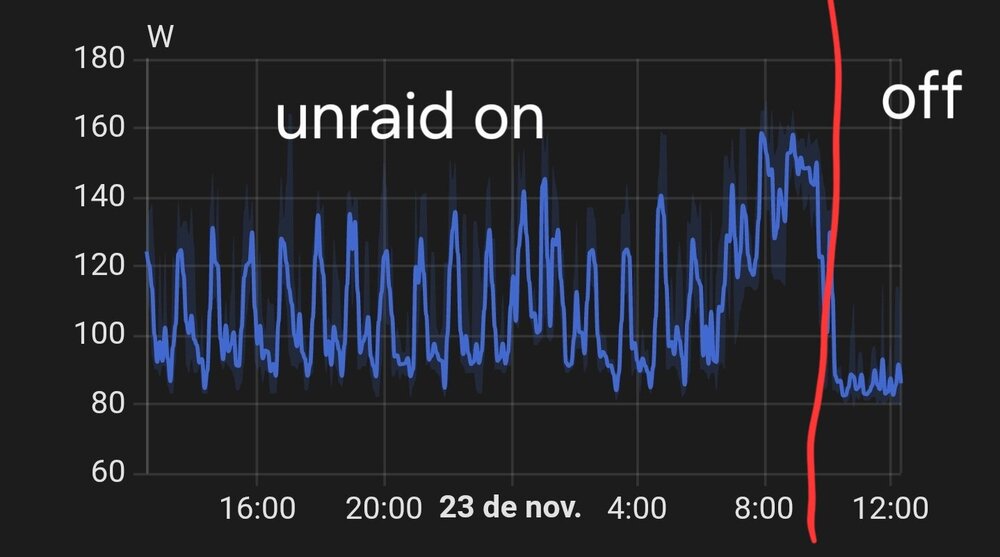
My Proxmox server suffers from the same symptom. When the Unraid VM is turned off, the entire cluster's consumption stays around 80W. When Unraid is running, consumption fluctuates between 80W and 120W. I've already tried several things to reduce it but nothing works.
-
i do. Unraid is virtualized on proxmox. igpu driver blacklisted on host and passed through to unraid. I use igpu for plex transcoding.
-
Booting in safe mode (no plugins) does not fix. Error still occuring. tower-diagnostics-20230525-1108.zip
-
Logs partition is filling up in about 5 days. Cant figure out myself the real issue. tower-diagnostics-20230521-2349.zip
-
since using usb manager theres no reason to use this plugin right?
-
y? is there any work around in this case?
-
Its not working properly in latest 6.10.2 release. Flashdrive is not showed in usb devices list to hotplug.

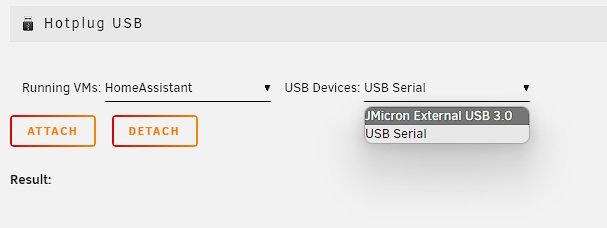 here it is thanks tower-diagnostics-20220421-1739.zipFrom what i could see its working as expected. I have enabled spin down delay to 45 minutes and now disks that get overheated after that time sleeps and cool down normally. Also disks that are not being checked during parity can sleep and dissipate less heat. parity.check.tuning.progress.savefirst completed parity check with latest release. tower-diagnostics-20220415-1520.zipasa you release it i will test and report.They barely do.My major problem is that im using an Orico 5 bay HDD case for my unraid parity storage. Today i raplaced the crappy fan with one that has much higher static pressure but when all disks are spinning temps still go higher than 60. the only way to keep temps down or cool them down is by spinning them down.hello here it its dynamix.cfgI think that there's another bug here. The plugin doesn't wait disks cool down to the resume temperature before resuming as it resumes earlier tower-diagnostics-20220407-1329.zipthat woud be great. Thank you for your efford.After latest update pausing and resuming are working correctly. Issue now is the temperature reading interval since disks are overheating above warning temperature. Maybe the disks case fan is now working properly contribuing to the fast warming. tower-diagnostics-20220406-1541.zipIs the plugin temperature reading frequency anyway related to the "Settings -> Disk settings -> Tunable (poll_attributes)"?Great ideias. Before updating to the latest version you pushed I realized that plugin was pausing and resuming as it should so I took the logs. Another issue that I realized is that warning temperature is set to 60 and pause threshold set to 3 degrees below that but it's only pausing in a higher temperature like 61 or 62. tower-diagnostics-20220405-1235.zipI will test this new version and report with logs here. You said that if parity was paused bacause disk overheating and if it spin down before reaching resume temperature so it would be treated as cooled down and parity should be resumed. Just as an ideia wouldn't be a better option keep the disk spinning in that situation until it really cool down and so resume parity would make sense? I think that if parity resuming when disk spin down would have trouble if it's still warm and pause parity again and restart again after spinning down and so...so i enabled increments for manual parity checks and changed increment pause and resume times to extend the parity window. tower-diagnostics-20220405-0011.zip
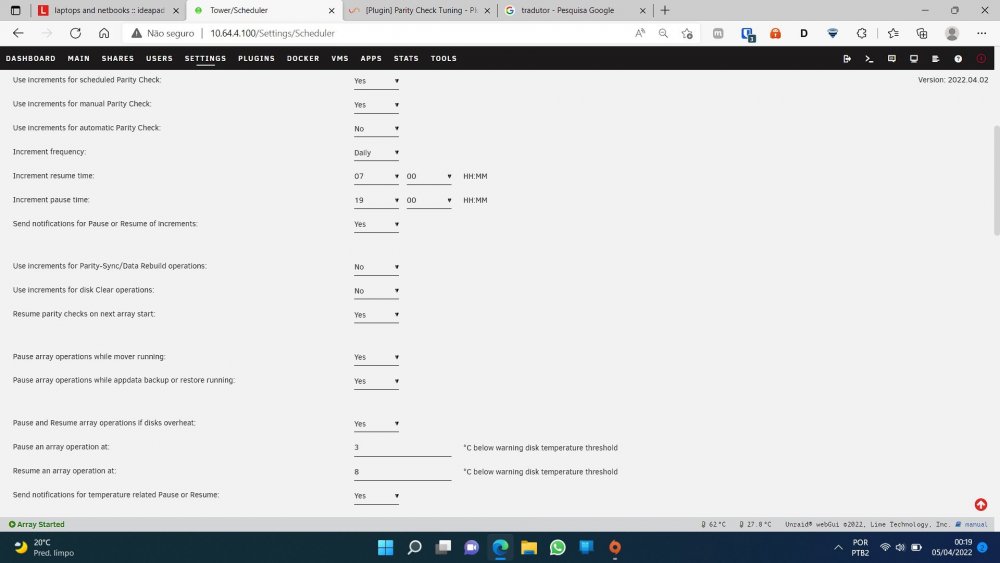 I can confirm that the issue is not related to disks spinning down. i have disabled the spin down delay but the behavior keeps the same. But shouldnt plugin resume parity asa next time window arrives? Testing mode just activated. Just give it some time to get some logs.That's what happen even after setting spin down delay to 1 hour I think that drives goes to standby before cooling down so it reaches the resume threshold temperature while sleeping and never resumes the parity automatically tower-diagnostics-20220403-2152.zipMy Parity Tuning is configured to pause parity by disk temperature but asa temperature down below warning disk threshold the parity doenst resume. Maybe because disk spin down time is set to 15 minutes and that time is not enough to cool down disks?