




Skip to content
View in the app

A better way to browse. Learn more.

Unraid

A full-screen app on your home screen with push notifications, badges and more.

To install this app on iOS and iPadOS
  1. Tap the Share icon in Safari
  2. Scroll the menu and tap Add to Home Screen.
  3. Tap Add in the top-right corner.
To install this app on Android
  1. Tap the 3-dot menu (⋮) in the top-right corner of the browser.
  2. Tap Add to Home screen or Install app.
  3. Confirm by tapping Install.

Vash12

Members
  • Joined

  • Last visited

Everything posted by Vash12

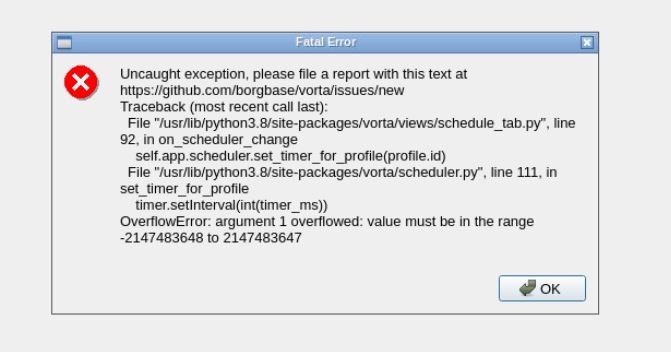
  1. I'm getting this error msg when I tried to change from "Backup manually" to Backup daily or weekly. Please help... thanks
  2. Thanks, I normally would remote into the mac vm using splastop or vnc. Want to avoid passingthrough a gpu. Sent from my iPhone using Tapatalk
  3. Thats what I did as well. Spent hours trying to resize the partition, couldnt get it working. In the end, it was just easier to fresh install and use migration assistant.
  4. Do you experience any lag using nomachine? I usually remote into the VM. no point passing through a GPU.
  5. Finally got a functional Macinabox Catalina! Ryzen 1600AF with 4 cores + 8gb ram assigned Catalina had no problem detecting my GPU (MSI Gt 710 1GB) Native support, no web drives needed. Awesome work SpaceInvader !!

Account

Navigation

Search

Search

Configure browser push notifications

Chrome (Android)
  1. Tap the lock icon next to the address bar.
  2. Tap Permissions → Notifications.
  3. Adjust your preference.
Chrome (Desktop)
  1. Click the padlock icon in the address bar.
  2. Select Site settings.
  3. Find Notifications and adjust your preference.