





gusgus
Members
-
Joined
-
Last visited
Everything posted by gusgus
-
That was exactly it! I had totally forgot about Encrypted Drive Manager. I created the device-derived key on the drives and rebooted and HDD pool is now successfully automounted at bootup. Thank you!
-
Ok finally I'm back. Here are the two scenarios that result in the HDD pool in not mounting and one scenario where it does mount. As a reminder, I have two ZFS encrypted pools with the same passphrase. Scenario 1: When I do the following, the HDD pool fails to unlock: Boot up with the keyfile in place. NVME pool succeeds to unlock HDD pool does not unlock and instead says "Unmountable: wrong or no file system" Scenario 2: When I do the following, the HDD pool fails to unlock: Delete the keyfile Stop the array Start the array Enter the correct passphrase NVME pool succeeds to unlock HDD pool does not unlock and instead says "Unmountable: wrong or no file system" Note: The exact order of the steps I'm not sure of because right now it refuses to delete the keyfile (delete button > restart array > keyfile is still there). Scenario 3: This causes the HDD pool to successfully mount Start with the drive set to encrypted zfs filesystem Format (Yes I want to do this) The HDD pool is now unlocked and mounted The next time I reboot UnRAID and forever after it will refuse to mount without being reformatted as a workaround.
-
The odd part is I have two pools, both formatted as encrypted zfs. They both have the same encryption passphrase. The other pool that I'm not having this problem with is unlocking just fine at bootup as expected. Why would one pool unlock perfectly fine using the keyfile and another pool repeatedly but only occasionally fail to unlock using that same keyfile? Is this still possibly a memory corruption issue? Unless I'm missing something, I would think it's time to file a bug report.
-
Three times now I have reformatted a single drive that's in its own pool (as encrypted zfs) because it has randomly come up as Unmountable: wrong or no file system. And it just did it again. It's a new drive, there are no SMART errors. How can I force it to mount correctly? How do I prevent this from happening? This most recent occurrence appears to have happened after a hard shutdown of (loss of power to) the server. I also noticed that after this hard shutdown the root user's authorized SSH keys were wiped, when before I had no issues with it retaining the keys. metaverse-diagnostics-20261002-1002.zip
-
Worked perfectly! Thank you JorgeB for all of the help!
-
A scrub cleared it up, zpool status -v now says errors: No known data errors So it looks like the next step is to remove the extraneous mirror device in the Nvme pool. How would I go about doing that? Thank you JorgeB for all your help! Definitely will be sending beer money when this is over! metaverse-diagnostics-20260924-1751.zip
-
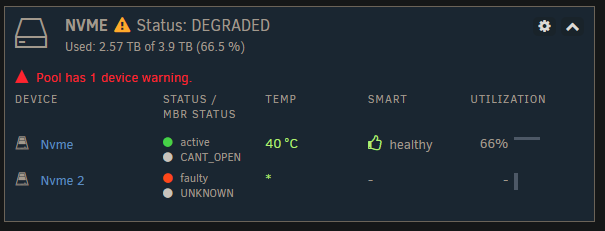
Ok finally the corrupted file has been deleted, but the CANT_OPEN error is still on the existing nvme drive. A look at zpool status -v says: errors: Permanent errors have been detected in the following files: nvme:<0x10f> metaverse-diagnostics-20260923-1850.zip
-
@JorgeB after resolving this will I be able to remove the second mirror drive from the pool?
-
Thank you @JorgeB! I guess unRAID hasn't integrated zfs data integrity issues properly into the UI yet.
-
Diagnostics here metaverse-diagnostics-20260914-0848.zip
-
Thank you for the reply! Screenshot attached, it's the Nvme pool that I need to remove a device from. Right now the red triangle next to the existing drive says "Device has an error status: CANT_OPEN" which I've never seen before. It's also inaccurate since the drive is mounted and operating. Anyone wondering how I have dark mode, I use the Dark Reader extension which works very well and is available on Chrome and Firefox.

-
Hi, I recently did a system upgrade that I'm rolling back. On the newer system I expanded a single drive pool into a mirrored pool. Now I have to revert that mirror into a single drive again. The challenge is that I only have one m.2 slot on this older system so I have to revert it to a single drive without the full mirror being present. Right now it is successfully mounting but is marked as degraded. I'm sure there is some straightforward way to do it but I've looked and looked and haven't found it. If someone could please point me in the right direction that would be very helpful.
-
Mods if you could flag this as a bug report that would be very helpful, I don't see how I am able to do it.
-
I found the hack that makes my backups bootable: 1. Using the unRAID USB Creator (I used it on Linux), create a stock image of the version from your backup, mine was 7.3.2. 2. Remount the newly created unRAID USB media and delete everything except for EFI folder. 3. Unzip your backup file and copy over the contents except for the EFI folder that's in the backup file. Done. You should now be able to boot into your backup. unRAID clearly has a bug with corrupting the EFI folder contents during backup creation! And for the ZFS key issue, I discovered that my backup used a single drive at the time for a pool but I later created a mirror. When I was recreating my existing pools I thought that the mirrored device would suffice but no it wanted the original device (even though they were mirrored and had the same ZFS key). So unRAID clearly has a misleading error message in this situation where the wrong pool member was used - it should say that instead of saying that the key is wrong because the key isn't what failed.
-
After a failed hardware upgrade (which went so far as successfully installing internal boot on the new system), I found too many issues and am reverting back to my original build which has been running without issue for around 4 years. There are two issues: 1. Not being able to use my unRAID backup files 2. unRAID won't accept my ZFS encryption key which I know is correct and I know is being pasted into the text field correctly I'm putting both of these issues in a single post because if we can resolve issue 1 then issue 2 will be resolved as well. Issue 1: It started off with every backup I have made being unbootable on this UEFI-only system that has had no problems booting unRAID on USB media for many years via multiple attempts including: -unRAID USB creation tool on Windows (loading a backup file) -unRAID USB creation tool on Linux (loading a backup file) -Rufus: format as Large FAT32 then create FreeDOS then dumping the backup files on there There are 4 different backup files from v7.3.2 and none of them result in a bootable USB media using the above attempts. What ended up working is the unRAID USB creation tool on Linux loading a stock 7.3.2 image, forcing me to install from scratch. But it seems that if I could just get one of my backups to be bootable then this problem would resolve itself because it was loading the ZFS encryption keyfile just fine before the hardware upgrade. Issue 2: Incredulously, unRAID is claiming that my ZFS encryption key is invalid. Here are the steps that I followed: 1. Created the pools for my drives - each pool has a single drive, both drives are ZFS encrypted with the same key which I did before the upgrade in unRAID 7.3.2 2. Entered the ZFS encryption key from my password manager into the text field under "Passphrase". Click Start to accept the key and start the pools. 3. The pools did not start. I scroll down to find that it says "Wrong key". There there known issues with ZFS encryption passphrase/keyfile in 7.3.2? I have no idea what to do about this other than to finally abandon this scrappy and unreliable software.
-
I've read around and it seems that I'm not the only one having these problems. But I wasn't able to find a solution to any of them. Perhaps a reader has one that they could share? Or are these known issues with internal boot in 7.3.2? Note that I just switched to new hardware as a part of this change so maybe I missed some step involved in hardware migrations? Pools, shares, and networking are at least correct except for what's described below. The previous build ran without any of these issues for years. Problem 1: SSH authorized keys, saved in root user via Users > root, are not persisting across reboots. Problem 2: I have multiple encrypted pools. Before moving to internal storage boot I just had to enter the passphrase once and then it saved it. Now it complains that it has the "wrong key" every time I reboot. There is a keyfile so it's saving something but it complains that whatever it's saving isn't the right key. When I delete the keyfile and reenter the passphrase it correctly decrypts my pools and the "array" (I have pools, my array is empty) starts. Problem 3: libvirt refuses to start. Docker runs fine, no issues with the associated shares though I do have a pool with no libvirt-relevant shares that's totally disconnected right now. I know I have a VM that has some IOMMU groups that need to be updated but that shouldn't prevent libvirt from starting at all right? I don't have enough RAM installed at the moment to start all of the ones that are on autostart but that shouldn't prevent libvirt from starting right? I didn't see libvirt mentioned in the logs. Diagnostics package attached for those who want it. metaverse-diagnostics-20260905-1905.zip
-
Fixed thanks for the hint! For others: I had recently replaced all of my arrays/pools but forgot to go into Shares and set the new storage location for each share. So yes, the ISOs share had an incorrect/invalid disk allocation.
-
I am unable to download the latest Default Windows VirIO driver ISO (via webgui > Settings > VM Manager > show Advanced). Every time I try it says I need at least 630 MB free (see screenshot), however I have tons of free space on every pool: Boot pool: 253 GB free VM pool: 1.8 TB free HDD pool: 8.7 TB free Seems like a bug. Can anyone else confirm this issue, or let me know what I'm doing wrong? Like maybe it's a permissions issue somewhere?

-
Hi I'm having a problem with SSL certs, on Firefox I'm getting SSL_ERROR_INTERNAL_ERROR_ALERT (with Chrome it's a ERR_SSL_PROTOCOL_ERROR) when navigating to my proxy host. Below are the setup steps I followed along with the troubleshooting I did. Short of testing the SSL cert on a webserver to verify that it is intact (please let me know if I should attempt this), I'm out of ideas. Any help is greatly appreciated. The setup steps I followed: Setup a subdomain haos.mydomain.com to redirect to my top-level domain, mydomain.com Verify that mydomain.com is currently pointed to my dynamic IP (via dynamic DNS). Follow this tutorial to setup NPM-Official, which is basically: https://www.youtube.com/watch?v=nhacNUxVcy4 Install NPM-Official container. Choose to have a fixed IP address. Forwarded ports 80 and 443 from my router to the NPM-Official IP address. Verify that I can access the NPM-Official welcome screen when navigating to http://myipaddress Setup mydomain.com and *.mydomain.com SSL Certs in the NPM webUI. I deviated from the tutorial by enabling DNS Challenge to allow wildcard cert generation. Create a Proxy Host. It's pointed to my HA OS virtual machine, so http and port 8123. It uses the *.mydomain.com SSL cert. Now I should be able to type in haos.mydomain.com via http or https and see the HA OS interface. But instead, what I see with http is 502 bad gateway, and with https SSL_ERROR_INTERNAL_ERROR_ALERT on Firefox and with Chrome it's a ERR_SSL_PROTOCOL_ERROR. Troubleshooting: nslookup says haos.mydomain.com is correctly pointed to my external IP address manually navigating to the HA OS IP address successfully shows me the HA web interface as expected NPM-Official log shows successful cert generation when I click on Renew: [7/5/2025] [8:40:19 PM] [SSL ] › info - - - - - - - - - - - - - - - - - - - - - - - - - - - - - - - - - - - - - - - - Processing /etc/letsencrypt/renewal/npm-2.conf - - - - - - - - - - - - - - - - - - - - - - - - - - - - - - - - - - - - - - - - Renewing an existing certificate for *.mydomain.com and mydomain.com - - - - - - - - - - - - - - - - - - - - - - - - - - - - - - - - - - - - - - - - Congratulations, all renewals succeeded: /etc/letsencrypt/live/npm-2/fullchain.pem (success) - - - - - - - - - - - - - - - - - - - - - - - - - - - - - - - - - - - - - - - - [7/5/2025] [8:40:19 PM] [Global ] › ⬤ debug CMD: openssl x509 -in /etc/letsencrypt/live/npm-2/fullchain.pem -subject -noout [7/5/2025] [8:40:19 PM] [Global ] › ⬤ debug CMD: openssl x509 -in /etc/letsencrypt/live/npm-2/fullchain.pem -issuer -noout [7/5/2025] [8:40:19 PM] [Global ] › ⬤ debug CMD: openssl x509 -in /etc/letsencrypt/live/npm-2/fullchain.pem -dates -noout
-
Yes this was it, I didn't configure the shares correctly! For future readers, the solution is: 1. Go to Shares tab 2. Click on each share and choose Array or Cache to indicate where they should reside. 3. Once done, go to Main, scroll to the bottom, and click on Move. The folders will move between /mnt/disk1 and /mnt/cache but will universally be available at /mnt/user no matter where they are.
-
I'm currently trying to move the data myself with rsync: rsync -rltgoDhUHX --remove-source-files --info=progress2 --verbose /mnt/cache/ /mnt/disk1/
-
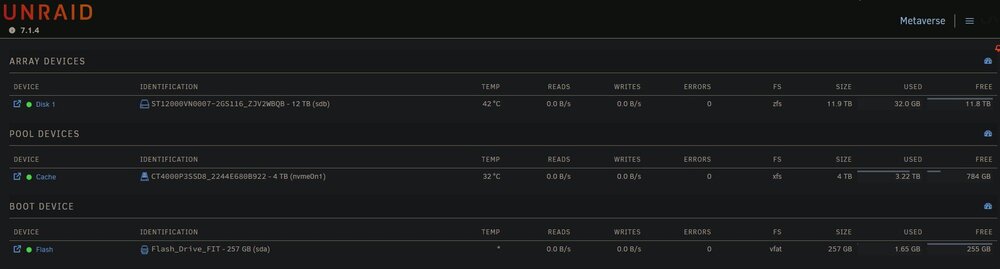
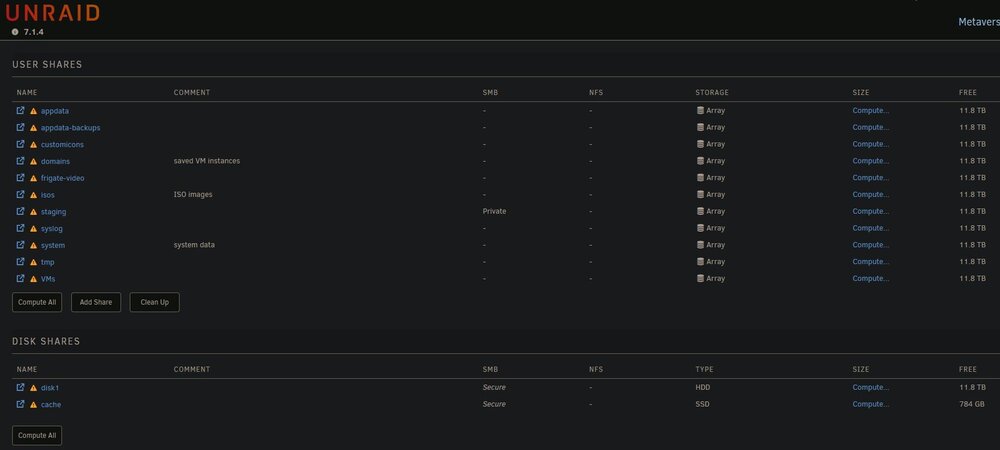
I've read all the posts I can find about mover not moving from Cache (pool) to Array, none helped. I have Cache as a SSD Pool and Array as 1 HDD. I'm trying to move all of my data from Cache to Array so I can reformat the Cache as zfs (taking advantage of a lull in user demand). However it moved only 32 GB (the ISOs user share) of the 3.22 TB of data and then stopped. VM and Docker services are both disabled. I have invoked manual Move (Main > Move button) 3 time since but no change. All shares in User Shares are set to Array (high-water). I've attached screenshots of Shares and Main screens and the diagnostics file. What possible problems could crop up if I move these shares myself via command line? Is it possible that the manual mover isn't doing anything because the move schedule is for 3:30 am and it's currently daytime? I didn't see anything about this in known issues for 7.1.x. The array drive has some SMART errors - Unraid doesn't have logic that prevents the mover from moving to a drive with SMART errors right? This is a calculated risk and have made this decision based on how much I care about the data. I'll be replacing the Array drive soon enough. metaverse-diagnostics-20250621-0924.zip
-
I upgraded from 6.12.10 to 6.12.14 when it was released some time ago. For the first time since then, I'm trying to ssh into the box and can't authenticate using publickey method, which is the method that I have been using for years from multiple clients, and now it won't work from any client. It appears that sshd is ignoring my /root/.ssh/authorized_keys file. My keys are both present and correct in both /root/.ssh/authorized_keys and /boot/config/ssh/authorized_keys. The usual location for sshd auth.log does not appear to be present. Any ideas before I blow this system away and reinstall? Permissions of my /root/.ssh/authorized_keys file: root@box:~# ls -al /root/.ssh/authorized_keys -rw------- 1 root root 332 Jan 26 09:38 /root/.ssh/authorized_keys Permissions of my sshd_config file: root@box:~# ls -al /etc/ssh/sshd_config -rw------- 1 root root 1522 Feb 3 07:37 /etc/ssh/sshd_config Contents of my /etc/ssh/sshd_config file, which are the same contents as my /boot/config/ssh/sshd_config file, note that I only have password as an AuthenticationMethods entry for troubleshooting, normally this is publickey only: # Supported HostKey algorithms by order of preference. HostKey /etc/ssh/ssh_host_ed25519_key HostKey /etc/ssh/ssh_host_rsa_key HostKey /etc/ssh/ssh_host_ecdsa_key KexAlgorithms [email protected],ecdh-sha2-nistp521,ecdh-sha2-nistp384,ecdh-sha2-nistp256,diffie-hellman-group-exchange-sha256 Ciphers [email protected],[email protected],[email protected],aes256-ctr,aes192-ctr,aes128-ctr MACs [email protected],[email protected],[email protected],hmac-sha2-512,hmac-sha2-256,[email protected] # Password based logins are disabled - only public key based logins are allowed. AuthenticationMethods publickey password # LogLevel VERBOSE logs user's key fingerprint on login. Needed to have a clear audit track of which key was using to log in. LogLevel VERBOSE # Log sftp level file access (read/write/etc.) that would not be easily logged otherwise. Subsystem sftp /usr/lib/ssh/sftp-server -f AUTHPRIV -l INFO # Root login is not allowed for auditing reasons. This is because it's difficult to track which process belongs to which root user: # # On Linux, user sessions are tracking using a kernel-side session id, however, this session id is not recorded by OpenSSH. # Additionally, only tools such as systemd and auditd record the process session id. # On other OSes, the user session id is not necessarily recorded at all kernel-side. # Using regular users in combination with /bin/su or /usr/bin/sudo ensure a clear audit track. PermitRootLogin Yes
-
Solved. All this time I assumed that the OOM error was not actually unRAID running out of memory, because I miscalculated the amount of RAM that should be allocated to each VM to prevent an OOM condition. I reset the memory allocation for each VM (correctly this time) and the system no longer crashes.
-
Additional info: I found in the VM logs the following line at the time of each crash (with different timestamps of course): 2024-03-24 17:41:47.443+0000: shutting down, reason=crashed So it would appear that qemu recognizes a problem and recovers long enough to write to the log. This is the only line after each crash.



