





Two Wire
Members
-
Joined
-
Last visited
Everything posted by Two Wire
-
Ok! here is the diagnostics file. Thanks for looking at it. tower-diagnostics-20220803-1521.zip
-
Thanks, for the quick reply. As far as I know, the drives were functioning at the time I noticed they were not being detected. But, I very seldom look at the web GUI so I don't know for sure. However, I did not replace those drives I just changed the sata ports. So, I guess something is wrong. I hope the data on those drives will not be deleted during the parity rebuild.
-
I had two sata ports on the motherboard fail. I bought a 6 port sata controller card and connected the two cables from the inactive drives to the ports on the new controller card. The server is now doing a rebuild for the two inactive drives. My question is should this be happening since if have not made any changes to the data. I thought that if the server looks for the drive serial number then parity should be valid.
-
I disconnected one of my hard drives some time ago and now want to add it back to the server. It was full of data when I removed it and was accounted for by the two parity drives. Over time, adding new data to the remaining shares changed parity. My question is can I add this drive back to the server without loosing its contents.
-
Thanks, This ia the one I ordered: MZHOU PCI-E 1X Interface 3.0 10 Port SATA Card
-
I have a ASRock z97 extreme 6 mother board that has two bad sata ports. Not quite sure what 4/8 ports pcie controller card that will be compatible with my MB. Any suggestions.?
-
Hey Guys, Thanks for your help and advice. I have one more question. I bought two HDD's and plan to replace the two drives which appear to be faulty. In the past I used preclear before I added a new disk. Now, I can't seem to find that option. From reading the forum I understand this can be done automatically. My question now is, can I replace these drives one at a time.and not loose parity. I don't want to do both at the same time. I have dual parity. Once again. thanks for helping this old guy out.
-
The two drives in question are not showing in the bios. However, I can still read and write to them using Windows file explorer. I can also play the files with Kodi. There is something going on here I don't understand. I'm wondering if somehow this behavior is a result reading from the parity drives . I could check the drives, but not sure how to do this
-
Thanks, Trurl for the reply. Since I can read the contents of these two drives I'm wondering if updating the OS would take of this problem? If not, any suggestions as to what may be causing these drives to not be recognize. As to why I am still using ReiserFFS I started using unraid about 2003 and have updated the software on a regular basis. What I have is a result of these upgrades. I have really not paid any attention to this since it just works as is. Perhaps I should look into this.
-
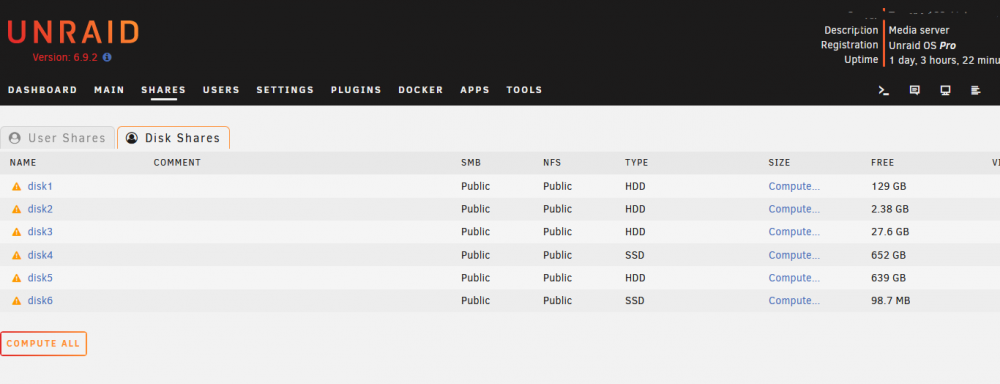
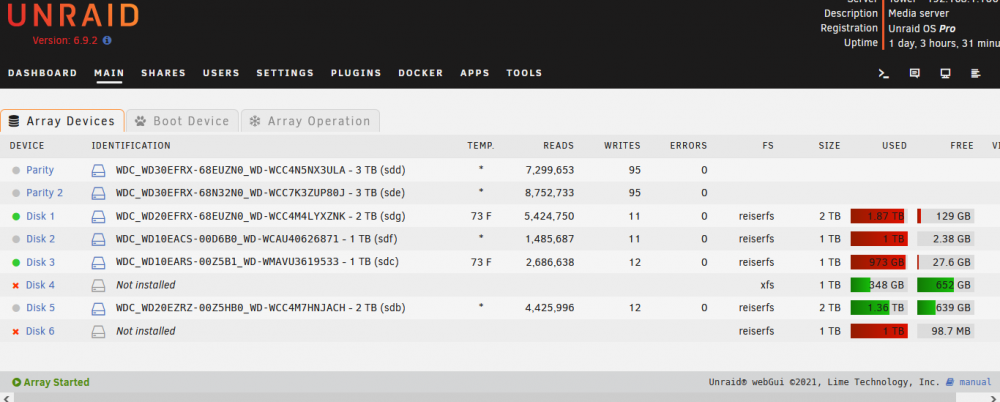
I have two hard drives which are not being mounted by the Unraid OS. However, I can read the contents of these two drives using Windows explorer. While reviewing my disk share settings, I notice the two drives in question are identified as SSD shares and I think they should be listed as HDD's. Whatever the cause, these two hard drives should be recognized by the OS. Any help will be appreciated. I have attached two tower-diagnostics-20220702-1737.zip
-
Two of my disk shares are being listed as being "not installed" in the Array Devices tab. The Disk Shares tab list these two share types as being SSD. However, these two shares are hard disk drives. I have no idea as to how this happened. What do I need to do to correct this?
-
Thanks for the tip Trul.
-
Thanks guys for the assistance. With your help I can now access my disk shares and will return to private status. Now I'm going to dig into the various posting all of you suggested. "Ya learn something new every day" With this problem solved makes going into the new week even more enjoyable Thanks,again.
-
Update, I finally was able to achieve my goal by changing the disk shares to public. I don't want to keep them at that setting, but, at least, that is a start. I made the update without really knowing what all was in the latest release. My bad. I think the answer to successfully assigning the disk shares to private lies somewhere in the latest latest release
-
Trul, thanks for the info. that explains why my post was not at the top of the list. I can now access my shares, but I cannot open any of the individual disk. I deleted all the credentials, but I still get the network credential popup. I'm going to read through the list you suggested.
-
Turl, Thanks for the info. that allowed me to reach the shares. However, when I try to open them I get a popup asking for network credentials, username and password. I went to control panel/user accounts/manage your accounts, and set up a user name and password for network credentials. No luck when I entered that info, I got the same response: "Tower is not accessible. You might not have permission to use this network......."". For what it's worth, I can now open the flash folders.
-
Turl, it has been quite a while since I have visited this forum and I am not familiar with the mechanics of how it works. I posted my topic and looked for it under General Support. I thought it would be at the top of the list, being the latest post, but it wasn't. I finally found it listed on the 3rd page which I thought was odd. I tried to delete the original post and could not find any way to d to do it I re-posted thinking it had been deleted. The double post was unintentional, but was a result of me trying to figure out the mechanics of posting.
-
Itmipi, thanks for the reply. Entering the IP address just gives me the user interface, as has always been the case SQUID, sorry for not stating the version which is 6.92. However it has been quite a while since I last updated, possibly around 6.4? I will try the link you sent.
-
I uodated to the latest version of unRaid and now I cannot access my server using windows explorer. When I try to access the server I get a network error popup stating "Tower is not accessible. You might not have permissinto use this network......." It seems to me the this update is somehow blocking access to the server. I have looked at a few things, but cannot figure it out. Help!!
-
Thanks, Raidserver, for the reply. I am away for the holiday and will not be back until Tuesday. I will look at it again then. Thanks
-
I need some help with getting minidlna to work with my client. There are no files listed by my dlna app, and I'm thinking I don't have my path properly described. I am not at all knowledgeable about the pathing syntax Linux uses. My user share (Movies) is a collection of The contents of my disk shares. The path I entered for Host Path on the setup page is: /mnt/user/Movies/. I also edited the config file to match this entry. This path description is obviously just a guess Note: I don't know if this information is needed, but the name of my unraid box is "Tower." I have tried various other path descriptions, but all have been unsuccessful. I would appreciate any help with this.
-
Bonienl, thanks. I guess this means I do not need the last two plugins.
-
Bonienl, I reinstalled 6.12 and got these errors. After seeing them I reinstalled the S3. sleep, power down plugin, and the cache.dirs, but I'm not sure as to what the last two refer. Should these items have been installed? What do I need to do? /boot/config/plugins-error/dynamix.cache.dirs-2.1.0-noarch-bergware.plg ERROR NOTE: Reinstalled /boot/config/plugins-error/dynamix.s3.sleep-2.1.1-noarch-bergware.plg ERROR NOTE: Reinstalled /boot/config/plugins-error/dynamix.system.temp-2.1.0-noarch-bergware.plg NOTE;: Don't need this /boot/config/plugins-error/dynamix.dns.server-2.1.0-noarch-bergware.plg ERROR /boot/config/plugins-error/dynamix.plugin.control-2.1.1-noarch-bergware.plg ERROR Thanks
-
Bonienl, Thanks for taking the time to help me with this issue. I was unaware I needed the power down plugin. Sorry, about that. Although, thinking about it now, I think I did have it when I was using ver 5 Anyway, your plugin is now working on my server and I am happy about that. As for the setting of the switches, I set them for the unconditional shutdown hoping to eliminate any influence of some unknown server activity as I was trying to get the plugin to work. I will be setting them properly to suit my needs. Thanks again.
-
Bonienl, I think this what you want. Feb 15 00:39:41 Tower s3_sleep: killing s3_sleep process 14933 Feb 15 00:40:44 Tower s3_sleep: ---------------------------------------------- Feb 15 00:40:44 Tower s3_sleep: command-args=-C 2 -m 10 -D 0 Feb 15 00:40:44 Tower s3_sleep: action mode=shutdown Feb 15 00:40:44 Tower s3_sleep: check disks status=no Feb 15 00:40:44 Tower s3_sleep: check network activity=no Feb 15 00:40:44 Tower s3_sleep: check active devices=no Feb 15 00:40:44 Tower s3_sleep: check local login=no Feb 15 00:40:44 Tower s3_sleep: check remote login=no Feb 15 00:40:44 Tower s3_sleep: version=3.0.0 Feb 15 00:40:44 Tower s3_sleep: ---------------------------------------------- Feb 15 00:40:44 Tower s3_sleep: included disks=sdb sdc sdd sde sdf sdg sdh sdi Feb 15 00:40:44 Tower s3_sleep: excluded disks=sda Feb 15 00:40:44 Tower s3_sleep: ---------------------------------------------- Feb 15 00:40:44 Tower s3_sleep: s3_sleep process ID 18005 started, To terminate it, type: s3_sleep -q



