





s0b
Members
-
Joined
-
Last visited
-
I really need this. Im tempted to do it myself even if I never did an Unraid plugin, will give it a go.
-
s0b changed their profile photo
-
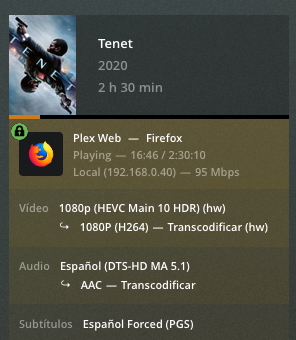
I been playing a bit with files and configs and seems like disabling the option "Enable HDR tone mapping" in the Plex transcode options reduces a lot the CPU load. Will keep chasing this issue in the Docker side as seems like the drivers are working as expected. Thanks again for this plugin and your support!
-
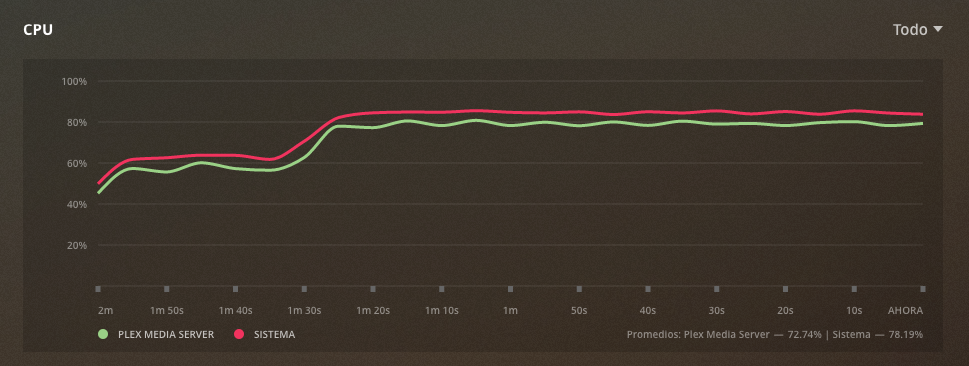
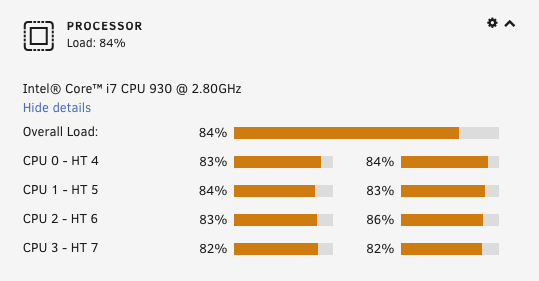
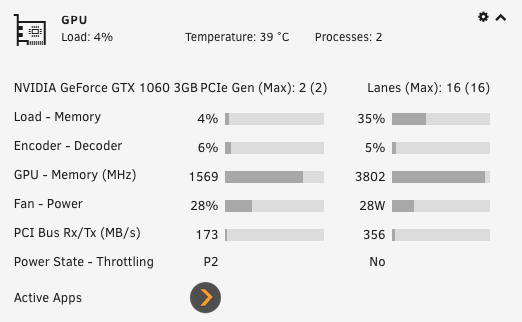
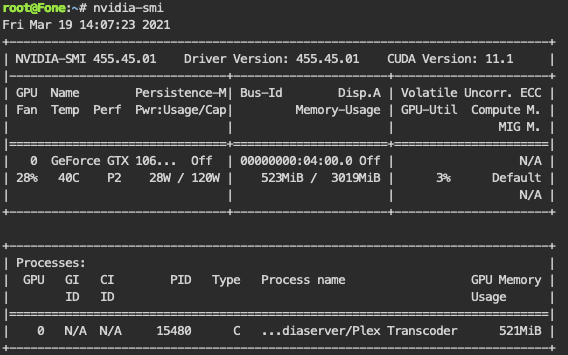
I been using Unraid 6.8.3 with the old Unraid-Nvidia plugin until a few hours ago and I upgraded this morning to Unraid 6.9.1 and this plugin (thanks for doing it!). Im having a weird problem, hopefully you can see what Im doing wrong. Plex is detecting my GPU and seems to do some transcoding with it but the CPU is impacted heavily while the GPU is under a low work load. This wasn't the case before, the CPU usage rarely went up of 10% while transcoding. This are a few screenshots that I took: I have tried using the official and LinuxServer.io Plex docker images and both shows the same problem so Im coming here just in case you get some ideas about what could be happening
-
Thanks! Just downloaded the latest version and created a user script to execute it. Will sleep better now
-
After checking the script seems like adding single quotes on the line 164 solves my issue reported above From: eval "find ${media_shares_match} -type f ${include_folders_cmd} ${include_extensions_cmd} ${exclude_folders_cmd} ${exclude_extensions_cmd} -exec ${chattr_cmd} {} \;" To: eval "find '${media_shares_match}' -type f ${include_folders_cmd} ${include_extensions_cmd} ${exclude_folders_cmd} ${exclude_extensions_cmd} -exec ${chattr_cmd} {} \;" @binhex can create a pull request if you prefer
-
Truly appreciate this script. I never had problems with ransomware but heard enough stories to fear them. Mistakes were made when I setted up my shares and I used spaces in some of them, when I try to run the scripts this is the output: root@Fone:~# /mnt/user/appdata/no_ransom/no_ransom.sh --lock-files 'yes' --media-shares 'short films' --debug 'yes' [info] Running no_ransom.sh script... [info] Checking we have all required parameters before running... [info] Finding share that match 'short films' on disk '/mnt/disk1'... [debug] find /mnt/disk1 -maxdepth 1 -type d -name short films [info] Share found, processing media share '/mnt/disk1/short films' using 'chattr' recursively... [debug] find /mnt/disk1/short films -type f \( -name "*.*" \) -exec chattr +i {} \; find: ‘/mnt/disk1/short’: No such file or directory find: ‘films’: No such file or directory [info] Processing finished for disk '/mnt/disk1' [info] [info] Finding share that match 'short films' on disk '/mnt/disk2'... [debug] find /mnt/disk2 -maxdepth 1 -type d -name short films [debug] No matching media share for disk '/mnt/disk2' [info] Processing finished for disk '/mnt/disk2' [info] [info] Finding share that match 'short films' on disk '/mnt/disk3'... [debug] find /mnt/disk3 -maxdepth 1 -type d -name short films [info] Share found, processing media share '/mnt/disk3/short films' using 'chattr' recursively... [debug] find /mnt/disk3/short films -type f \( -name "*.*" \) -exec chattr +i {} \; find: ‘/mnt/disk3/short’: No such file or directory find: ‘films’: No such file or directory [info] Processing finished for disk '/mnt/disk3' [info] [info] Finding share that match 'short films' on disk '/mnt/disk4'... [debug] find /mnt/disk4 -maxdepth 1 -type d -name short films [info] Share found, processing media share '/mnt/disk4/short films' using 'chattr' recursively... [debug] find /mnt/disk4/short films -type f \( -name "*.*" \) -exec chattr +i {} \; find: ‘/mnt/disk4/short’: No such file or directory find: ‘films’: No such file or directory [info] Processing finished for disk '/mnt/disk4' [info] [info] Finding share that match 'short films' on disk '/mnt/disk5'... [debug] find /mnt/disk5 -maxdepth 1 -type d -name short films [debug] No matching media share for disk '/mnt/disk5' [info] Processing finished for disk '/mnt/disk5' [info] [info] Finding share that match 'short films' on disk '/mnt/disk6'... [debug] find /mnt/disk6 -maxdepth 1 -type d -name short films [info] Share found, processing media share '/mnt/disk6/short films' using 'chattr' recursively... [debug] find /mnt/disk6/short films -type f \( -name "*.*" \) -exec chattr +i {} \; find: ‘/mnt/disk6/short’: No such file or directory find: ‘films’: No such file or directory [info] Processing finished for disk '/mnt/disk6' [info] [info] Finding share that match 'short films' on disk '/mnt/disk7'... [debug] find /mnt/disk7 -maxdepth 1 -type d -name short films [info] Share found, processing media share '/mnt/disk7/short films' using 'chattr' recursively... [debug] find /mnt/disk7/short films -type f \( -name "*.*" \) -exec chattr +i {} \; find: ‘/mnt/disk7/short’: No such file or directory find: ‘films’: No such file or directory [info] Processing finished for disk '/mnt/disk7' [info] [info] Finding share that match 'short films' on disk '/mnt/disk8'... [debug] find /mnt/disk8 -maxdepth 1 -type d -name short films [info] Share found, processing media share '/mnt/disk8/short films' using 'chattr' recursively... [debug] find /mnt/disk8/short films -type f \( -name "*.*" \) -exec chattr +i {} \; find: ‘/mnt/disk8/short’: No such file or directory find: ‘films’: No such file or directory [info] Processing finished for disk '/mnt/disk8' [info] [info] Finding share that match 'short films' on disk '/mnt/disks'... [debug] find /mnt/disks -maxdepth 1 -type d -name short films [debug] No matching media share for disk '/mnt/disks' [info] Processing finished for disk '/mnt/disks' [info] [info] no_ransom.sh script finished After running it I have verified running "lsattr /mnt/user/short\ films/" that the files are still unprotected. Can I run the script somehow without changing my share names?


