





gaikokujinkyofusho
Members
-
Joined
-
Last visited
-
nada? Is there some other information I could post? I realize its likely a super noob question but help would be appreciated, maybe I should post on the github issues?
-
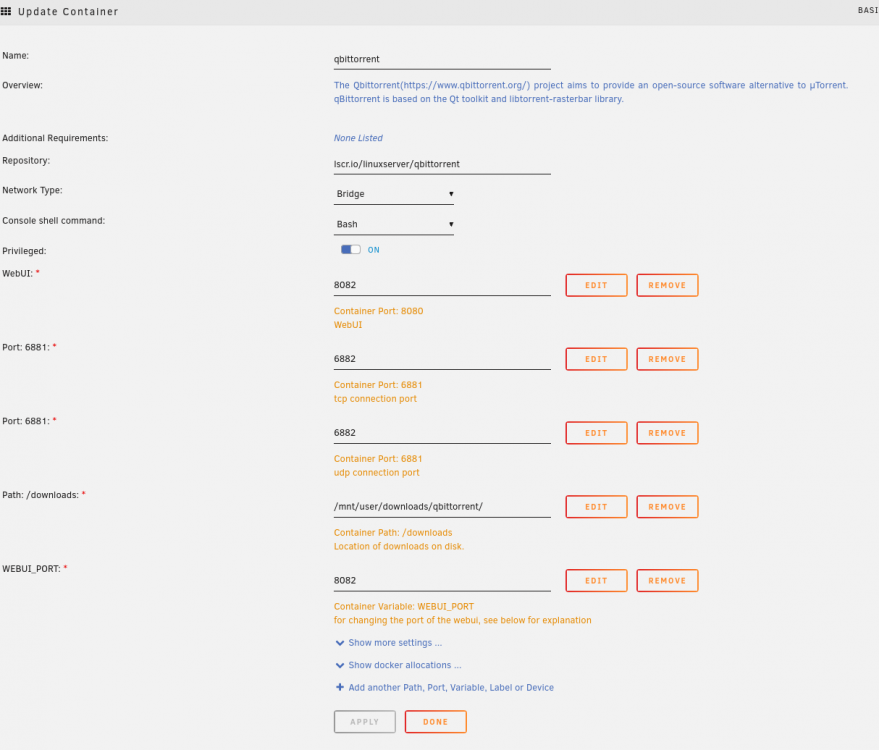
For some reason I cant seem to access the webgui, everytime I try to I get: Unable to connect Firefox can’t establish a connection to the server at localhost:8082. have tried using my lan ip 192.168...:8082 same error. I figured I might be asked about logs and settings so: s6-rc: info: service s6rc-oneshot-runner: starting s6-rc: info: service s6rc-oneshot-runner successfully started s6-rc: info: service fix-attrs: starting s6-rc: info: service 00-legacy: starting s6-rc: info: service 00-legacy successfully started s6-rc: info: service fix-attrs successfully started s6-rc: info: service legacy-cont-init: starting cont-init: info: running /etc/cont-init.d/01-envfile cont-init: info: /etc/cont-init.d/01-envfile exited 0 cont-init: info: running /etc/cont-init.d/01-migrations cont-init: info: /etc/cont-init.d/01-migrations exited 0 cont-init: info: running /etc/cont-init.d/02-tamper-check cont-init: info: /etc/cont-init.d/02-tamper-check exited 0 cont-init: info: running /etc/cont-init.d/10-adduser cont-init: info: /etc/cont-init.d/10-adduser exited 0 cont-init: info: running /etc/cont-init.d/30-config cont-init: info: /etc/cont-init.d/30-config exited 0 cont-init: info: running /etc/cont-init.d/90-custom-folders cont-init: info: /etc/cont-init.d/90-custom-folders exited 0 cont-init: info: running /etc/cont-init.d/99-custom-files cont-init: info: /etc/cont-init.d/99-custom-files exited 0 s6-rc: info: service legacy-cont-init successfully started s6-rc: info: service legacy-services: starting services-up: info: copying legacy longrun qbittorrent (no readiness notification) s6-rc: info: service legacy-services successfully started s6-rc: info: service 99-ci-service-check: starting s6-rc: info: service 99-ci-service-check successfully started [migrations] started [migrations] no migrations found ------------------------------------- _ () | | ___ _ __ | | / __| | | / \ | | \__ \ | | | () | |_| |___/ |_| \__/ Brought to you by linuxserver.io ------------------------------------- To support LSIO projects visit: https://www.linuxserver.io/donate/ ------------------------------------- GID/UID ------------------------------------- User uid: 99 User gid: 100 ------------------------------------- [custom-init] no custom files found exiting... [ls.io-init] done. ******** Information ******** To control qBittorrent, access the WebUI at: http://localhost:8082 screen shot of settings attached.
-
apparently export needed to be enabled
-
via ssh yes, via smb no.
-
Yes, well one share in particular but yes public shares. I took a look on the share and confirmed, its set to public.
-
I had to reinstall unraid recently and reinstalled many of the dockers I was runing before, problem is most, but not all, of them are giving me errors when i try to connect to the webUI i get an error, like for the invidious docker: Unable to connect Firefox can’t establish a connection to the server at 192.168.1.129:2690. i get pretty much the same kind of error for the linuxserver qbittorrent docker but then for things like qdirstat and resilio-sync they seem to work? Am really not sure how to resolve this?
-
I used to be able to connect my kodi box to unraid via SMB but my flash drive went bad (yeah, didnt have a proper backup) so I had to reinstall unraid and now I cant figure how to set it so I can connect to unraid via SMB? I thought it would be settings -> network services -> smb but it seems to have the correct settings? (the defaults, workgroup is "WORKGROUP", smb is enabled... but I cant seem to connect? Are there some other settings I should be checking?
-
yeah!!!!!! THANK YOU! Yes, the old flash is still in use and I can ssh into my machine and just took a look at the /boot/config folder so hopefully am good. Really appreciate it!
-
It seems my flash is dying, i tried fixing it on a win box but scan disk (or whatever its called) said the flash was fine. I am not able to access the web interface, when I try to login in I get: Warning: session_write_close(): write failed: No space left on device (28) in /usr/local/emhttp/login.php on line 96 Warning: session_write_close(): Failed to write session data (files). Please verify that the current setting of session.save_path is correct (/var/lib/php) in /usr/local/emhttp/login.php on line 96 Warning: Cannot modify header information - headers already sent by (output started at /usr/local/emhttp/login.php:96) in /usr/local/emhttp/login.php on line 98 So I used the unraid flash disk utility to write an image to a new flash (64gb, it warns me but continues) but its unclear to me if i can get the config dir and my old key from within an ssh session or not? I have been scared to shutdown my computer fearing I would not be able to boot unraid again or read the flash drive so wanted to at least see if i can copy those via an ssh session first before shutting down the server and copying those files locally. The error seems to indicate I am our of space, it was a 16gb flash and the unraid flash utility says unraid only takes up 1gig ... so? thoughts?
-
That would be great! Thank you (again!)
-
Yay! Thank you for this! Question though, is there a way to use the cli version? I tried opening a terminal and it seems that the cli usage of it is actually a separate program? I had assumed that it would just be a cli with a gui interface separate? I tried wgetting it from https://github.com/qarmin/czkawka/releases/download/2.3.0/linux_czkawka_cli into the docker which worked except it didnt as when i try to run it, well here: /tmp # chmod 755 linux_czkawka_cli /tmp # ls linux_czkawka_cli nginx run /tmp # ./linux_czkawka_cli sh: ./linux_czkawka_cli: not found /tmp # linux_czkawka_cli --help sh: linux_czkawka_cli: not found /tmp # ./linux_czkawka_cli --help sh: ./linux_czkawka_cli: not found The reason I ask is I wanted to automate a few things and the cli interface is perfect for that. Regardless, thanks for this! I have been waiting for either Czkawka or some other prog that I could run via docker that can detect similar graphics! Cheers
-
I installed the docker on unraid but when i try to use the login:admin password:adminadmin it just takes me back to the login page like I never put in login creds? no error or anything (I can get an error if i try to enter something else but if i put in the correct login i get nada)?
-
This is barely related but I am getting a bit desperate. I am trying to find a caddy for my N54L and they seem to be non-existent on the net, not ebay or anywhere else. Does anyone know of a places that sells the cold swap caddies that will fit a G7 microserver? Suggestions welcome and really appreciated! Update: correction, I can't find them for anything less than highway robbery
-
No worries, Thanks for the reponse (better late than never!). Ok, so at least now I know I am on the right track in needing the script but I haven't managed to resolve the issues that I was having with the script. Do you think the script is supposed to be edited? I tried just putting the script as was and also editing but nada, also, where exactly do you think it should go? Thanks so much!
-
Not to pry, but was anyone able to figure out how to get syncthing to write versions to an alternate location?


