





brdweb
Members
-
Joined
-
Last visited
Everything posted by brdweb
-
It's possible.... but really wouldn't make sense. At least when using quadlets, which is how and why I prefer Podman over Docker. Since slack doesn't use systemd, neither does Unraid. I am using a debian trixie vm to manage my containers, though I kept everything in the same appdata folders when I ported it over. There's sometimes a hiccup with the vm mounting the data shares.... but I use a systemd automation to see if it's down and then automatically bring it back up mounted properly again.
-
Still waiting on approval for CA apps. However, v2026.03.19.7 is available on Github for direct install. This version adds a widget to the dashboard. Github Page: https://github.com/brdweb/podman-manager Release Page: https://github.com/brdweb/podman-manager/releases/tag/v2026.03.19.7 Direct install from Plugins Page: https://raw.githubusercontent.com/brdweb/podman-manager/main/unraid-plugin/podman-manager.plg
-
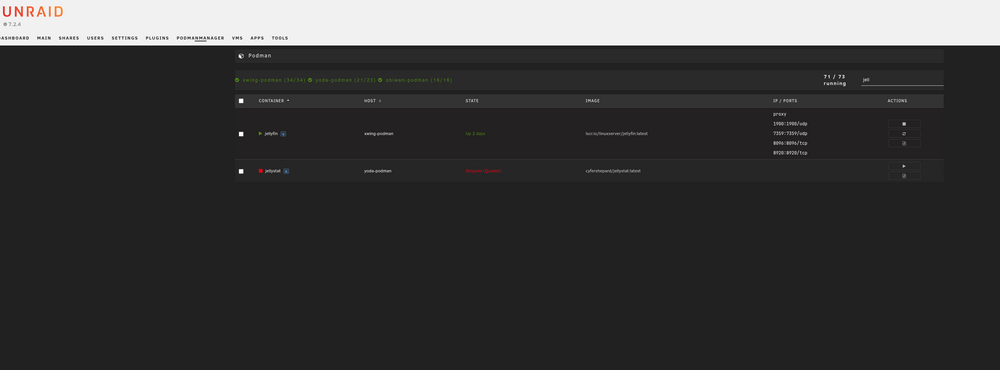
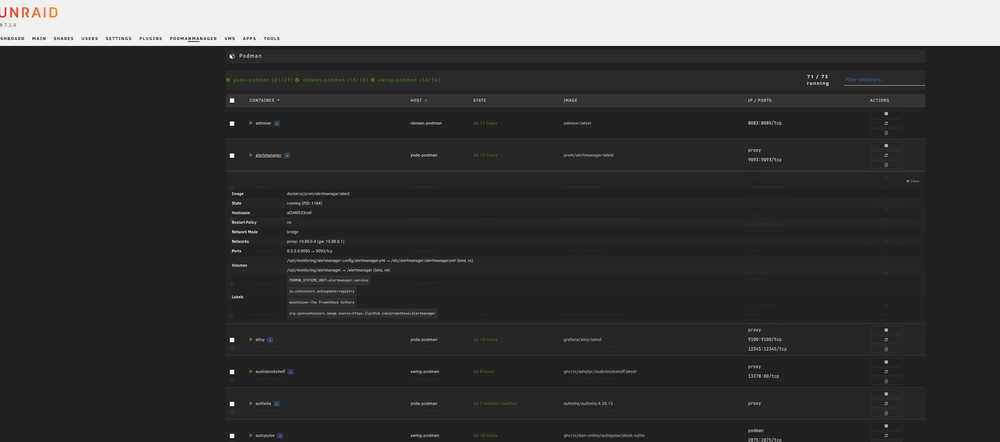
Podman Managerhttps://github.com/brdweb/podman-manager Hello everyone. Created my first Unraid plugin to scratch an itch that I had and I'm currently submitting this to squid for inclusion in Community Apps. Recently I've replaced all of the docker containers that I've been using across Unraid and 2 Debian VMs running on Proxmox and managed by Komodo with Podman using Quadlets. There's a lot of reasons I like this better but I'll let you read about it yourselves: https://ilmanzo.github.io/post/podman_quadlets_tutorial/. This left me with a bit of a dilemma though. I already had lost most of what had made managing docker on Unraid so easy because I had switched first to using Docker Compose (using the plugin) but then because I also went multi-host, was managing everything in Komodo. I could still start/stop/restart the local docker containers using the Unraid UI but that was it. So I decided to create this plugin (and separate web app as well if that's how you want to roll), that at least replicates some of the unraid management capabilities but for Podman. NOTE: This doesn't actually go through the process of setting up podman itself on your unraid server. But it DOES support all three methods of using Podman (regular podman commands, compose, quadlets). You just need to set up SSH access via keys on each of the hosts you want to manage with this tool. Multi-host Podman container management for Unraid Podman Manager provides a unified dashboard to monitor and control Podman containers across your Unraid server and multiple remote hosts. It connects to each host via SSH and executes Podman commands, exposing the results through a REST API consumed by either the native Unraid plugin or the standalone web application. FeaturesMulti-host dashboard — manage containers across unlimited remote Podman hosts Full container lifecycle — start, stop, restart from the UI Management method detection — automatically identifies Quadlet (systemd), Docker Compose, and standalone containers with visual badges Quadlet (systemd) support — proper systemctl-based lifecycle management for Quadlet containers Compose support — identifies Docker Compose-managed containers Inline container details — click a container name to expand details (IPs, ports, volumes, networks) Container logs — view logs directly from the UI Bulk actions — checkbox selection with bulk start/stop/restart Sortable columns — click Container or Host column headers to sort Rootful and rootless Podman — supports both modes per-host SSH-based — no agents to install on remote hosts, just SSH key access PHP API proxy — works over both HTTP and HTTPS (no mixed-content issues) In-browser config editor — edit config.yaml with syntax highlighting (ace editor)
-
Thanks for this. Will be trying this theory tonight as I've been going through all of the same troubleshooting. Only difference is I'm using the hotio plex container. I DID verify that I'm on the Plex 1.40 branch however.
-
Nope. Pulled down the newest image and Redis doesn't connect. Keeps saying it's trying localhost. Perhaps the .env file needs edited manually?
-
Worked for me as well. Thank you for the find!!!!
-
Bumping the thread for Linkace. Anyone have any success getting back in?
-
What troubles did you have? My working installation has stopped working, giving me a 500 error every time I try to login with no errors in the logfile.
-
The LinkAce container has suddenly stopped working, producing a 500 - Server Error with no settings changed.

