





BrockTrainedAsh
Members
-
Joined
-
Last visited
-
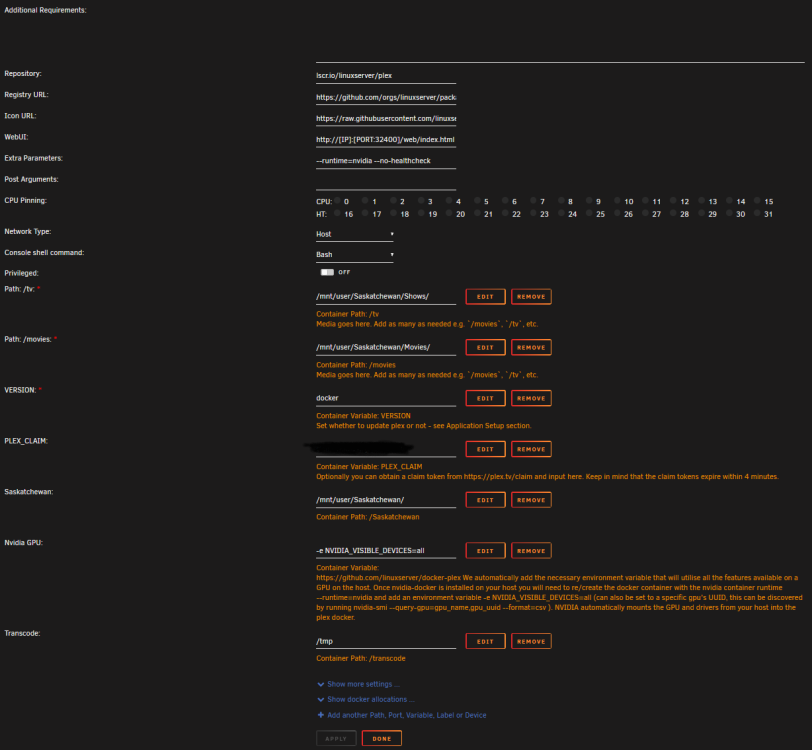
That was it! That worked! I was just too stupid not to realize the GUI was changing the command. THANK YOU!
-
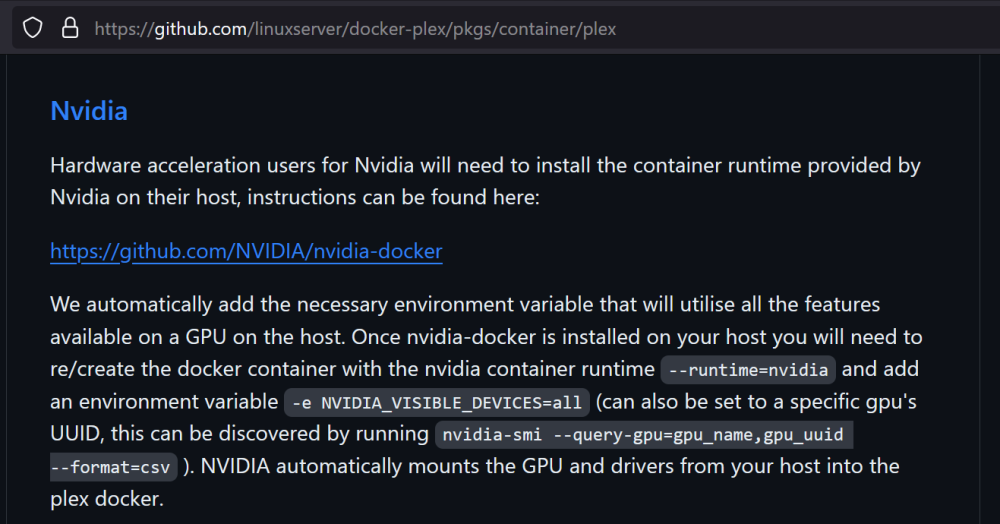
Hey Ich777, thanks for replying. I did have my old configuration as you said when I was using the plex-media-server docker. However, the linuxserver docker instructions are a little different in setting up nvidia passthrough. However, I did try your recommendations anyway and they didn't work unfortunately.
-
I followed it... multiple times throughout this process. My setup should be correct. I should add, I once had it working but then one day I noticed that my cpu was transcoding a file and then I realized that something stopped working along the way.
-
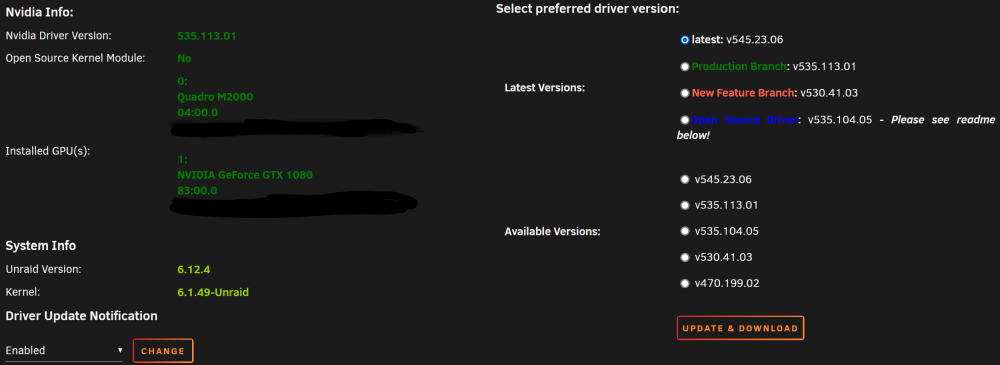
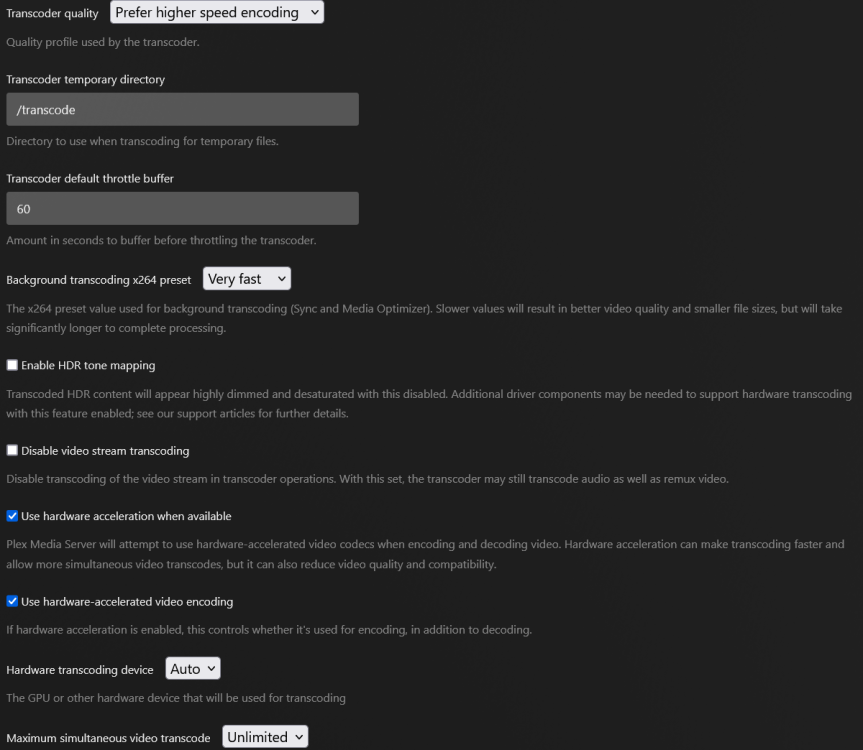
Hey guys, I seem to have trouble getting hardware transcoding working with plex. Right now, all files that need to be converted become transcoded via the CPU. So, my diagnostics and configuration are attached. The error log I get through plex: Oct 20, 2023 16:41:45.123 [22821048994616] ERROR - [Req#44b3/Transcode] [FFMPEG] - Cannot load libcuda.so.1 Oct 20, 2023 16:41:45.123 [22821048994616] ERROR - [Req#44b3/Transcode] [FFMPEG] - Could not dynamically load CUDA Oct 20, 2023 16:41:45.140 [22821048994616] ERROR - [Req#44b3/Transcode] [FFMPEG] - Cannot load libcuda.so.1 Oct 20, 2023 16:41:45.140 [22821048994616] ERROR - [Req#44b3/Transcode] [FFMPEG] - Could not dynamically load CUDA Oct 20, 2023 16:41:45.146 [22821048994616] ERROR - [Req#44b3/Transcode] [FFMPEG] - Cannot load libcuda.so.1 Oct 20, 2023 16:41:45.146 [22821048994616] ERROR - [Req#44b3/Transcode] [FFMPEG] - Could not dynamically load CUDA Oct 20, 2023 16:41:45.156 [22821048994616] ERROR - [Req#44b3/Transcode] [FFMPEG] - Cannot load libcuda.so.1 Oct 20, 2023 16:41:45.156 [22821048994616] ERROR - [Req#44b3/Transcode] [FFMPEG] - Could not dynamically load CUDA Things I have tried over the last two weeks so far: Restarting the server. Restarting the docker container plex. 3 Double checked that yes, I do have a plex pass and that I have turned on hardware transcoding in the settings. Deleting the codecs folder and letter the docker container recreate them with a restart. Updating drivers in the nvidia plugin. Switching to older and different drivers in the nvidia plugin. Uninstalling the plugin, turning off docker containers, reinstalling the plugin, restarting, updating the drivers, and enabling docker containers again. Remapping the transcoding to happen on RAM via /tpm. Pulling my Nvidia 1080 card from a vm passthrough and adding it to the pile that can transcode (wondering if my M2000 was the problem) and setting Plex to transcode with all GPUs. Switching which docker container I used from Plex-Media-Server to just linuxserver's Plex. Maybe a few other things I forgot that I've done in the last two weeks. Can someone please help me find a solution to this mission impossible? I feel like with two different dockers, reinstalling the plugins, and with two different working drives, I would have found the problem by now. As a side note, I hope this isn't related but I'll put it here. I started seeing this issue come up when one of my cache drives failed and started corrupting my entire appdata share. I ended up deleting the whole thing since not even appdata backup could save it--which was devastating in terms of server progress. However, ever since I rebuilt the docker container from scratch, I have never been able to get the docker to transcode using the hardware again. rocky-diagnostics-20231020-1633.zip
-
I had this same issue in my diagnostics. Turns out my amcrest2myqtt docker was pointed at an incorrect ip address and kept trying to reconnect in error. Going one by one down my dockers and turning them off is how I found the error. Also, its log was huge.



