





jsoonias
Members
-
Joined
-
Last visited
-
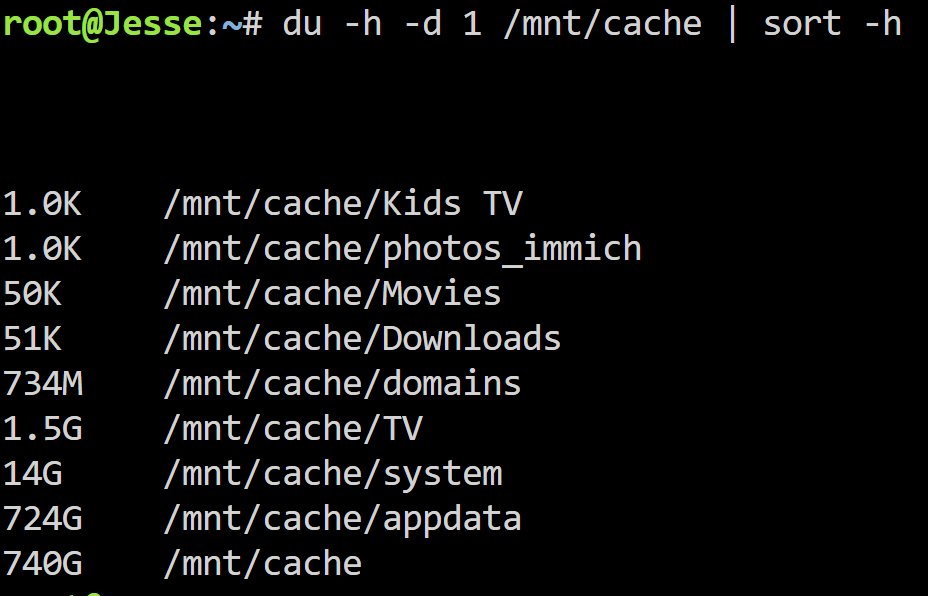
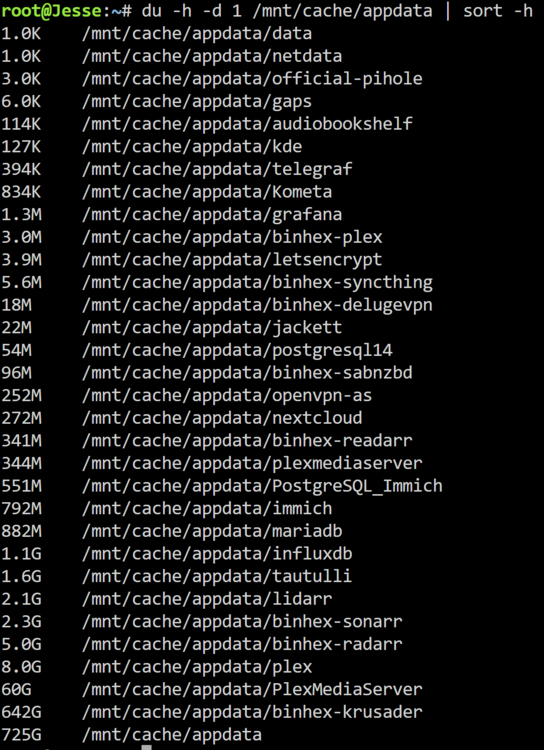
Hello, I am looking for help troubleshooting several issues with my Unraid server. A few of these problems started around the same time, so I am not sure if they are related or separate issues. System InformationModel: Custom Unraid version: 7.1.4 Motherboard: MSI PRO B760-P WIFI DDR4 (MS-7D98) Version 1.0 BIOS: American Megatrends International, LLC. Version 1.60, dated 07/13/2023 CPU: 13th Gen Intel Core i5-13500 Memory: 32 GiB DDR4 Max memory capacity: 128 GiB HVM: Enabled IOMMU: Enabled Network: eth0, 1000 Mbps, full duplex, MTU 1500 Kernel: Linux 6.12.24-Unraid x86_64 OpenSSL: 3.5.0 Case: Norco RPC-4220 BackgroundA few weeks ago, I came home from work and found that the Docker service had stopped. My 2 TB cache drive was completely full. From what I could tell, it looked like one of my arr containers may have upgraded/replaced many existing media files and triggered a large number of downloads. I thought I had a minimum free space setting configured in SABnzbd, so I am not completely sure if that was the root cause. I was able to manually start the mover and free up a large amount of space on the cache drive. However, Docker still would not start afterward. I eventually recreated the Docker image and reinstalled my containers, which got Docker working again. I would like help figuring out what happened and how to prevent it from happening again. Current Issues1. Docker service stopped after cache drive filled upThe Docker service stopped when the cache drive became full. After freeing space with mover, Docker still would not start. I had to recreate the Docker image and reinstall my containers. I would like help understanding: What logs/settings should I check to determine why this happened? How can I prevent downloads or Docker/appdata from filling the cache drive again? Should I be checking minimum free space settings in Unraid shares, SABnzbd, and the arr containers? 2. Pi-hole Docker failed around the same timeAround the same time the Docker service failed, my Pi-hole container also stopped working. I tried reinstalling Pi-hole several times, but it gave an error each time. I have left Pi-hole uninstalled for now. I can try reinstalling again and capture the exact error if needed. 3. Cache drive still has about 1.1 TB usedSince the incident, the cache drive stays around 1.1 TB used, even after running mover. I am not sure what data is still on the cache drive or whether it is supposed to remain there. I would like help confirming: What is currently using space on the cache drive? Whether my shares are configured correctly for cache usage Whether appdata, domains, system, downloads, or media files are stuck on cache I have posted the output of: du -h -d 1 /mnt/cache | sort -h 4. Server would not shut down cleanlyThe server is currently very full and I need to add another drive. I attempted to shut the server down so I could add a drive and begin a preclear, but the shutdown process hung. From what I remember, it appeared to be trying to spin down the drives, but the cache disk seemed to still be in use and would not spin down. The server stayed in this loop and never completed the shutdown. I eventually had to hard power it off, which I would obviously like to avoid. I would like help figuring out: How to identify what is keeping the cache drive busy during shutdown Whether a Docker container, VM, SMB connection, mover process, or plugin could be preventing shutdown What logs I should check after a forced shutdown 5. Docker image sometimes fills upI have previously received warnings that my Docker image was filling up. I have not seen the warning recently, but I never figured out what was causing it. I would like help checking whether one of my containers is writing data inside the Docker image instead of to a mapped appdata/downloads/media path. 6. Many old unused appdata foldersI have many old appdata folders from containers I have used over the years. For example, I have three different Plex appdata folders. I am not sure which appdata folders are currently in use. I would like to know: How to confirm which appdata folder each active Docker container is using The safest way to remove old unused appdata folders Whether there is a plugin or recommended process for appdata cleanup 7. Windows 10 File Explorer access issueI do not think I have been able to reliably access the server from Windows 10 File Explorer for several years. I usually rely on previously saved/recent folder shortcuts to access random folders on the server. I would like help fixing normal SMB browsing/access from Windows File Explorer. 8. Persistent logsI found and downloaded what appear to be my persistent syslog files: syslog-192.168.1.49.log syslog-192.168.1.49.log.1 These were stored on the cache drive. I will attach both logs along with the diagnostics zip. I am not sure if they go back far enough to capture the original Docker/cache failure from a few weeks ago, but they may still help with recent shutdown/cache activity. 9. Power button/startup issue with Norco RPC-4220 caseWhen I shut down the server, I often have some kind of issue getting it started again. The front power button appears to do nothing the first few times I press it. The case is a Norco RPC-4220. I am not sure if this is just a case power button issue, a motherboard issue, a power supply issue, or something else. Attached Files / Available InfoI have attached or can provide: Diagnostics zip from Tools → Diagnostics Persistent syslog files: syslog-192.168.1.49.log syslog-192.168.1.49.log.1 Screenshots of the Main tab showing array, parity, cache/pool devices, usage, and filesystems Screenshots of share settings for appdata, system, domains, downloads, and media shares Screenshot of Settings → Docker showing Docker image location, size, and usage Docker container path mappings for SABnzbd, Sonarr, Radarr, Plex, Prowlarr, and others if needed SABnzbd settings for temporary folder, completed folder, and minimum free space Output from du commands showing what is using space on /mnt/cache Pi-hole reinstall error, if I try reinstalling again Main QuestionsI am mainly looking for help with: Determining what caused the cache drive/Docker failure Preventing the cache drive or Docker image from filling again Finding what is still using 1.1 TB on cache Fixing shutdown hangs Cleaning up old appdata folders safely Restoring normal Windows SMB access Thanks in advance for any help. syslog-192.168.1.49.log syslog-192.168.1.49.log.1 jesse-diagnostics-20260517-1349.zip
-
I also got this warning today after updating plugins. not sure where to go from here. it looks like i still have my shares. Will create my own post for guidance i guess
-
I looked and all the dockers are mapped correctly. I tried using mover, it didn't fix it. How can I tell what the duplicate files are? For the appdata folder in mnt I tried to delete but it wont delete. (through krusader) Should my appdata and system be set to cache only? Thanks
-
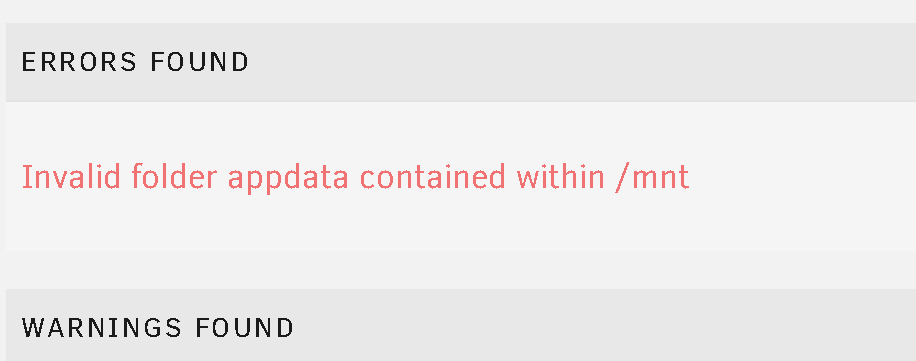
A few months ago I tried to replace my 500g cache drive with a 2tb cache when I rebuilt my server. This did not work for whatever reason and since then I have had an error that there was an invalid appdata folder within mnt. I did not have time to look into this so it was left until now. I then recently got the old drive replaced with the newer drive but now I notice that I have constant reads and writes on my cache and array. I also see that I the fix common problems app is telling me I have data on both cache and array for appdata and system as they are set to cache only. I believe I also messed up the cache settings on those shares when I changed my cache drive. I thought that I had found the appdata folder within my mnt and the only thing in there is a plex transcode folder. I tried to remove with krusader when docker was disabled but it didnt work. Could someone please look at my logs and let me know what I need to change? Thanks in advance jesse-diagnostics-20240424-2017.zip

-
I am getting the following error. I believe this started happening after I tried (and failed) to replace my 500g cache with a 2tb cache drive. Any help would be greatly appreciated! jesse-diagnostics-20240413-1702.zip
-
thats correct. I enabled the syslog this morning and it crashed soon after.
-
Yes, I did. Am I doing something wrong?
-
Those logs were right after unraid started after a crash before downgrade.
-
See attached. I have downgraded to 6.10.3 for the time being as another user on reddit said this solved a similar problem. jesse-diagnostics-20230103-0927.zip syslog-192.168.1.49.log
-
Hello All, I posted this topic on reddit and have downloaded the logs and have them attached. Basically unraid has crashed/ become unresponsive for the second time after upgrading the OS. jesse-diagnostics-20230102-1954.zip
-
My Nextcloud has not worked for over a year. What is my best shot for getting it back up and running again? I have existing files in my nextcloud docker still. Should I delete the nextcloud and mariadb dockers? is there anything else I would need to do? Thanks so much for you input
-
Be aware the lists can contain probably mutliple TBs of data.
-
Hello, I have an issue where I added a Disney list that contained about 100000 movies and now I want to purge my radarr and start from scratch. What is the best way to do this?
-
Hey guys, My nextcloud stopped working a while back and I am just starting to look at it again. I cannot load the nextcloud webui at all. Where should I start?? Browser gives me error : ERR_CONNECTION_REFUSED Found my letsencrypt docker was orphaned and not running. Found the guide. Let me confirm everything is ok first. oops Thanks
-
Got the same issue. Anyone figure it out?


