





guigz
Members
-
Joined
-
Last visited
Everything posted by guigz
-
tower-diagnostics-20230217-1408.zip Nope, didn't work. It's a fairly old SSD, it might have died of old age.
-
tower-diagnostics-20230217-1205.zip I disconnected and reconnected the drive with a new cable and now it has disappeared from the list of devices. Is it dead?
-
Yeah, I had to specify a path otherwise I run into problem. Hmmm, I could try to make it work from the cache drive. The issue I run into is the "path does not exist" problem I describe above. Can I use MC to manually create the folders somewhere and try again?
-
Yeah I hear you. I'll do it when I buy a larger drive. I just can't be bothered trying to find space so that I can move over all the data to empty one disk to format it right now. I have 5 data drive and my array is only 8tb so the 16tb limit isn't a problem at all here I got the docker to work by choosing a folder instead of the cache so my appdata folder is on one of my disks.
-
Dockers were working before I copied over the CFG files above. After copying it wouldn't work so I added the cache drive (which was unassigned at that point) because the tooltip said that a cache drive was preferred. I'll just take out the cache. Any other suggestion for getting this to work? Re Format: Why do I have to convert to a different format? Is this a functionality that will be removed in future versions? If so, I'll just stay with the current stable version (I was on 6.2 for the last 6 years and that was fine for me). The process looks like a PITA and with all the troubles I'm running into, I'd rather not risk losing my data.
-
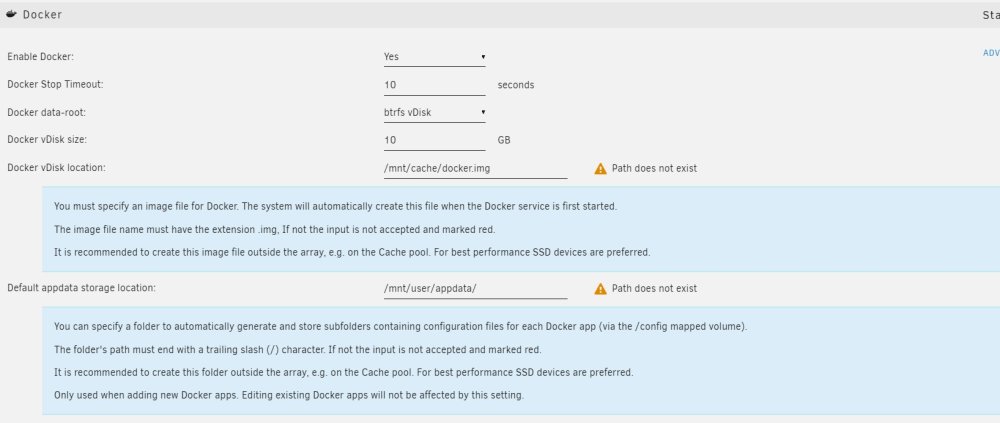
This worked to preserve my settings but now I can't activate dockers. On the settings page, I'M seeing this. Any suggestions? tower-diagnostics-20230216-1631.zip
-
I had copied the entire folder. Thanks! I'll try just copying those you suggested.
-
Are there specific files I can copy in the config folder on the flash that will only carry over the users, shares, disks and network settings?
-
Doiing this broke my server again

-
Sorry, I'm not very experienced with Unraid and don't want to break all my stuff
-
Yep, I do have it. Which files should I copy to the flash?
-
I didn't keep the config, just the go and key files tower-diagnostics-20230214-1347.zip
-
Another problem though. Now I can't see any of the shares on windows. It opens the network location but it's completely empty.
-
I ended up manually updating to 6.9.2 and that worked. Then I was able to update to the latest version via the gui. Weird but glad it worked!
-
I looked into my router for the assignment table and I don't see the unraid machine. Unfortunately it's running headless and it's a PITA to get it hooked up. Could I perhaps restore the flash backup and maybe try manually installing an earlier version (like 6.3 or 6.4) and upgrading from that version?
-
So I did it but I'm not sure how to log back in. I can't find the machine on the network.
-
Thanks, Squid. Will that remove my settings (like network stuff)? Also, can I do it from network or do I have to remove the USB?
-
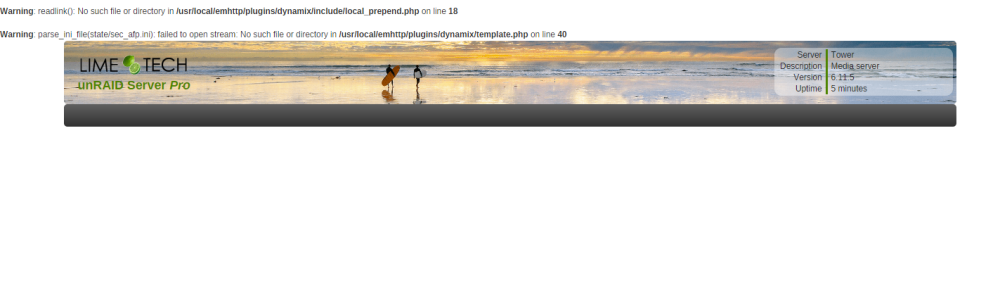
Now all I see when I log in is below. Not sure what I can do now...
-
Yeah, I'm on windows
-
ANy suggestion for comparing the files in the two directories? Also, can I rsynch between my local computer and the unraid server that are on the same subnet?
-
Thanks Jorge. This fixed my issue with the disk share but not the user share. Doing Rsync on the disk share, I ended up with a user share called Disk4 again. I renamed it to another name. Trouble is that I believe it has duplicate files on it and I'd like to delete it after confirming that all of the files have been copied to the Disk1. I tried running rsync on the user share but it takes forever because the size of the files and ends up disconnecting after several hours. Is there a command to do a quick check to see what files are present in a given folder that aren't present in another? Just comparing the names would be ok. PS: would accidentaly dragging and dropping a disk share into a user share create a problem like mine? Thats the only thing I can think of because I definitely did NOT create a Disk4 user share manually
-
With the * or without? There are folders on the destination because the share are set to high water
-
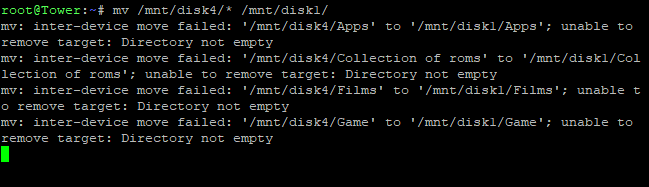
Not sure what I should do next
-
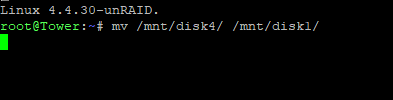
That's the command I entered, is there anything missing?
-
Ok, this is insane. I renamed the share disk4 to another name, deleted that share, rebooted, confirmed that neither disk4 nor the other named share was there. Then I tried to movev the files again using putty and the command "mv /mnt/disk4/ /mnt/disk1/" and it created a user share called disk4 again!!! What the heck??


