





binhex
Community Developer
-
Joined
-
Last visited
Everything posted by binhex
-
no problem there in the logs, what is the ip address of the machine running the web browser you are using to connect to the web ui?
-
incoming ports are assigned automatically for you for pia, that is correct, as mentioned VPN_INPUT_PORTS has nothing to do with incoming port assignment. This is totally expected, template changes do not get pushed out, and as the template has been updated to the newer format it will look different. I will need to see a log to help further, please see the following link:- https://github.com/binhex/documentation/blob/master/docker/faq/help.md#unraid-users
-
try setting NAME_SERVERS to 1.1.1.1,1.0.0.1, some of the name servers you have defined can be a bit flaky, resulting in name lookup failure. fyi the template does not contain any ports for VPN_INPUT_PORTS or for OUTPUT ports either, both of which having nothing to do with incoming port assignment (port forwarding), so if that does have a port you must of assigned it.
-
BTW deleting the container, or the image or both should result in zero configuration and data loss, both are expendable items, clicking on 'add container' and then selecting your template from the 'user templates' section would get you back up and running within minutes (seconds if you dont delete the image).
-
ok for some reason the container seems unable to connect to PIA to get the list of port forward enabled endpoints and as you have STRICT_PORT_FORWARD set to 'yes' the script cannot continue. from your log:- 2025-05-02 23:59:11,110 DEBG 'start-script' stdout output: [warn] PIA endpoint API 'https://serverlist.piaservers.net/vpninfo/servers/v4' currently down, skipping endpoint port forward check [info] Script finished to assign incoming port So try opening a web browser and see if you can get back a response from url https://serverlist.piaservers.net/vpninfo/servers/v4, it will be in json format, i just checked it and its live for me so if it doesn't return anything then something is blocking on your network. If it does return then try restarting the container, you may of just attempted connection when the api was down.
-
I will need to see a log to help further, please see the following link:- https://github.com/binhex/documentation/blob/master/docker/faq/help.md#unraid-users
-
Im running prowlarr myself, no issues here, have you tried deleting the config and starting from fresh?
-
This has now been implemented:-
-
I have now implemented sub version tagging for all images going forward (no retro version tags), this means if you are sensitive to version changes for any application you can now restrict this by specifying the version you want in a more exact manner. The tags generated are as follows:- <major version> <major version>.<minor version> <full version> 'latest' So for example a version of 'v1.45.0' would generate the following tags:- v1 v1.45 v1.45.0 latest So if you wanted to only use v1, then you could specify '<repo name>:v1' or if you wanted to use the current major-minor version then '<repo name>:v1.45' Do keep in mind sub version tags will only be generated for applications that comply to semver, that is 3 (or more) octets in the version, not all application developers do this. Now included in FAQ, see Q11:- https://github.com/binhex/documentation/blob/master/docker/faq/general.md
-
https://forums.unraid.net/topic/75539-support-binhex-qbittorrentvpn/page/177/#findComment-1546747
-
have you checked your servers memory for errors?
-
You would need to avoid any host port clashes, so yes different ports will be required, you will also need to have a different host path for /config, on top of that you will need to use a different browser for the different containers, this is due to qbittorrent cookies related issues.
-
Is it seriously too much to ask for you to click on a single link to view the version before upgrading? if i programmatically generated a changelog it would consist of the same information as the tag, plus any commits (of which the vast majority of the time there will be none), what benefit is that?, do keep in mind I have 60+ repositories to support here, and what you might think is a trivial change is not for me. EDIT - I will see how tricky it is to create versioned tags as I do see the benefit in this.
-
The tags i use should give you the information you require, the tag format is <app version>--<upstream build number>-<my build number>, so for example '5.1.0-01-01' means app version v5.1.0, upstream build 01, my build 01. Tags can be found for every image at docker hub:- https://hub.docker.com/r/binhex/arch-qbittorrentvpn/tags Or alternatively don't use 'latest' and instead use the specific version tags shown in the link above, adding in automated tagging for major-minor versions is tricky as i would need to cover all different version schemes for all the applications i support (60+), it's possible but its work. p.s. 5.1.0 has literally just been built, so if your tracker has not ok'd that version then do NOT update at this time.
-
apparently plex has removed the redirection to /web, so now you need to append /web to the url, for example:- http://192.168.1.10:32400/web
-
correct
-
Tailscale messes with DNS causing name lookup failure, you cannot use it with this container, Please see Q36 from the following link:- https://github.com/binhex/documentation/blob/master/docker/faq/vpn.md
-
try stopping the container, then delete the file /config/perms.txt and then start the container, this should reset permissions for you, it could take a while to process so leave it running until the conainer starts, or if it's in a broken state then leave it for around 30 minutes then perform the dbrepair.sh again
-
most probably you were connecting to a non port forward enabled endpoint and had STRICT_PORT_FORWARD set to yes, but without logs we will never know - I will need to see a log to help further, please see the following link:- https://github.com/binhex/documentation/blob/master/docker/faq/help.md#unraid-users
-
There looks to be an issue with your openvpn config file, it seems to be causing some sort of routing issue, from your log:- 2025-04-21 20:53:03,115 DEBG 'start-script' stdout output: 2025-04-21 20:53:03 us=115049 Recursive routing detected, drop tun packet to [AF_INET]95.181.232.15:443 2025-04-21 20:53:06,008 DEBG 'start-script' stdout output: 2025-04-21 20:53:06 us=8401 Recursive routing detected, drop tun packet to [AF_INET]95.181.232.15:443 2025-04-21 20:53:07,147 DEBG 'start-script' stdout output: 2025-04-21 20:53:07 us=147256 Recursive routing detected, drop tun packet to [AF_INET]95.181.232.15:443 Not sure if this is the cause of the inability to access the web ui, but in any case i would get that sorted first.
-
ok that all looks fine, no obvious issues, i can see qbittorrent has started, ensure its not tailscale getting in the way, Please see Q36 from the following link:- https://github.com/binhex/documentation/blob/master/docker/faq/vpn.md
-
what is the ip address of the machine running the web browser that you are using to attempt connection to qbittorrent web ui?
-
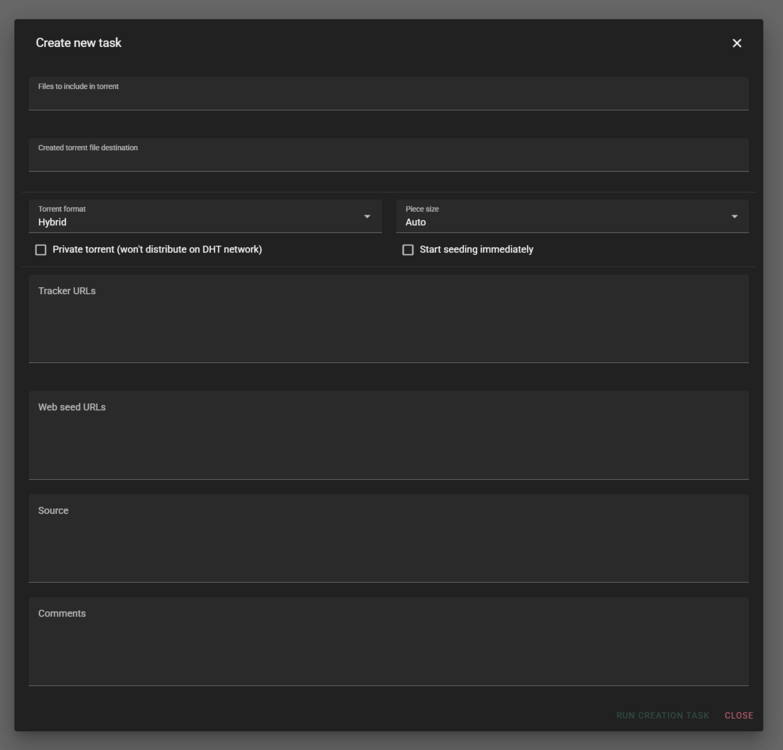
If you install VueTorrent (alternative web ui) then this comes with a torrent creation tool:-
-
incorrect LAN_NETWORK, from your log:- LAN_NETWORK defined as '10.95.58.42/32,192.168.0.1/24' Please see Q4 from the following link:- https://github.com/binhex/documentation/blob/master/docker/faq/vpn.md
-
can i get a bit more detail than this guys. I will need to see a log to help further, please see the following link:- https://github.com/binhex/documentation/blob/master/docker/faq/help.md#unraid-users




