





Griminal
Members
-
Joined
-
Last visited
Everything posted by Griminal
-
This is the way. CONFIRMED!!!! Thank you. I knew it had to be something simple.
-
I just tried that. No love unfortunately.
-
I'm using a 32GB Samsung Fit drive. I used the UnRAID tool to create it. In my troubleshooting, I took a known good USB2 with UnRAID on it running on a MicroServer Gen8 and tried to use that to boot into the F4-424 Max... no resolution. I still had to go into the BIOS first.
-
Is there a USB distro or tool that we could use to boot into UnRAID in the interim? Basically have two USB sticks and the first one tells the system to use the 2nd UnRAID stick. I need to install this headless, unfortunately.
-
I sent my own finely crafted email to their support. Hoping I don't have to return this unit. Its the perfect box for my installation needs.
-
Just picked up a F4-424 MAX today. Luckily I stumbled on this post. Could not understand why the system wouldn't boot without going into the BIOS first. Following this thread.
-
Sorry. I ran the script with both of the variables set to "yes" and it reclaimed the space. Forgot to mention that.
-
Hey there. Sorry if this is a FAQ. Search didn't come up with much for me. I had a Docker image go rogue on me and stole 14GB of my docker image. I've ran SpaceInvader's script with the variables set to "yes" and it reclaimed the space I've stopped and started the Docker service but all the local volumes still show up in the report. Do I need to stop/restart the array? There are 11 Images taking up ......4.829GB There are 11 Containers taking up ......698.6MB There are 1228 Local Volumes taking up ......14.24GB There are 0 Build Cache taking up ......0B The majority of the output is like this: ID 0ac4de6fbf18978129a5b73e4aa5b43079b0ad7f085e0ca086f1cbe5dfd37873 This volume connected to has a size of 0 ID 0b826c844421dc7beea0d20b65da805b4e9067da4e3a21ad54a78f1b5528be5e This volume connected to has a size of 0 ID 0b9063d6e0ab478a2c754c49325d5327dc2092c00d0eadbd10a6c727dd719ea7 This volume connected to has a size of 0
-
I have not. I suppose I could try that.
-
Disk2 decided it wanted to be corrupt too. I haven't fixed that one yet. Questioning my hardware at this point. I will respond back when I figure out what to do. Thank you.
-
I appreciate the help. Attached diagnostics. I'll hold off on a "new config" until I hear if you all have any concerns. hyde-diagnostics-20240326-1218.zip
-
Hello. So I had a HBA die out on me. Disk3 became disabled. I removed Disk3 from the array, attempted to mount it, and it failed. I performed a check on it and everything repaired successfully. I'm able to mount and browse the disk now. My concern, if I add the drive back to the array, will it overwrite all the files on it? If a parity check happens, will it consider all the files currently on the drive? Right now, my shares are missing a lot of files... because they were stored on Disk3. I had to do a lot of reboots diagnosing the HBA issue. Sorry for my vague questions. The old brain isn't working like it used to.
-
I ended up downgrading to Version: 6.12.4 after the file check. No more problems so far.
-
So I moved Disk2 to a mobo SATA port, away from the LSI controller. Parity is at ~20% at this time. I'm keeping an active browser window up to capture the logs. I'm seeing this thus far. Its been rebuilding for 5 hours. Feb 1 18:26:50 hyde kernel: mpt2sas_cm0: log_info(0x31080000): originator(PL), code(0x08), sub_code(0x0000) Feb 1 18:26:50 hyde kernel: mpt2sas_cm0: log_info(0x31080000): originator(PL), code(0x08), sub_code(0x0000) Feb 1 18:26:50 hyde kernel: mpt2sas_cm0: log_info(0x31080000): originator(PL), code(0x08), sub_code(0x0000) Feb 1 18:26:55 hyde kernel: mpt2sas_cm0: log_info(0x31110d01): originator(PL), code(0x11), sub_code(0x0d01) Feb 1 18:26:55 hyde kernel: mpt2sas_cm0: log_info(0x31110d01): originator(PL), code(0x11), sub_code(0x0d01) Feb 1 18:26:55 hyde kernel: mpt2sas_cm0: log_info(0x31110d01): originator(PL), code(0x11), sub_code(0x0d01) Feb 1 18:26:55 hyde kernel: mpt2sas_cm0: log_info(0x31110d01): originator(PL), code(0x11), sub_code(0x0d01) Feb 1 18:26:55 hyde kernel: mpt2sas_cm0: log_info(0x31110d01): originator(PL), code(0x11), sub_code(0x0d01) Feb 1 18:26:55 hyde kernel: mpt2sas_cm0: log_info(0x31110d01): originator(PL), code(0x11), sub_code(0x0d01) Feb 1 18:26:55 hyde kernel: mpt2sas_cm0: log_info(0x31110d01): originator(PL), code(0x11), sub_code(0x0d01) Feb 1 18:26:55 hyde kernel: mpt2sas_cm0: log_info(0x31110d01): originator(PL), code(0x11), sub_code(0x0d01) Feb 1 18:26:55 hyde kernel: mpt2sas_cm0: log_info(0x31110d01): originator(PL), code(0x11), sub_code(0x0d01) Feb 1 18:26:55 hyde kernel: mpt2sas_cm0: log_info(0x31110d01): originator(PL), code(0x11), sub_code(0x0d01) Feb 1 18:26:55 hyde kernel: mpt2sas_cm0: log_info(0x31110d01): originator(PL), code(0x11), sub_code(0x0d01) Feb 1 18:26:55 hyde kernel: mpt2sas_cm0: log_info(0x31110d01): originator(PL), code(0x11), sub_code(0x0d01) Feb 1 18:26:55 hyde kernel: sd 9:0:4:0: Power-on or device reset occurred Feb 1 18:26:56 hyde kernel: sd 9:0:4:0: Power-on or device reset occurred
-
What would have filled up the logs in a 12 hour period? Maybe my LSI card is having issues? Maybe the breakout cable is going? What recommendations do you have for me to go forward after I reboot?
-
Done. I paused the re-build. Shares, docker, and VMs are back. I'm scared to touch anything.... Diagnostics posted. hyde-diagnostics-20240201-1104.zip
-
Phase 1 - find and verify superblock... Phase 2 - using internal log - zero log... ALERT: The filesystem has valuable metadata changes in a log which is being destroyed because the -L option was used. - scan filesystem freespace and inode maps... clearing needsrepair flag and regenerating metadata sb_fdblocks 1771110769, counted 1775009412 - found root inode chunk Phase 3 - for each AG... - scan and clear agi unlinked lists... - process known inodes and perform inode discovery... - agno = 0 - agno = 1 - agno = 2 - agno = 3 - agno = 4 - agno = 5 - agno = 6 - agno = 7 - agno = 8 - agno = 9 - agno = 10 - agno = 11 - agno = 12 - agno = 13 - agno = 14 - agno = 15 - process newly discovered inodes... Phase 4 - check for duplicate blocks... - setting up duplicate extent list... - check for inodes claiming duplicate blocks... - agno = 0 - agno = 4 - agno = 7 - agno = 2 - agno = 6 - agno = 8 - agno = 9 - agno = 5 - agno = 10 - agno = 11 - agno = 12 - agno = 13 - agno = 1 - agno = 15 - agno = 14 - agno = 3 Phase 5 - rebuild AG headers and trees... - reset superblock... Phase 6 - check inode connectivity... - resetting contents of realtime bitmap and summary inodes - traversing filesystem ... - traversal finished ... - moving disconnected inodes to lost+found ... Phase 7 - verify and correct link counts... Maximum metadata LSN (694513559:307199) is ahead of log (1:2). Format log to cycle 694513562. done
-
Phase 1 - find and verify superblock... Phase 2 - using internal log - zero log... ERROR: The filesystem has valuable metadata changes in a log which needs to be replayed. Mount the filesystem to replay the log, and unmount it before re-running xfs_repair. If you are unable to mount the filesystem, then use the -L option to destroy the log and attempt a repair. Note that destroying the log may cause corruption -- please attempt a mount of the filesystem before doing this.
-
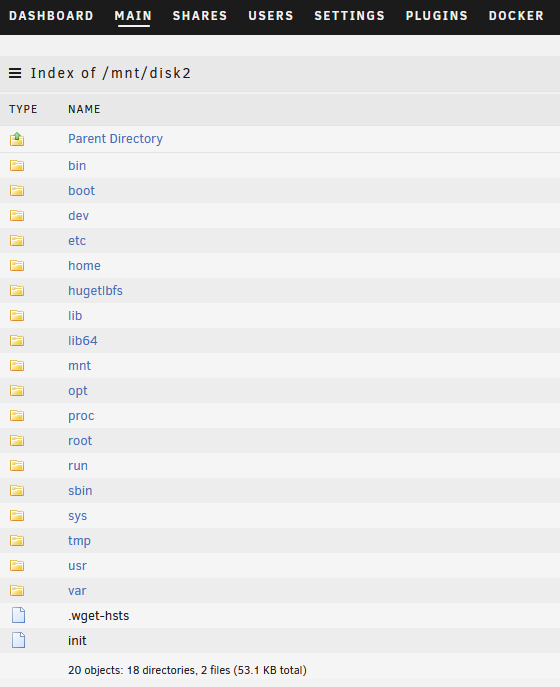
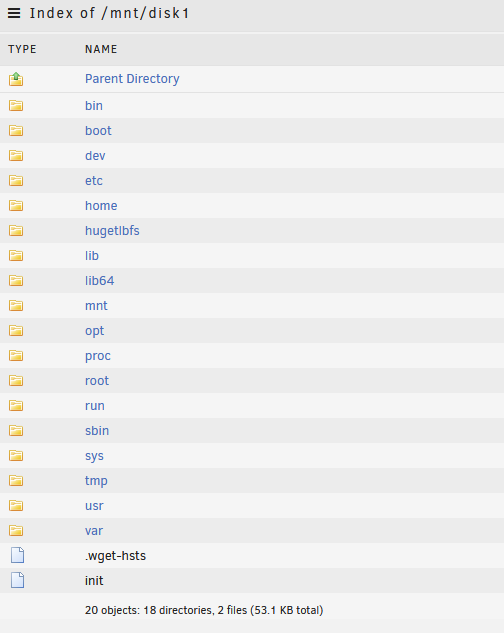
I posted a few days ago. (link below) I ran in emulated mode for a few days. The new drive arrived, I shut down the system and inserted the new drives and selected one of them as DISK1. Started up the array and the re-build was in process like I expected. I even started throwing some of my backup-ed files back on the array as the parity check was going. I went to bed. I check it this AM, all my shares are missing.... I browse DISK1 and DISK2 now, and it looks like the root of a *nix system! (see screenshot) I'm beside myself. I replaced a dozen drives in the same way and I just don't understand. I just don't know what to do anymore. I've stop the array rebuild and won't touch the system until someone gives me some more guidance. I have 3 non-array members. I have two internal drives in the system, a brand new one ZR5F463E that I haven't formatted yet. ZL2LCCS2 was the original drive with CRC errors that I don't have mounted, but left in the slot. Z84109XN is one of the backup drives I had mounted to copy some data back to the array. I don't know what's happening. I'm quickly losing faith in my build. Here's my previous post: hyde-diagnostics-20240201-0813.zip
-
Yep. Ordered a replacement drive so I could do just that. I learned a lot of lessons this time. Thanks for the help.
-
Mounted ZL2LCCS2 has lost+found. Some data is there. Doing a search for files larger than 2GB yields no results. I have a few ISOs that went missing. Phase 1 - find and verify superblock... Phase 2 - using internal log - zero log... - scan filesystem freespace and inode maps... - found root inode chunk Phase 3 - for each AG... - scan and clear agi unlinked lists... - process known inodes and perform inode discovery... - agno = 0 - agno = 1 - agno = 2 - agno = 3 - agno = 4 - agno = 5 - agno = 6 - agno = 7 - agno = 8 - agno = 9 - agno = 10 - agno = 11 - agno = 12 - agno = 13 - agno = 14 - agno = 15 - process newly discovered inodes... Phase 4 - check for duplicate blocks... - setting up duplicate extent list... - check for inodes claiming duplicate blocks... - agno = 0 - agno = 5 - agno = 11 - agno = 2 - agno = 4 - agno = 1 - agno = 8 - agno = 7 - agno = 10 - agno = 6 - agno = 12 - agno = 9 - agno = 13 - agno = 14 - agno = 15 - agno = 3 Phase 5 - rebuild AG headers and trees... - reset superblock... Phase 6 - check inode connectivity... - resetting contents of realtime bitmap and summary inodes - traversing filesystem ... - traversal finished ... - moving disconnected inodes to lost+found ... Phase 7 - verify and correct link counts... done
-
Will do. Thanks for the help. No changes to diagnostics. I ordered a few new 16TB and I'll wait for those before I make massive file changes. Disk1 emulated: Phase 1 - find and verify superblock... Phase 2 - using internal log - zero log... - scan filesystem freespace and inode maps... - found root inode chunk Phase 3 - for each AG... - scan (but don't clear) agi unlinked lists... - process known inodes and perform inode discovery... - agno = 0 - agno = 1 - agno = 2 - agno = 3 - agno = 4 - agno = 5 - agno = 6 - agno = 7 - agno = 8 - agno = 9 - agno = 10 - agno = 11 - agno = 12 - agno = 13 - agno = 14 - agno = 15 - process newly discovered inodes... Phase 4 - check for duplicate blocks... - setting up duplicate extent list... - check for inodes claiming duplicate blocks... - agno = 0 - agno = 5 - agno = 7 - agno = 13 - agno = 4 - agno = 6 - agno = 8 - agno = 11 - agno = 1 - agno = 9 - agno = 10 - agno = 12 - agno = 15 - agno = 14 - agno = 2 - agno = 3 No modify flag set, skipping phase 5 Phase 6 - check inode connectivity... - traversing filesystem ... - traversal finished ... - moving disconnected inodes to lost+found ... Phase 7 - verify link counts... No modify flag set, skipping filesystem flush and exiting. Non-member: FS: xfs Executing file system check: /sbin/xfs_repair -n '/dev/sdg1' 2>&1 Phase 1 - find and verify superblock... Phase 2 - using internal log - zero log... - scan filesystem freespace and inode maps... - found root inode chunk Phase 3 - for each AG... - scan (but don't clear) agi unlinked lists... - process known inodes and perform inode discovery... - agno = 0 - agno = 1 - agno = 2 - agno = 3 - agno = 4 - agno = 5 - agno = 6 - agno = 7 - agno = 8 - agno = 9 - agno = 10 - agno = 11 - agno = 12 - agno = 13 - agno = 14 - agno = 15 - process newly discovered inodes... Phase 4 - check for duplicate blocks... - setting up duplicate extent list... - check for inodes claiming duplicate blocks... - agno = 0 - agno = 5 - agno = 9 - agno = 12 - agno = 15 - agno = 4 - agno = 7 - agno = 6 - agno = 8 - agno = 10 - agno = 11 - agno = 13 - agno = 14 - agno = 2 - agno = 1 - agno = 3 No modify flag set, skipping phase 5 Phase 6 - check inode connectivity... - traversing filesystem ... - traversal finished ... - moving disconnected inodes to lost+found ... Phase 7 - verify link counts... No modify flag set, skipping filesystem flush and exiting. No file system corruption detected!
-
Trurl... thannks for the responses. Unfortunately, I think I screwed up at step 4. The instructions don't say explicitly say "allow the array to rebuild"... I stopped it at like .3% and moved on to step 4. So I think I'm hosed. Oddly, Plex hasn't reflected some of these files being removed. Normally, as soon as the file system is changed, it reflects it. Any options for me or am I out of luck? I don't see the missing files in emulated or on the mounted, non-member data disk. 1. Stop array 2. Un-assign disabled disk 3. Start array so the missing disk is registered 4. Important: If the drive to be rebuilt is a data drive then check that the emulated drive is showing the content you expect to be there as the rebuild process simply makes the physical drive match the emulated one. If this is not the case then you may want to ask in forums for advice on the best way to proceed. 5. Stop array 6. Reassign disabled disk
-
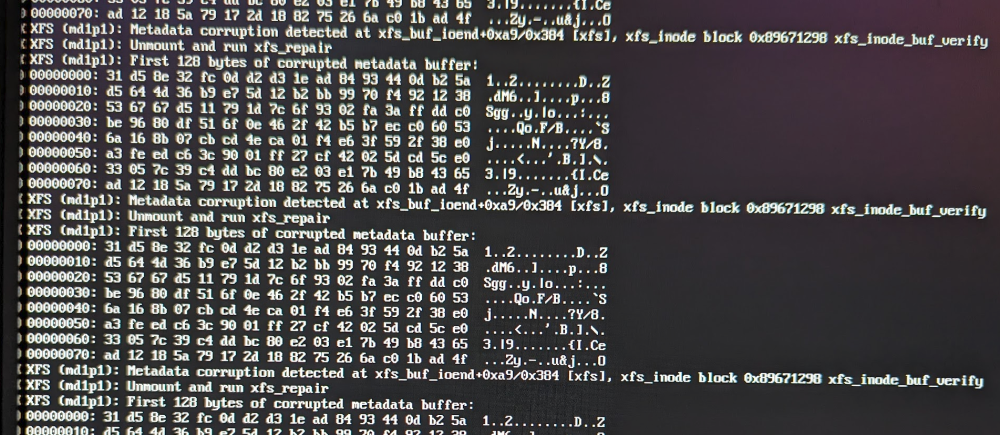
I had a disk become disabled so I did the procedure to remove it from the array and add it back. SMART data was good. I rebooted the server and saw the screenshot I have attached. So I removed the offending drive again, rebooted, and did an XFS_repair while the disk was out of the array. I left the drive out and am going to purchase a replacement drive, just to have a spare. I then noticed a lot of data missing. I see a lot of data in my lost+found. It seems like my emulated data must have been wrong. I'm not sure. Files and folders I've added for the past month or so seem to be missing data. Maybe I have BTRFS issues? I hope?? hyde-diagnostics-20240127-2321.zip
-
I had to contact support for a new key file... automated key recovery did not work for me. I followed the doc JorgeB posted to ease my concerns. I'm back up. Sorry for freaking out.


