





geekjitsu
Members
-
Joined
-
Last visited
-
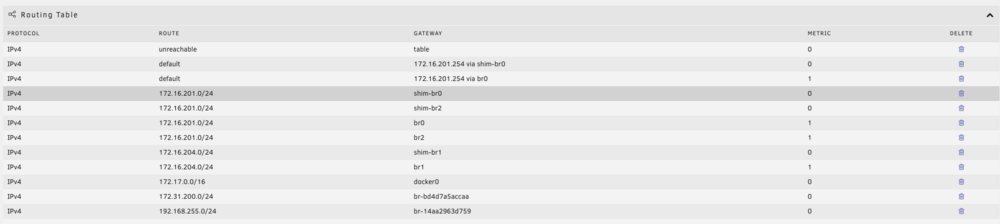
Yesterday I attempted to set up an Apple VM using SpaceInvader's "macinabox" container. VM was sluggish so I bumped the VM to 6 cores and 8 GB of RAM, but my Unraid sever only had 7 GB of RAM unallocated. Unraid's web interface and SSH became unresponsive, but ping was still working. I ended up doing an unclean shutdown (power button on the computer) after that I wasn't able to ping Unraid. I have the box in a closet and can't connect a monitor to it from there (dumb on my part I know, I ordered a portable LCD last night), so I moved it into my office and connected my monitor to it. Didn't see any errors during the start up and was able to ping my gateway and other network devices from it, but I still was not able to ping it from any device on my network or access the web interface. I have multiple NICs and after a reboot I have to create a new entry in my route table for the default route to point to my gateway. I did this in the GUI and still was unable to ping my Unraid host from my workstation or any other device on my network. I did a few clean reboots during troubleshooting. Eventually I figured out that I could still access Plex both from my network as well as outside of my network so I did a clean shutdown and put it back in place so my kids could watch a movie last night. After returning it to the closet I was able to ping it from my workstation and access the web interface, I made no changes from the last time I was able to ping it other than the clean shutdown (which I had done several times). A parity check is running currently, but will take at least another day to complete. Everything seems to work but my VMs. I believe my libvirt.img is corrupt because I'm unable to access any of my VMs through VNC. After a clean reboot the VM manager will start, but VMs can't be accessed. If I stop the VM manager and then start it again, on the VM page I get the "libvirt failed to start". If I clean reboot again VM manager starts, but VMs can't be accessed. If I stop and start VM manager I get the "libvirt failed to start" message again. Edit: It does appear my Home Assistant VM is still working as I can control things and get notifications from it in the iOS app, but I can't access it via VNC. Looking at my route table now I see an entry showing a route is unreachable and the gateway as table. I can't delete this even with VM manager and Docker stopped. Unfortunately I wasn't backing up my /mnt/user/system/ directory so I don't have a known good copy of libvirt.img to replace the existing one with. Is there some where I can download this? Diagnostics attached. Thanks in advance! braaam-diagnostics-20250209-1018.zip
-
Is there any way to select the videos to delete by codec, framerate, or video size?
-
Can you share the other thread? About to take the same leap. TIA.
-
Support got me sorted. Thanks!
-
My USB flash drive failed. I used an old USB drive as a temporary and tried to do the replace key process, but after a few hours of not receiving an email with the new key I ran to the store and purchased a new USB drive. Tried to do the replace key process again and received the following error: Sorry, an error occurred registering USB Flash GUID The error is: KeyFile is not valid I assume the replacement key generation is already underway. Other than the contact support web page, is there a quicker way to get a new key for my new USB drive? Thanks!
-
That's the ticket right there! Thanks!
-
In the last week or so my binhex-delugevpn container stopped being accessible when VPN was enabled. The WebUI is inaccessible from any computer on my network and my other containers (e.g. binhex-sonarr) that used it as a proxy are unable to connect to the internet when they're set to use the proxy. I've made no changes on my network. LAN_Network is 172.16.201.0/24 in the container and is what my computer is on. The Docker bridge network is 172.17.0.0/24 which all my containers that are set to Bridge mode are using. If I set VPN enabled to 'no' in the container I'm able to connect to the WebUI. I haven't tried removing the container and redeploying it yet. Anything I should look at before doing that? Thanks in advance.

