Meleniumshane90
Members
-
Joined
-
Last visited
Everything posted by Meleniumshane90
-
Same issue here. I looked and the only other Docker that wasn't starting was Tdarr. Both of those services relied on my GPU for transcoding, so I checked & those drivers weren't working. Updated the drivers, rebooted, & everything is back up and running.
-
My Plex server stopped working after the most recent update. Edit: Is there a way to have the server pull from the previous release so my server isn't out of commission? After updating, which I have set to go automatically at 3am EST, Plex cannot be loaded on the local server or by anyone else. I dumped the logs and can PM them if necessary. Unless there's something I can trim out of the 300+ lines that might help. And now everything is working again. Well alright. I initially tried restarting the container, which didn't work, but I stopped the Plex container for a few minutes while I was trying to figure this out. I started it up and now it's working, so no clue.
-
Huge thank you for responding! I was able to get it working with the info you provided. In case someone's searching for this in the future: I stopped the server, punched in the info above, and it wouldn't load the game. I figured it was because the latest save was incompatible, so I backed the files contained in "appdata\factorio\saves" to my desktop and grabbed the one that what was from the last time my friend's and I played. I edited that .zip file (in my case "_autosave3.zip") to "_autosave1.zip", as well as the folder contained within the .zip file to "_autosave1". I deleted all the saves in "appdata\factorio\saves" using Krusader, then moved my save into that folder. Started Factorio and was able to login without issues.
-
I have Factorio setup as default, which is set to download the latest stable version (V1.1.21), and it updated to a beta version (V1.1.24). Anyone know of a fix to this? I'm hoping it didn't break my game save.
-
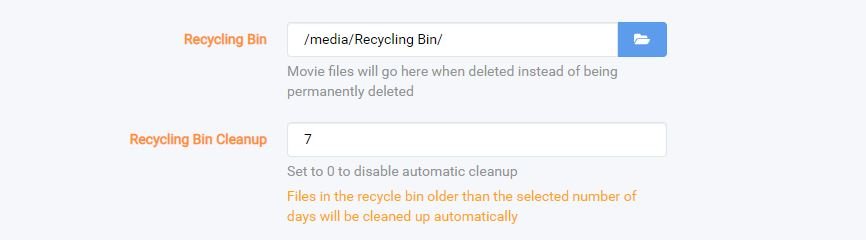
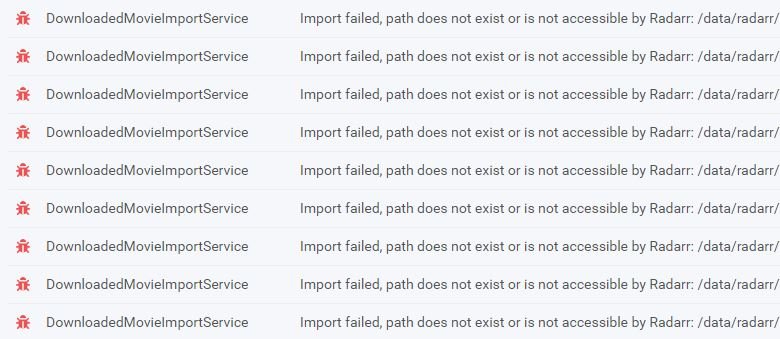
These last updates broke a whole bunch of stuff. The importer no longer works. I have over 300 pages of errors identical to this and a bunch of things stuck in limbo. For some reason, possibly related to this, it has downloaded three different copies of the same movie in no particular order. It's not replacing a lower quality copy with a higher quality copy, I think it doesn't see the file moved, so it tries another release. The thing that really sucks is the recycling bin enabled a default option to delete ALL files in that folder older than 7 days. I hadn't gone in and manually fixed the files sitting in that folder yet, so it wiped that entire directory. This should have been an opt-in instead of the default configuration, considering this is an in-place upgrade and not a new installation. Whereas this is how it handled it prior to the update (this is Sonarr, which fortunately hasn't been broken):