





MiniMoe
Members
-
Joined
-
Last visited
Everything posted by MiniMoe
-
Data from log when "Downloading...": [steam] 192.168.0.246 / - - - [30/Nov/2022:18:54:30 +0000] "GET /depot/1/chunk/0a98ca153d0b406288e3d606c5a1181be7d3d977 HTTP/1.1" 200 0 "-" "Valve/Steam HTTP Client 1.0" "MISS" "cache8-iad1.steamcontent.com" "-" Data from log when "Retrying...": [steam] 192.168.0.246 / - - - [30/Nov/2022:18:55:39 +0000] "GET /depot/1/chunk/3348068e2413ad6d52e6f24c63bc53c6d9059866 HTTP/1.1" 200 0 "-" "Valve/Steam HTTP Client 1.0" "MISS" "cache4-iad1.steamcontent.com" "-" Basically shows the same info while downloading and retrying.
-
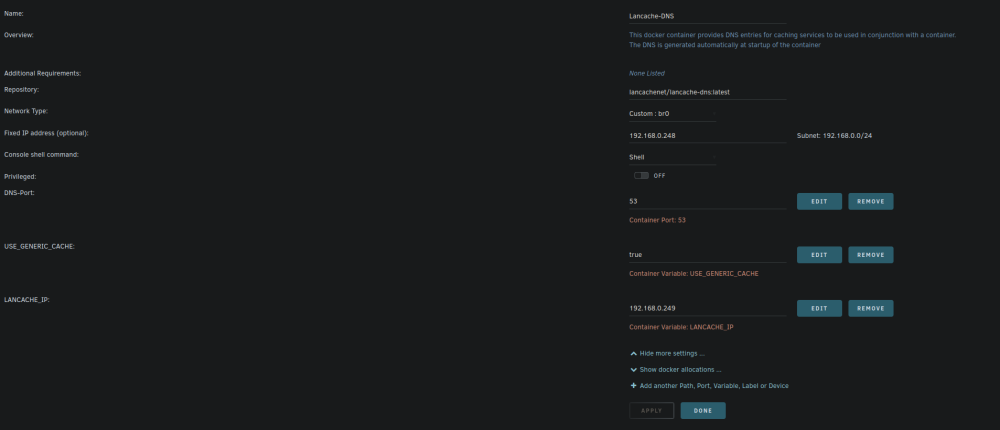
If i set --dns manually it doesn't work. I have not, I only have the default parameters filled in inside the container. Attached a screenshot. As a side note - Lancache does work by itself with just the 2 containers. I just can't get the pre-fill to work.
-
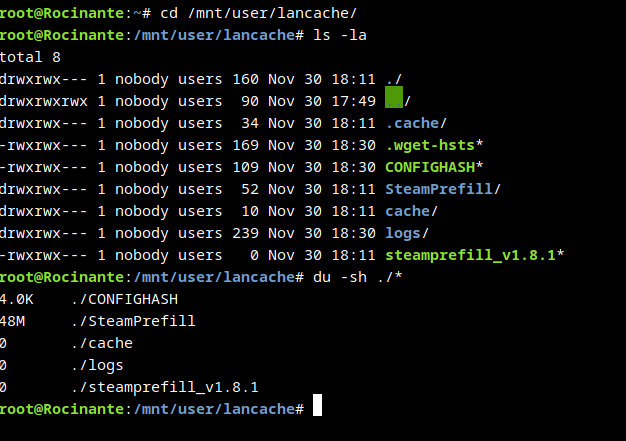
I do have pi-hole, but it's not running as a DHCP server, only connects to a few devices manually with static IPs. It's not configured for my PC or server. I do have my DNS servers to 8.8.8.8 and 8.8.4.4 in unraid's network settings, as PiHole wasn't always set up like this. I just haven't changed it back yet. Could this be the issue? I can set unraid back to DHCP as I've just set my router to give my server a static IP. I attached a screenshot in my original post of the "Retrying" part, along with the wrong IP. Attached an image of my container set up and my lancache directory.

-
I'm having a problem with the Lancache-Prefill container. The pre-fill container is looking at the Lancache container at 192.168.0.249, rather than the Lancache-DNS container at 192.168.0.248. I have --dns=192.168.0.248 in Extra Parameters. The downloads fail, then continue to retry. I can't see any files in the cache directory when it tries to download either. Is there a config inside the container that I can change to point it as 192.168.0.248?

-
I got everything working. Game Parameters - +server.maxplayers 10 +rcon.web 1 +rcon.port 28016 +rcon.password ****** I added the following to /mnt/user/appdata/rust/server/my_server_identity/cfg/serverauto.cfg server.eac "0" server.secure "False" server.encryption "0" I access RCON through http://rcon.io/console. You might want to update the container with some details about rcon? You need +rcon.web, +rcon.port and +rcon.password to get it working. I can join from the console (F1) from the main menu with client.connect 192.168.0.65:28015 or mydomain.xyz:28015 (with port forwarding set up). It also shows up on BattleMetrics but since no EAC i don't think it will stay up there for long. Hope this helps anyone else trying to achieve the same thing (self hosting a Rust game server, and playing from Linux with proton) in the future. See also - https://www.protondb.com/app/252490
-
I made some progress. I'm using these in game parameters; +server.maxplayers 10 +server.secure 0 +server.encryption 0 +rcon.web 1 +rcon.port 28016 +rcon.password ***** Note on the rcon port - container has "eg: '+rcon.port 27016 +rcon.password YOURPASSWORD". I used 28016 as its the game port +1. I also added 28016 as a port variable in the container. I also added myself as an admin through rcon and set server.eac to 0 and gave the server.writecfg command after to save it. (used http://rcon.io/) Error's I get now are relating to steam: (Steam Status "Invalid") (Steam Status "InvalidAuthSession") Still working on a fix for these.
-
Ok, I'll do some more research and if I find a fix I'll update here for anyone else looking to do this.
-
I did read it, and I was connecting exactly like this. I get these when the container loads the config, I don't know why they appear twice. Command 'rcon.password' not found Command 'rcon.password' not found Command 'batchmode' not found Command 'batchmode' not found Command 'server.eac' not found Command 'server.eac' not found I have the following in Game Parameters +server.maxplayers 10 +server.secure 0 +server.eac 0 +server.encryption 0 +rcon.port 28016 +rcon.password ****** I also get the following in the RUST.log Could not establish a TCP connection to <publicip>:28083 (Filename: ./Runtime/Export/Debug/Debug.bindings.h Line: 35) Kicking 192.168.0.149:51004/steamid/username (Steam Status "InvalidAuthSession") (Filename: ./Runtime/Export/Debug/Debug.bindings.h Line: 35) 192.168.0.149:51004/steamid/username kicked: Steam: InvalidAuthSession Saved 96,872 ents, cache(0.04), write(0.01), disk(0.02). (Filename: ./Runtime/Export/Debug/Debug.bindings.h Line: 35) I can't seem to find any info on these errors.
-
I've added these to the container but now getting this problem; kicked: Steam: InvalidAuthSession Whenever I try to join. Is this a client or server side problem? I can't find much on it.
-
Is setting up RCON the same in Game Parameters? I assume I need to add another port (27016)?
-
I'll give this a go, thank you
-
How can I disable EAC on the rust server so I can join from linux?
-
that was it, i had a "@". thanks
-
My apply button is broken, i camt set any schedules. on 6.10.3
-
This happens a lot, getting kind of annoyed with it. I set up an Arch VM over VNC from my laptop, then added my GPU to it and started it up. Nothing on the screen. Theres no errors in the logs, tried with and without binding the GPU to vfio add trying over VNC now shows "Guest has not initialized display". Card is a 3070, vbios is there too. Windows 10/11 work totally fine, but can't get Linux to show up on the screen. Anyone know why? I'm on 6.10rc2, using a display port cable. Going to try with HDMI soon.
-
I've been having all kinds of weird problems with my server today. I rebooted earlier, and couldn't get to the WebUI, after some troubleshooting a noticed i had a 169.xxx.xxx.xxx address. Fixed that in GUI mode, set a static ip and used google's DNS servers. System now boots up fine, dockers are running and can start VM's. My windows VM I can get running if I set a static IP inside the VM, but won't work with DHCP. DHCP is enabled on my Hub (Virgin Media). Not sure where to find the fix for this one, can anyone help? I'd prefer to avoid having to set static IP's every time I throw a VM up for something.



