





flyize
Members
-
Joined
-
Last visited
-
Looks like it was an empty /appdata folder from 2020 on the array. I just removed it. Hopefully that doesn't destroy anything... Thanks for the awesome help!
-
What's the quickest way to do that? And thanks for the share cleanup! I didn't know that existed!
-
Full disclosure, I didn't read the updates regarding the Mover Tuning plugin and ended up running out of space on the array. Dumb, I know, but here we are. I asked ChatGPT and it suggested that I can just remove the offending .cfg(s). I don't trust it enough to actually delete things. Any thoughts on the contents of /boot/config/shares? Anything else I should check after running out of space? Thanks!
-
Getting back to this. How do I mount an array drive with UD? edit: Duh, figured it out. The disk mounts fine via UD and I can browse it normally.
-
It doesn't show up in Unassigned Devices. And now I have disk12 also showing as missing. What could be happening? truffle-diagnostics-20250709-0745.zip
-
So this worked for a day and then the drive dropped off again. I powered everything down and attempted to reseat everything. When I powered it back up, it didn't recognize the filesystem. I ran the xfs_repair command, but didn't opt to fix anything because I saw it said it had a bunch of directories to move to lost+found. That seems... bad. truffle-diagnostics-20250708-2058.zip
-
Okay, I'll reset everything. Thanks! And yeah, apparently those Frigate OOM issues are just for me. Their folks were not able to figure it out. Thankfully I was able to limit its ability to grab ALL the memory and crash the server.
-
I woke up this morning to a disabled drive. Any idea what's going on? truffle-diagnostics-20250707-0749.zip
-
So I swapped everything and it was stable for a day. Then it dropped off again. I started the array in maintenance mode, ran an xfs_repair to make sure nothing was wrong. It said that a log file needed to be replayed. I tried that and got another error (I don't recall). According to the message in Unraid, it didn't seem like I would lose any real data if I zeroed out the log - so I did. I'm now getting this error: Unmountable: wrong or no file system This seems bad. What have I done? truffle-diagnostics-20250426-1444.zip
-
The details say its empty, but if I check the box to delete - nothing happens.

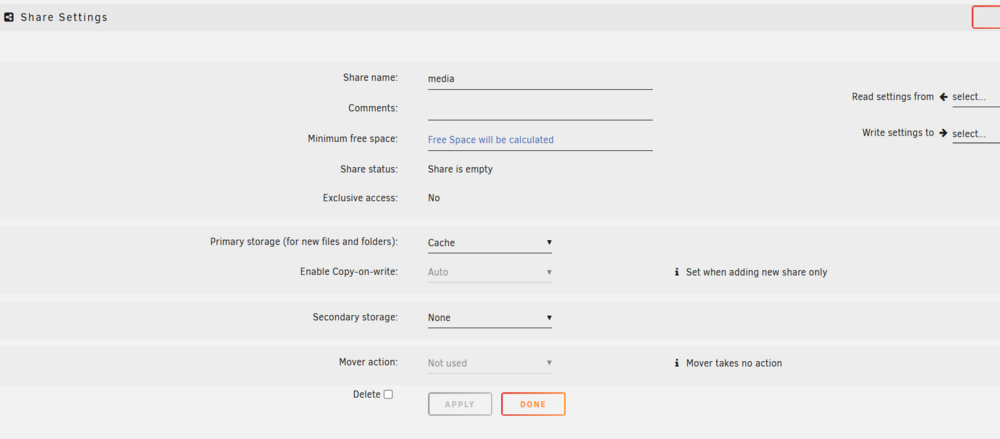
-
Meaning likely a bad power or SATA cable?
-
Hmmm, maybe it isn't okay

-
So I ended up risking it for the biscuit. I set a new config, keeping everything, and the drive seems to be fine now. I'm now back to zeroing out the drive listed above at about 200MB/s. I assume the zeroing process will rebuild parity as it goes, correct? edit: Crap, it will only rebuild parity through 8TB. I guess I should fully rebuild parity first.
-
I think I discovered the problem when I rebooted. Seems disk 13 died somehow?
-
Nope, nothing going on. I assume I need to stop the zeroing so that I can move the array to maintenance mode? If its going to be this slow, I *really* don't want to have to start over, but certainly will if there is no other way.


