





chli01
Members
-
Joined
-
Last visited
-
Works like a charm, thanks for releasing the fix!
-
Hopefully you get it working. I was just testing by replacing the installed files on the fly... I didn't remove the existing bindings, so older Unraid version should still be fine. Otherwise, sounds great!
-
I was testing on 7.2.5. Could you reproduce?
-
Hi @SimonF , I've created a Pull Request for the issues mentioned above on GitHub. Would be nice if you find some time to have a look at it.
-
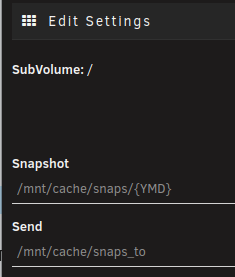
I've also noticed, that the checkboxes to show/hide docker or root volumes is gone in recent Unraid versions (because of breaking UI changes?): Maybe the UI gets confused because of this. Anyways, I cannot maintain schedules or settings for root subvolumes anymore, it somehow tries to manage "/" instead of "/mnt/cache/" and cannot find or manipulate any configuration because of that. E.g. if I hit settings here it wants to edit SubVolume "/" but it should be "/mnt/cache". Besides that the scripting part that triggers snapshot creation for already existing schedules is working fine, but configuration in the UI is impossible as of now.

-
Works like a charm. Thanks for your quick response!
-
Cannot be. It was working for years. However the disk was not initialzed with UD, since I already formatted it before. So maybe it was only working by chance. Anyways... it does not seem to be an intended feature so I have to chance the disk format. Thanks for your reply.
-
I'm using a Luks->Ext4 (with system enc key) external HDD. In the past mounting this device was working well, however after last reboot (and perhaps a new version of UD) I'm no longer able to mount the device because UD tries to mount it as XFS. Decrypting and mounting the volume manually wis working fine so it's not an issue of the device, see also the log: Dec 18 19:15:11 lud unassigned.devices: Adding partition 'WD_Elements_25A3'... Dec 18 19:15:11 lud unassigned.devices: Mounting partition 'WD_Elements_25A3' at mountpoint '/mnt/disks/WD_Elements_25A3'... Dec 18 19:15:11 lud unassigned.devices: Using Unraid api to open the 'crypto_LUKS' device. Dec 18 19:15:11 lud emhttpd: shcmd (281): /usr/sbin/cryptsetup luksOpen /dev/sdb1 WD_Elements_25A3 Dec 18 19:15:13 lud unassigned.devices: Mount drive command: /sbin/mount -t 'xfs' -o rw,noatime,nodiratime '/dev/mapper/WD_Elements_25A3' '/mnt/disks/WD_Elements_25A3' Dec 18 19:15:13 lud kernel: XFS (dm-5): Invalid superblock magic number

