





nearcatch
Members
-
Joined
-
Last visited
Everything posted by nearcatch
-
You could try setting "Preserve user defined networks" to "Yes" in docker settings. I remember having the issue you're experiencing and I *think* changing this setting fixed it.
-
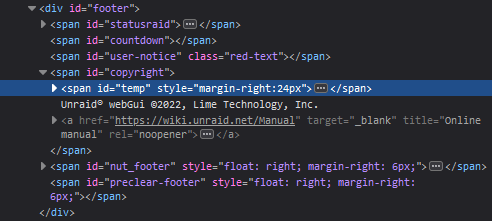
For the system temp statusbar display, can the span#temp be added to div#footer? Currently it's added to span#copyright which doesn't make sense. I want to hide the span#copyright with css but that would hide the temp too.
-
to elaborate on this, docker-compose is no longer a separate program but is a plugin to docker itself. So that's why it's `docker compose` now - you're passing the compose option to docker.
-
There isn't good official documentation afaik, but I gave an example in a comment here.
-
If you're moving a folder named "/mnt/user/media" that has hardlinks to "/mnt/user/downloads", then Unbalance (which uses rsync) will not touch the "/mnt/user/downloads" files, even if there are hardlinks to files in there. The preservation of hardlinks will only happen for files within "/mnt/user/media". Also, hardlinks in general act pretty weird on Unraid and they're not recommended, iirc.
-
I do agree, but I've run into an unintended effect from the above setting. I didn't realize that was happening until yesterday, and unfortunately my previous posts weren't specific enough for you guys to realize what I was doing. I use this folder structure because I also have a /mnt/user/appdata/docker/compose I use to keep track of yamls, and a /mnt/user/appdata/docker/secrets for docker secrets. Presumably this plugin is hardcoded to exclude any folder named docker, regardless of whether it's the system docker directory, which is why my appdata/docker isn't backed up. Can that be changed so that the hardcoded exclude uses /mnt/user/system/docker/, and not just docker? Or ideally, read the exclude path directly from the unraid docker settings, in order to catch any differences in user settings, rare as they might be.

-
The point of backing up the docker folder is to backup persistent data that is generated by the containers, not to backup the simple container instructions. You can reinstall a mariadb container from the Apps page, but it won't recreate the database you had previously. The entire reason this plugin stops your containers is so that it can backup the containers' persistent folders in appdata. It even has an advanced option to ignore certain containers that you want to keep running and not backup.
-
I've noticed that my backups are not including the docker folder. The CA backup command in the logs is odd - it excludes the docker folder with single quotes instead of the double quotes used for folders I've specified. Where is the settings file for CA Backup located? It seems like it has somehow decided to exclude docker but not tell me in the gui. CA Backup/Restore: Backing Up appData from /mnt/user/appdata/ to /mnt/user/backups/appdata/[email protected] CA Backup/Restore: Using command: cd '/mnt/user/appdata/' && /usr/bin/tar -cvaf '/mnt/user/backups/appdata/[email protected]/CA_backup.tar.gz' --exclude "mergerfs" --exclude 'docker' * >> /var/lib/docker/unraid/ca.backup2.datastore/appdata_backup.log 2>&1 & echo $! > /tmp/ca.backup2/tempFiles/backupInProgress CA Backup/Restore: Backup Complete CA Backup/Restore: Verifying backup CA Backup/Restore: Using command: cd '/mnt/user/appdata/' && /usr/bin/tar --diff -C '/mnt/user/appdata/' -af '/mnt/user/backups/appdata/[email protected]/CA_backup.tar.gz' > /var/lib/docker/unraid/ca.backup2.datastore/appdata_backup.log & echo $! > /tmp/ca.backup2/tempFiles/verifyInProgress
-
Maybe put in a way for people to choose whether to use the stable version of docker-compose or pre-releases. Stable is 2.0.1 right now, but pre-release is 2.1.0.
-
I've installed and rebooted but all I get is the following when I try running "docker compose" or "docker-compose": docker: 'compose' is not a docker command. I see this when I run "docker" [...] Management Commands: builder Manage builds compose* Docker Compose (Docker Inc., v2.0.1) config Manage Docker configs container Manage containers context Manage contexts [...] EDIT: Nevermind, got it working. I'd earlier manually created the cli-plugins folder in my ~/.docker in an attempt to install Compose v2 manually, and it seemed to cause some issues. Deleted it and everything works now.
-
FYI, the current version of Docker Compose supports both v2 and v3. The recommended way to write compose files is to omit the "version" tag at the top entirely. Compose will then read the yml and interpret all v2 and v3 features.
-
Thanks. I wish unraid allowed user installation of docker plugins but this will do for now.
-
Docker Compose v2 is now primarily a plugin for docker instead of a standalone application. The directions on compose's github are as follows: How would I do this in unraid? None of these locations exist in unraid. I see a "plugins" folder in my docker folder but putting docker-compose there and then chmod +x does nothing (I also tried the "plugins/storage" folder and the "plugins/storage/ingest" folder). I also tried creating the "cli-plugins" folder in $HOME/.docker (which is linked to /boot/config/plugins/dockerMan/), but that didn't work either.
-
I'm trying to set up a registry proxy for the docker daemon. According to the instructions here, it is normally set using a systemd file. I have found that in unraid, simply setting the environment variables in a shell window and then using '/etc/rc.d/rc.docker restart' will properly get docker using the registry proxy. My question is: How can I set the environment variables globally on boot so that the docker daemon recognizes them upon startup? Setting the variables in my go file or in profile.sh does not work. After a reboot, the variable is set (from profile.sh only), but docker doesn't use it until I manually restart it from the command line. EDIT: For anyone else who ever wants to do this, I figured it out. There's a file on the flash drive at /boot/config/docker.cfg. Add the below lines to that file and your docker daemon will use a proxy. export HTTP_PROXY="http://proxy.example.com" export HTTPS_PROXY="https://proxy.example.com"
-
Good to know. Regardless though, hopefully the code in this thread can eventually imitate the normal webui spinup instead of the emergency spinup.
-
Oh I understand that it's a dangerous way to spec a server; I would never do it myself. But I think the webui staggers it exactly to avoid this scenario out of an abundance of caution, so that's why I started posting in the thread. But thank you for the bash code as is and any future improvements.
-
That's my concern. To give some more solid numbers: when all my disks are spun down and I press the spinup button in the webui, my UPS slowly increases output from ~300w to ~420w over about 2-3 minutes. The disks stagger the spinup and the power draw is gradual. If I use the bash code, my UPS immediately jumps to ~700w because 24 hard disks are spinning up at once. Then the power decreases to the normal draw of ~420w. My UPS and PSU can handle a 700w draw, but I think this code might be dangerous in its current state for people who don't have that extra power capacity in their servers.
-
I have no experience in this, but inspecting the code in the webui for the spinup button shows the following onclick event. So at the very least it appears to me that the button is limiting the spinup to the array? The bash in this thread doesn't do that. And again, the webui button staggers the spinups, versus the bash in this thread which does it all at once. It's very noticeable if you have more than a few disks; you could easily reproduce it yourself, I would think, just by pressing the webui button and watching the disk states, and then spinning down the disks and trying the same thing with the script. function onclick(event) { toggle_state('Device', 'array*', 'up') }
-
It's not. The webui spins up disks one at a time. The above bash code spins them all up at the same time. I can see the difference in power draw on my UPS, and the noise from the server is noticeably different as well. And as mentioned above, it also spins up my Unassigned Devices drives, which the normal webui spinup doesn't.
-
So I gave this a whirl in my profile.sh, and it works. But it spins up all 22 disks in my array and also the 2 Unassigned Devices disks I have, all at the same time. Unraid via the webui does a staggered spinup of 1 disk at a time. Is spinning up all 24 disks in my chassis at the same time safe? If not, is there a way to imitate the webui spinup?
-
Keeping it but otherwise classifying it as abandonware is what the concerns are about.
-
I would rather automate backups to a local network share rather than unraid.net. I doubt I'll even install the unraid.net plugin as I already have remote access set up to my satisfaction. Disappointed to hear that this plugin's auto-backup for flash will be deprecated in favor of a cloud solution.
-
Just wanted to say thanks for the script; I used it on unRAID 6.9.0-beta35 and successfully swapped a keyfile. Was sweating a bit the first time I brought the array down and back up, but it went perfectly. Did all 15 data disks, 2 cache pool disks, and 2 nvme pool disks.
-
I used the tarball method shared by beckp and it works in 6.9.0 beta 35. Simply one line in the go file and one tarball stored on the flash drive, and now my unRAID dynamically pulls the encryption key off of a local server when needed.

