parazit15
Members
-
Joined
-
Last visited
-
I know it has been some months since you made your post and i wanted to ask you, if you could get it to work?
-
Hi guys, i have changed my case SC-N400 to a Node 304 and my Asus card stopped working. All i have done is switched all the hardware into a new case and connected all parts. The only difference is that i don't have a sata controller in this case anymore, thats why i am using an extra cable to power the hard drives and the chassis fans. My motherboard is an ASUS Q170T The Asus card is being recognized because i see my nas listed in the connected devices in my router settings also i see an ip in the GUI of Unraid. It's strange tho, that the led lights next to the port are only flashing during boot for 5-10 seconds and then they turn off. The Asus card is connected to a m.2 > pcie adapter because the motherboard doesn't have a pcie slot. I have tried different settings and also been searching for solutions, but nothing helped and i don't really know what to do now. This Asus card has been working flawlessly for almost 2 years. Maybe the issue has nothing to do with Unraid, because plugged in a Ubuntu Live Flash Drive to see if the card is work, but it happened the same thing. Diagnostics file is attached. Thank you in advance! unraid-diagnostics-20210922-2058.zip
-
Hi guys, i am trying to get fscrawler to index my shares, but after a couple of hours, i always get this error and the docker stops. # A fatal error has been detected by the Java Runtime Environment: Anybody has an idea, what the error could be?
-
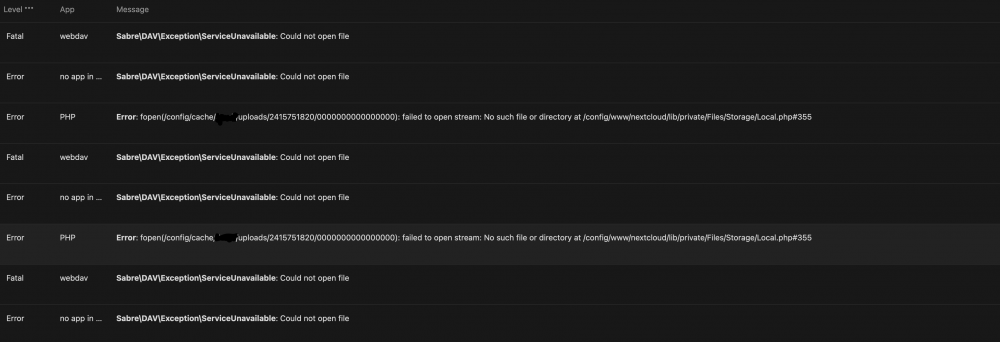
Hello guys, i am getting those errors which are visible in the picture for quite a while now. Updated to 20.0.4 and thought maybe that could fix it. Unfortunately it didn't help, that's why i wanted to ask here in the forum if anybody can help me out with it?