





netfox
Members
-
Joined
Everything posted by netfox
-
I will like to move a Docker from Unraid to Debian+Portainer. how can I extract the Docker run command from UNRAID? I then will composerize.com it to use it with portainer
-
Hi All, I encrypted the arrays, however now, I will like that the Array starts without have to type the password. I dont care about the array encryption security at this point, is there a simple way of setting the encryption Passphrasse in Unraid so it will auto start the array at boot? John
-
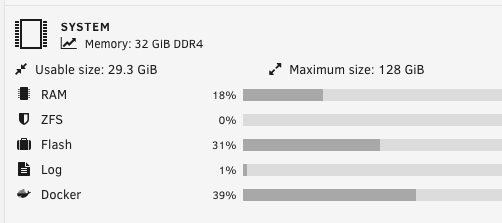
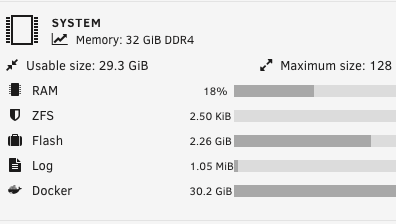
Hello, I'm on Version: 6.12.3, why docker is taking 30gb (39%) of memory with no running containers? If I disable Docker than docker memory will go to ZERO.
-
How can I Rolled back to 6.11.5? And which is the best version to rollback to avoid this issue?
-
What go2rtc version are you running, its still crashing on m with the 1.5
-
Me and other users opened issues on github, unfortunately we were not able to fix the OOM error. https://github.com/blakeblackshear/frigate/issues?q=is%3Aissue+"out+of+memory"+
-
Unraid Version: 6.11.5
-
We actually opened multiple post on github for the OOM, I am also running Dev release frigate:dev-7e5abe7 (go2rtc 1.5) however it is still happening. I also disabled go2rtc and user rtsp, same crash We actually have 2 issues: 1) Frigate causes OOM 2) Unraid crashes when a container gets OOM I also opened a ticket with Unraid, however I haven't had not reply yet John
-
Same here, my server keeps going down.
-
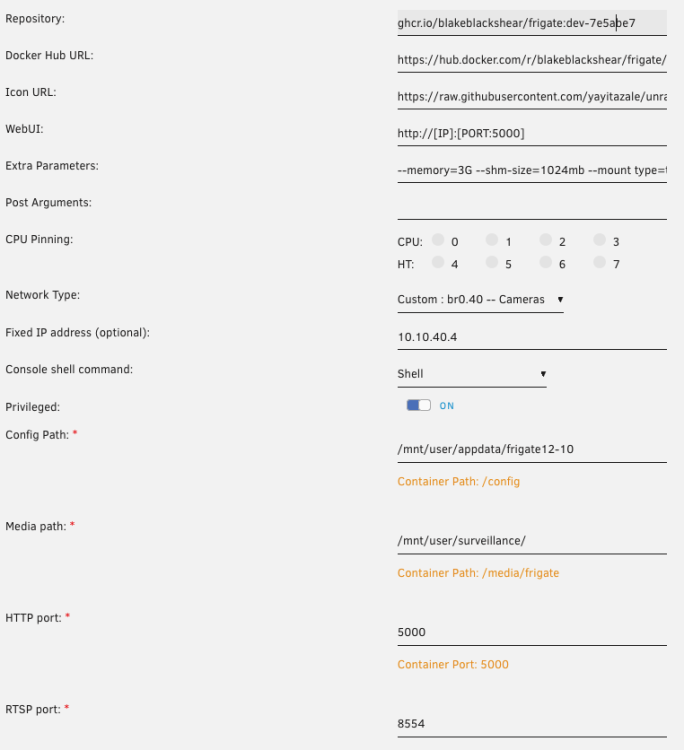
Hi guys, Frigate container OOM causes Unraid (Version: 6.11.5) Crash I am also using the following parameter so not sure why it crashed the server: --memory=3G --shm-size=1024mb --mount type=tmpfs,target=/tmp/cache,tmpfs-size=100000000 --restart unless-stopped Any suggetion on what to do to avoid that a container oom causes a unraid server crash? I tried --memory=1G 2G and 3G with no difference. Unraid crashes. Here are more details on the OOM error: Thanks
-
Is it possible to backup a single VM, as example with an export and eventually import afterwords? And where VMs are stored, cant find /etc/libvirt/qemu John
-
The Frigate container was eating all of the ram, I added --memory=2G however the container keeps bringing down the server and gets unresponsive. The only think to do is to hold the power button and start again the server
-
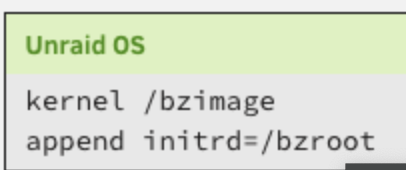
Hi guys, I had the message : Legacy PCI Stubbing found, so I wanted to reconfigure my config to ht lates passtrough: This is my cold config I removed "pcie_acs_override=downstream vfio-pci.ids=8086:150e" however the server does not boot this is what I see in the vfio-pci.cfg BIND=0000:01:00.0|8086:150e 0000:01:00.1|8086:150e 0000:01:00.2|8086:150e 0000:01:00.3|8086:150e I restored the old config and now i am getting this error this is my Attaching diagnostic unraidsrv-diagnostics-20230319-1919.zip

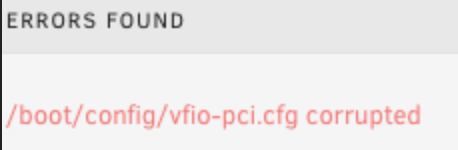
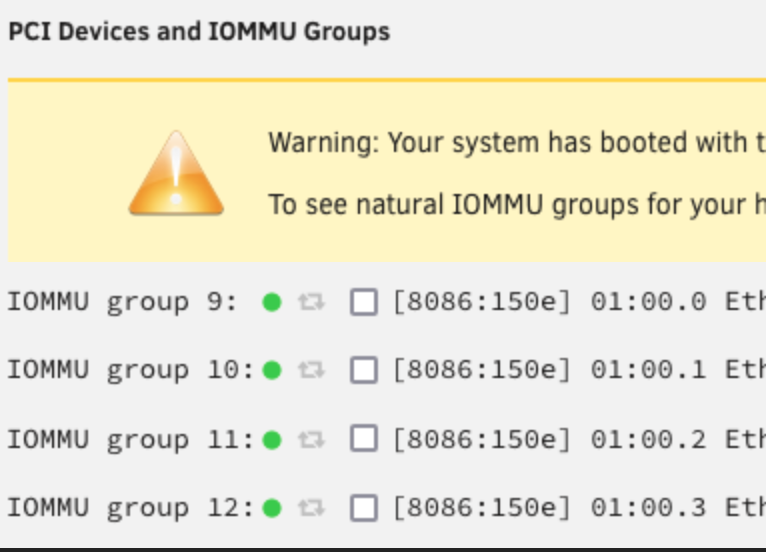
-
Here is an other crash and grafana and influxdb and telegraph were also off:
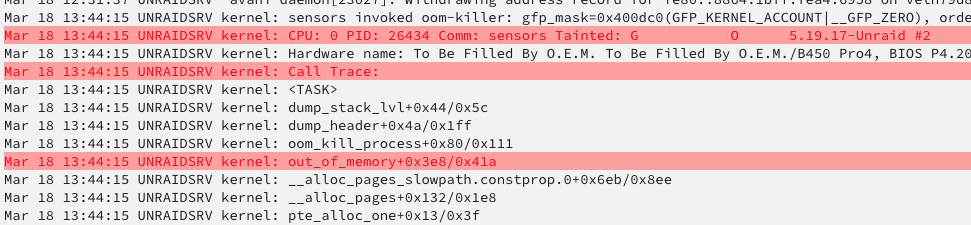


-
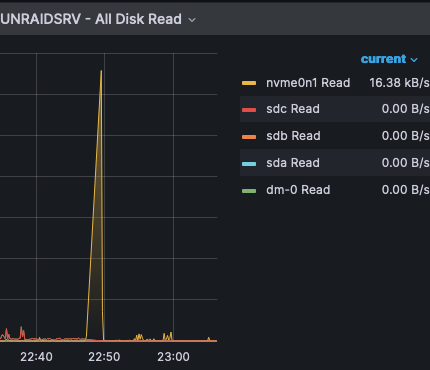
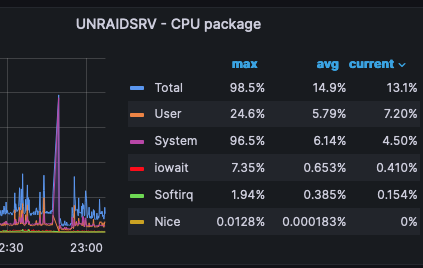
My guys, my pfSense VM crashes I actually see only a spike in CPU usage in Frigate: and spike in read as spike in system: These are the red errors in the logs: And these are the logs
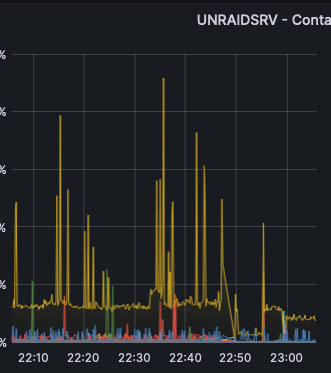


-
Firefox will now show "Primary vDisk Size:" /VMs/AddVM?template=Ubuntu
-
Checking this:
-
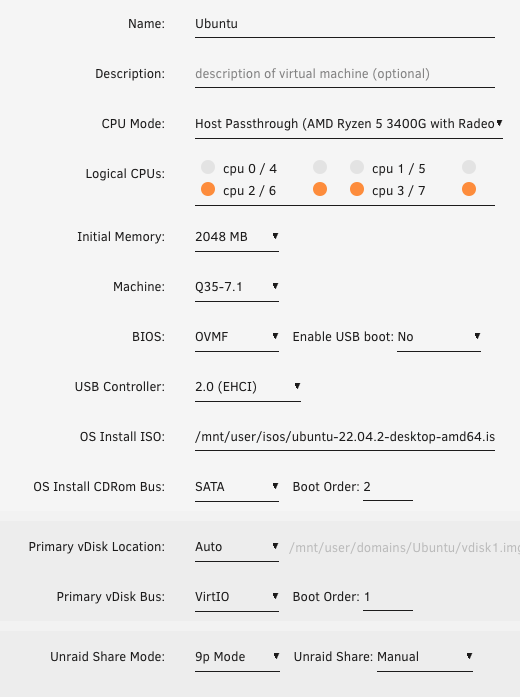
Hi Guys, for some reason I cant find "Primary Vdisk size" when creating a VM:
-
@JonathanM My plan was to create a minimalist Unraid Box with less cables as possible,is there any good way of connecting the Unraid to the pfSense VM?
-
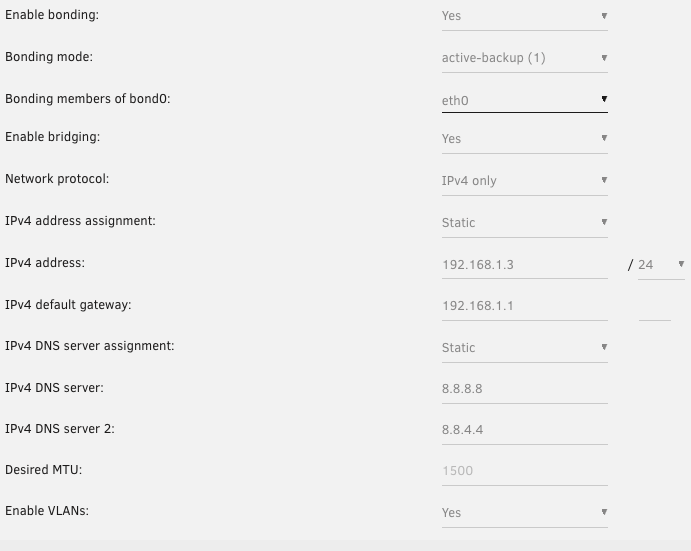
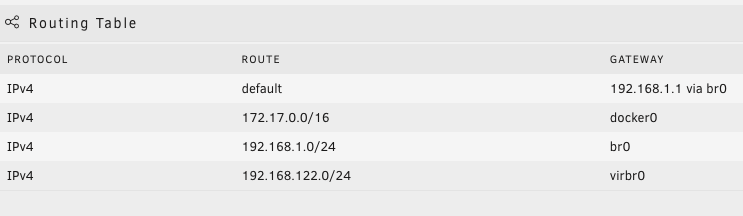
I was able to install with Auto (ZFS). Pass trough works great thanks to the amazon tutorial, I am also connected to internet on WAN. I configured pfSense on 192.168.1.1 on Unraid VM, however I cant reach the IP of Unraid 192.168.1.3 or any other ip on my unraid. Should I have left the bridge configuration in the configuration without deleting it? Or do I need to change something in the configuration of Unraid to have it use the pfSense network? John <?xml version='1.0' encoding='UTF-8'?> <domain type='kvm'> <name>pfSense</name> <uuid>XXXXXXXXXX9da</uuid> <metadata> <vmtemplate xmlns="unraid" name="FreeBSD" icon="freebsd.png" os="freebsd"/> </metadata> <memory unit='KiB'>3145728</memory> <currentMemory unit='KiB'>3145728</currentMemory> <memoryBacking> <nosharepages/> </memoryBacking> <vcpu placement='static'>2</vcpu> <cputune> <vcpupin vcpu='0' cpuset='1'/> <vcpupin vcpu='1' cpuset='5'/> </cputune> <os> <type arch='x86_64' machine='pc-q35-7.1'>hvm</type> <loader readonly='yes' type='pflash'>/usr/share/qemu/ovmf-x64/OVMF_CODE-pure-efi.fd</loader> <nvram>/etc/libvirt/qemu/nvram/XXXXXX_VARS-pure-efi.fd</nvram> </os> <features> <acpi/> <apic/> </features> <cpu mode='host-passthrough' check='none' migratable='on'> <topology sockets='1' dies='1' cores='1' threads='2'/> <cache mode='passthrough'/> <feature policy='require' name='topoext'/> </cpu> <clock offset='utc'> <timer name='rtc' tickpolicy='catchup'/> <timer name='pit' tickpolicy='delay'/> <timer name='hpet' present='no'/> </clock> <on_poweroff>destroy</on_poweroff> <on_reboot>restart</on_reboot> <on_crash>restart</on_crash> <devices> <emulator>/usr/local/sbin/qemu</emulator> <disk type='file' device='cdrom'> <driver name='qemu' type='raw'/> <source file='/mnt/user/isos/pfSense-CE-2.6.0-RELEASE-amd64.iso'/> <target dev='hda' bus='sata'/> <readonly/> <boot order='2'/> <address type='drive' controller='0' bus='0' target='0' unit='0'/> </disk> <disk type='file' device='disk'> <driver name='qemu' type='qcow2' cache='writeback'/> <source file='/mnt/user/domains/pfSense/vdisk1.img'/> <target dev='hdc' bus='sata'/> <boot order='1'/> <address type='drive' controller='0' bus='0' target='0' unit='2'/> </disk> <controller type='usb' index='0' model='ich9-ehci1'> <address type='pci' domain='0x0000' bus='0x00' slot='0x07' function='0x7'/> </controller> <controller type='usb' index='0' model='ich9-uhci1'> <master startport='0'/> <address type='pci' domain='0x0000' bus='0x00' slot='0x07' function='0x0' multifunction='on'/> </controller> <controller type='usb' index='0' model='ich9-uhci2'> <master startport='2'/> <address type='pci' domain='0x0000' bus='0x00' slot='0x07' function='0x1'/> </controller> <controller type='usb' index='0' model='ich9-uhci3'> <master startport='4'/> <address type='pci' domain='0x0000' bus='0x00' slot='0x07' function='0x2'/> </controller> <controller type='pci' index='0' model='pcie-root'/> <controller type='pci' index='1' model='pcie-root-port'> <model name='pcie-root-port'/> <target chassis='1' port='0x10'/> <address type='pci' domain='0x0000' bus='0x00' slot='0x02' function='0x0' multifunction='on'/> </controller> <controller type='pci' index='2' model='pcie-root-port'> <model name='pcie-root-port'/> <target chassis='2' port='0x11'/> <address type='pci' domain='0x0000' bus='0x00' slot='0x02' function='0x1'/> </controller> <controller type='pci' index='3' model='pcie-root-port'> <model name='pcie-root-port'/> <target chassis='3' port='0x12'/> <address type='pci' domain='0x0000' bus='0x00' slot='0x02' function='0x2'/> </controller> <controller type='pci' index='4' model='pcie-root-port'> <model name='pcie-root-port'/> <target chassis='4' port='0x13'/> <address type='pci' domain='0x0000' bus='0x00' slot='0x02' function='0x3'/> </controller> <controller type='pci' index='5' model='pcie-root-port'> <model name='pcie-root-port'/> <target chassis='5' port='0x14'/> <address type='pci' domain='0x0000' bus='0x00' slot='0x02' function='0x4'/> </controller> <controller type='pci' index='6' model='pcie-root-port'> <model name='pcie-root-port'/> <target chassis='6' port='0x15'/> <address type='pci' domain='0x0000' bus='0x00' slot='0x02' function='0x5'/> </controller> <controller type='virtio-serial' index='0'> <address type='pci' domain='0x0000' bus='0x02' slot='0x00' function='0x0'/> </controller> <controller type='sata' index='0'> <address type='pci' domain='0x0000' bus='0x00' slot='0x1f' function='0x2'/> </controller> <serial type='pty'> <target type='isa-serial' port='0'> <model name='isa-serial'/> </target> </serial> <console type='pty'> <target type='serial' port='0'/> </console> <channel type='unix'> <target type='virtio' name='org.qemu.guest_agent.0'/> <address type='virtio-serial' controller='0' bus='0' port='1'/> </channel> <input type='tablet' bus='usb'> <address type='usb' bus='0' port='1'/> </input> <input type='mouse' bus='ps2'/> <input type='keyboard' bus='ps2'/> <graphics type='vnc' port='-1' autoport='yes' websocket='-1' listen='0.0.0.0' keymap='en-us'> <listen type='address' address='0.0.0.0'/> </graphics> <audio id='1' type='none'/> <video> <model type='qxl' ram='65536' vram='65536' vgamem='16384' heads='1' primary='yes'/> <address type='pci' domain='0x0000' bus='0x00' slot='0x01' function='0x0'/> </video> <hostdev mode='subsystem' type='pci' managed='yes'> <driver name='vfio'/> <source> <address domain='0x0000' bus='0x01' slot='0x00' function='0x0'/> </source> <address type='pci' domain='0x0000' bus='0x01' slot='0x00' function='0x0'/> </hostdev> <hostdev mode='subsystem' type='pci' managed='yes'> <driver name='vfio'/> <source> <address domain='0x0000' bus='0x01' slot='0x00' function='0x1'/> </source> <address type='pci' domain='0x0000' bus='0x03' slot='0x00' function='0x0'/> </hostdev> <hostdev mode='subsystem' type='pci' managed='yes'> <driver name='vfio'/> <source> <address domain='0x0000' bus='0x01' slot='0x00' function='0x2'/> </source> <address type='pci' domain='0x0000' bus='0x04' slot='0x00' function='0x0'/> </hostdev> <hostdev mode='subsystem' type='pci' managed='yes'> <driver name='vfio'/> <source> <address domain='0x0000' bus='0x01' slot='0x00' function='0x3'/> </source> <address type='pci' domain='0x0000' bus='0x05' slot='0x00' function='0x0'/> </hostdev> <memballoon model='none'/> </devices> </domain>
-
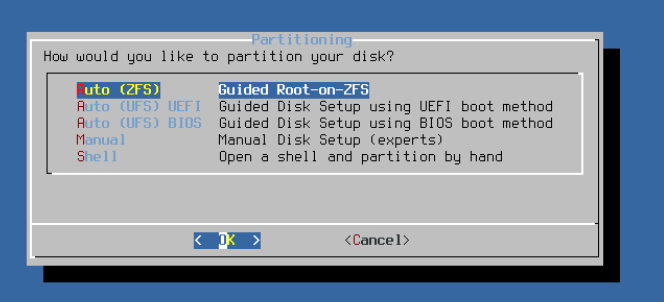
I'm installing pfSense on the VM following this tutorial, however now I see more partition options, will it work with Auto (ZFS)?
-
I got an unused HP NC365T 4 ports in my Ryzen Box.
-
Was looking for it but cant find the link. I guess i should install the ce version and add the Key that you get via email when you register
-
so should I install the CE or the plus version?
-
Hello, All, is it possible to install in Unraid VM pfSense plus and Boot Environment? John




