Rysz
Community Developer
-
Joined
Everything posted by Rysz
-
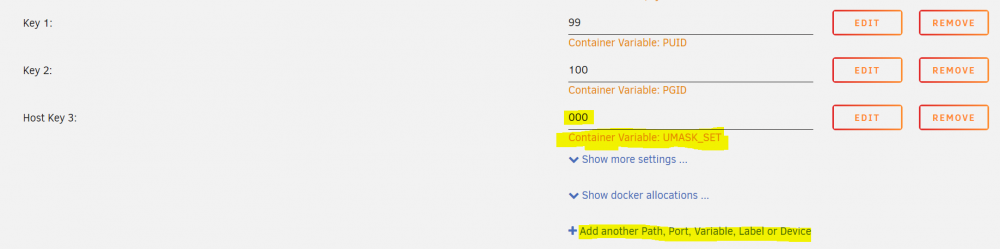
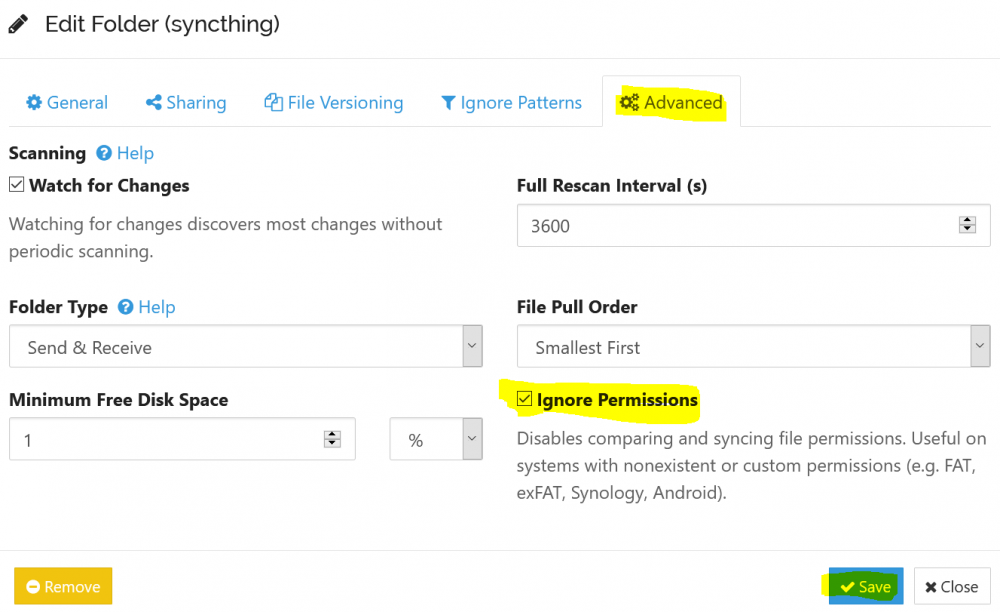
NOTE 01/2024: UMASK_SET has been renamed to UMASK (beware the outdated screenshots!) For anyone experiencing write-permission errors on Samba shares as I did, please make sure that: Syncthing Container (Docker) configuration has a configuration key set as follows: UMASK => 000 (UMASK as "Key" / 000 as "Value") Such a key can be added by clicking on "Add another Path, Port, Variable, Label or Device". to enable "Ignore Permissions" on each individual shared folder inside the Syncthing Web UI on your UNRAID machine. I have been investigating for hours why my files would keep ending up with the wrong permissions despite the supposedly correct UMASK of 000. Syncthing will, by default, try to synchronize the file permissions when exchanging data between two machines - beware of this functionality. Especially if you sync folders between another Linux machine and your UNRAID machine, Syncthing will initially create the file on your UNRAID machine respecting the UMASK 000 but later modify the permissions to reflect those on the original machine. By ensuring that your synced folders are all set to "ignore permissions", you basically tell Synthing to stay out of setting permissions altogether and respect the default local permissions. (which you have previously set by handing the UMASK 000 to the container) Hope this helps anyone experiencing permission troubles on Samba shares. 🙂