





Rysz
Community Developer
-
Joined
Everything posted by Rysz
-
Yeah, I'm guessing since it says "2.8.0-signed" it was built from this source code release: https://github.com/networkupstools/nut/releases/tag/v2.8.0-signed But that's more than a year old already, so many changes have been made to NUT since then. My versions were built from the master branch as of as of 26.08.2023, feel free to use them. 🙂
-
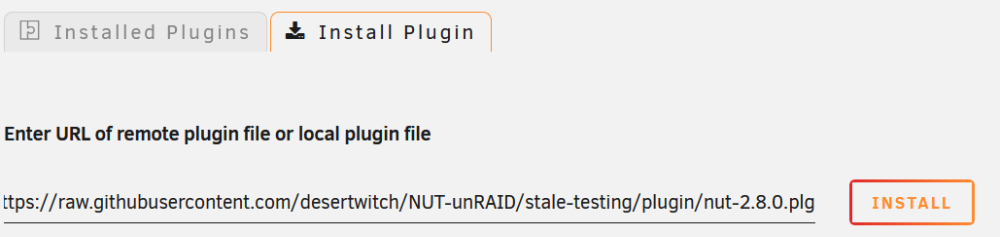
For the two of you and anyone else already on 2.8.0 but still experiencing incompatibility or problems with their UPS: I've compiled a more recent 2.8.0 backend package with the latest commits and changes based on the current state of the GitHub master branch (as of 24.08.2023), feel free to test if these upstream changes resolve your problems and please do report back here. A ton of bug fixes and changes have been made to the upstream NUT project since the NUT backend package (currently shipping with the NUT plugin) was last built (back on 30.04.2022), so it's definitely worth trying if you're still frustrated over something not working as intended. 🙂 If you do not have any problems, I suggest sticking with what you have installed. How to install this experimental version with the new backend? Uninstall your current NUT plugin Go to Plugins => Install Plugin Enter URL: https://raw.githubusercontent.com/desertwitch/NUT-unRAID/stale-testing/plugin/nut-2.8.0.plg Click on Install 🙂 Ideally restart your server (definitely restart your server if you run into problems) Here's a screenshot to illustrate the process:
-
There's a fix available as release candidate now, can you test if it works now?
-
Might be the USB interface (of the motherboard) then. Could be worth trying a PCIe USB expansion card if it bothers you much.
-
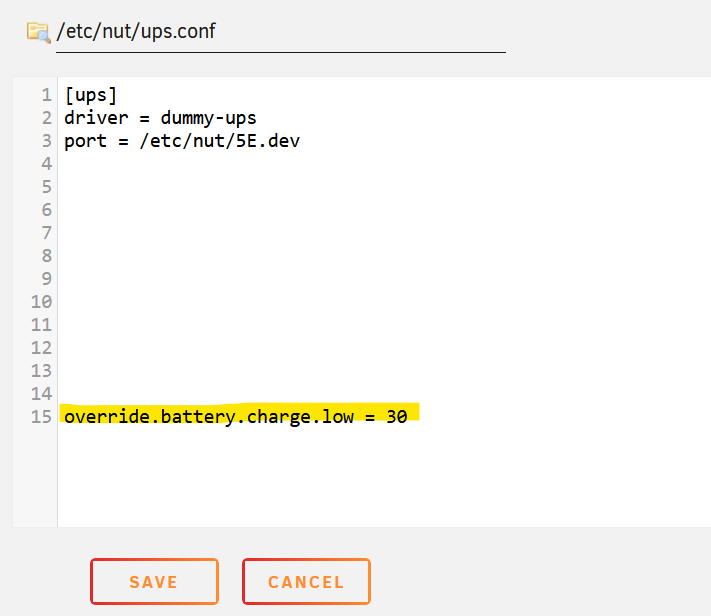
I'm guessing it's because battery.charge.low is set or reported at 100% for some reason. This'll basically shutdown your system if the battery drops just by 1% (likely to happen during testing). You can configure this directly on your UPS or UPS software (what charge it considers as "low battery") If this value is reported wrong from the UPS (say it's set to 30% on your UPS, but NUT still shows 100%) You can override the value by putting into your ups.conf on line 15: override.battery.charge.low = 30 NUT should correctly report the battery.charge.low value then and act according to this value instead. But make sure to attempt to set this value on your UPS first - this is something that should be set on UPS. Only if it's set on UPS correctly and still reported wrong by NUT you should override the value via configuration:
-
Please note this when following these instructions to test the new 2.8.0 package. Unless you're also changing the MD5 in the plugin definition file to the MD5 of the new package, the new package will not survive your system rebooting. You'll be thinking you're testing the new package when you're actually right back on the old package. The MD5 mismatching will make UNRAID pull the old 2.8.0 package from the GitHub repository once the system boots. Just sayin'
-
Why is this a big step? Updates are good in general, I really don't like the idea of always staying on a low version to avoid issues for users who have no issues but maybe make it harder for new users with newer UPS units which are maybe supported by the newer version. NUT 2.8.0 RC3 has been released 04-2022, it's already 07-2023. The plugin has been bundling a 7 year old release (built as a package last 3 years ago) as it's default package until now. It seemed from previous posts on this topic that stability was the prime concern for not upgrading the default to 2.8.0 earlier, people trust things on their UPSs working after all. In the last few months people having problems have been increasingly offered the 2.8.0 flavour of the plugin bundled with the very Sotirov 2.8.0 RC3 (last stable release) package. That has since helped various users fix their problems and seems to be working well overall. I'm just asking, why not stick with the stable release 2.8.0 package that you've already offered to some of your users to fix existing problems and then maybe custom-build the next version for everyone (2.8.1 being around the corner)? It just doesn't make sense from a point of continuity to me to keep users on 2.7.4 for years for sake of stability, then offer a portion of them a 2.8.0 RC3 stable bundle as a band-aid but then not switch the rest over to that stable version when everything seems to work, but instead a 2 days old experimental build which like 3 people have tested so far. I couldn't find anything "built by Slackware", oldest 2.7.4 packages I could find in the repository were built by V'yacheslav Stetskevych according to the build scripts (maybe he's with Slackware?...) Well people are kind of trusting their hardware on their UPS and NUT functioning. So I do think as much careful package stability consideration and testing as possible should go into things working right from the release. But I'll not pursue this further, we'll have to agree to disagree here. I have the utmost respect for all the work done here and I'll continue to contribute my part but I'm one of those people who think that not doing everything in-house has it's benefits too. 🙂
-
So far everything's working with the new custom-built package. But I do have a consideration regarding the switching of packages over to NUT 2.8.0. The existing NUT 2.8.0 package in @SimonF's repository already is/was the latest stable NUT 2.8.0 (RC3), it's this one from a reputable source providing tons of other Slackware packages too: https://slackware.pkgs.org/15.0/slackpack-x86_64/nut-2.8.0-x86_64-1gds.txz.html (by https://sotirov-bg.net/slackpack/). It's a bit more than a year old, so this Sotirov's package is probably as well made, stable and tested (by a larger audience) as it gets for NUT 2.8.0 on Slackware - that all sounds good to me. Is it then really a good idea to make the already quite large step from a well tested and stable 2.7.4 to a newer 2.8.0 with a custom-built package when we could be switching to Sotirov's one year tried and tested NUT 2.8.0 (RC3) package, which already presents us with the latest official stable release available? Any additions to the NUT GitHub since the last official 2.8.0 stable release (RC3) one could basically still consider as experimental, since there's been no more official stable releases since RC3 and 2.8.1 (https://networkupstools.org/docs/user-manual.chunked/apis01.html) is still being worked on at the moment (but has not been released yet). I mean none of us here can remotely do so much testing with this new custom-built package that it would supersede Sotirov's package from a year ago in terms of testing and stability. Wouldn't it be better to rely on such a package since stability is the paramount concern rather than having the "latest fix"? To me it makes not so much sense that we waited so long with the upgrade from 2.7.4 to 2.8.0 because of stability concerns and then we switch to a few days old custom-built package when there's another more long-term tested and stable one around. Just throwing this in here for discussion, thanks everyone for the efforts.
-
Yes, same ones, I just switched out the cable and so far there's been no more happening.
-
I'm getting random USB driver drops here since using the new package, but could be a cable issue. Just out of curiosity, did you build from the current GitHub repo or released 2.8.0 source? Don't get me wrong here, not implying you don't know how to compile a package - on a first glance the amount of differences made me wonder if something went wrong somewhere - just trying to help the user and myself here (trying a new cable this afternoon too) by keeping an open mind.
-
The status is correct, your driver is seeing "ups.status: OL DISCHRG" = online & discharging. In previous versions of the plugin not all possible status messages were always interpreted and shown, so it's probably always been there but was not displayed correctly until now. If the status message itself is wrong and your UPS screen/LEDs say otherwise, it's likely a problem with the driver but nothing we can affect from within the plugin. But really it could also mean that your UPS battery is not currently charging and in the process slightly discharging (as all batteries do when they're not being charged) and that's why your UPS is reporting itself as discharging. But don't worry, nothing happens because of this status.
-
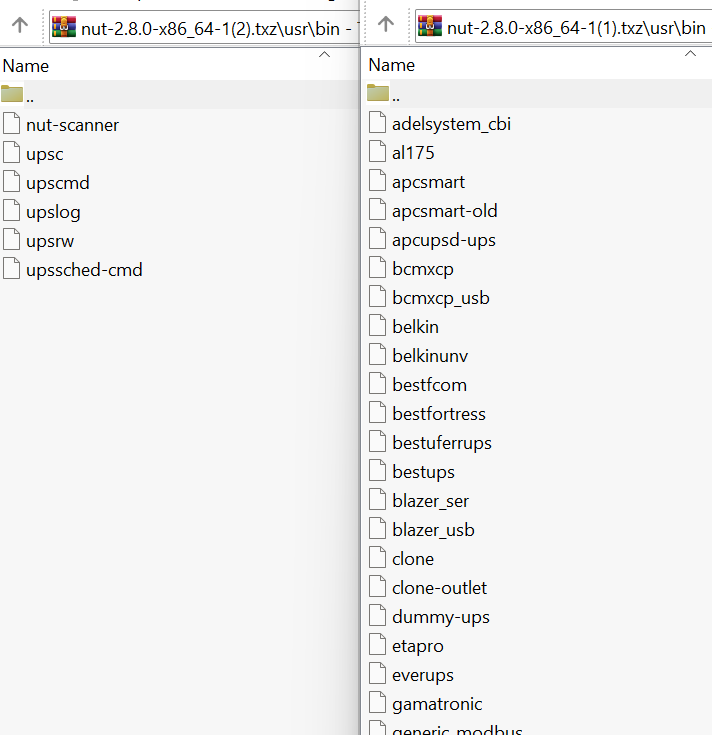
Was this before or after the reboot? The logs from above were with the new package (smaller one) or the old package (larger one)? The driver does seem to see your device, just not know how to talk to it. @SimonF @ich777 Regarding the different sizes of the package, I think something is funky with the new package here: It seems it is missing quite a few binaries and libraries. I'll try to re-compile and re-package later and will report back here. Can you please post the diag-nostics file, go to the NUT settings => Save Diag-nostics so we can take a look what your UPS is doing?
-
No worries there at all, I'm thankful and glad everyone's chiming in on the pull requests - that's what open source development is for after all and it opens another perspective. Generally it's probably a good idea to keep working permissions the same for now, if any problems happen down the line we can still treat them when they occur. I wouldn't want for things to break for current users either.
-
@ich777: I'll trust you there, thanks for the compiling insight - closing PR.
-
In the current version (disregarding my PR) we currently have a collection of: chmod +0755 chmod 640 chmod 0770 chown root:nut chown -R 218:218 (= nut:nut) chmod -R -r /etc/nut (what even is this, -r is nowhere in man pages of chmod) To me that seems like an inconsistent mess and asking for permission trouble in the future. At the moment some folders get root:nut, others nut:nut, some files 0770, some files 640 I chose 0770 root:nut for everything because that was already the most used throughout the script. So that the root user and nut group (which includes the nut user) would have read/write/delete/execute access to all files. I'm open to another single permission number throughout the whole plugin, but why the mess we're currently doing with multiple permissions scattered all over the place? What's the benefit of keeping those various different permissions throughout the plugin?
-
I'll test the new package too, thanks a lot @ich777 Since we're moving in direction of 2.8.0 I've checked for potential permission issues. A pull request was submitted so that all permissions are the same throughout the script. This should eliminate any possible problems with services and drivers not having enough access.
-
Thanks everyone for the hard work and @SimonF for bearing with our messy PRs. 😅
-
@SimonF just updated the plugin packages with our latest fixes. You can now update the package and don't need the fix-permissions commands from above anymore, so you can try again after the reboot is possible for you (just do the other steps). If that still doesn't work, then I'm afraid then the Slackware NUT 2.8.0 package doesn't recognize your UPS (maybe it was from an older 2.8.0 build not including the specific drivers for that UPS). You could wait for NUT 2.8.1. but I'm not sure that'll arrive within your return window for the UPS. Right now there's no indication in those logs that it's a problem with the plugin, rather that your device is not recognized by the driver itself.
-
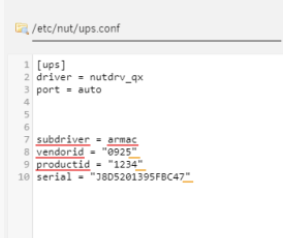
The logs indicate something in your configuration is broken. You should remove your broken configuration file: rm -f /boot/config/plugins/nut/nut.cfg After you should remove and reinstall the 2.8.0 plugin. After that's done disable the NUT service via the NUT settings. After that's done edit the ups.conf as shown above via the NUT settings (mind the line 7 oddity as you did before). Make sure to also set the driver to "Custom" and "nutdrv_qx" as well as the "Port" to "auto" in the NUT settings, not just inside the file. After that's done enable the NUT service via the NUT settings and report back here please. Don't restart the NUT service via the command line (rc.nut), it seems to mess up the configuration.



-
The permission problem is resolved - that's good and important for many other users (thanks for this!) Can please you try putting subdriver, vendorid and productid starting from line 7? [ups] driver = nutdrv_qx port = auto subdriver = armac vendorid = "0925" productid = "1234" It's a known oddity that causes problems in some cases. Then restart the services: /etc/rc.d/rc.nut stop /etc/rc.d/rc.nut start And check back with us here what is happening? Your UPS is a tricky one, at least the drivers are properly starting now.
-
If you want to test it in the meantime (on your running system) - run these commands: chown root:nut /var/state/ups chmod 0770 /var/state/ups /etc/rc.d/rc.nut stop /etc/rc.d/rc.nut start That should fix the problem on your running system and you can test if your UPS works with the driver. But note that this permission fix won't persist a reboot, you'll have to wait for the actual update for that.
-
I've tested this and it's actually (in part) a permissions issue with this driver on NUT 2.8.0 I've added a fix into the most recent pull request, so it should be fixed with the next update. Sorry for the inconvenience!
-
I'm afraid this one will most likely require a reboot to work as permissions will "clean up" after reboot. This is unfortunately one of the downsides on switching backends without rebooting in between. Please let us know after the reboot if the permission issue has resolved and if it's working with NUT 2.8.0
-
It's not a permission issue, it's remnants of the old 2.7.4. files (should be fixed with next update). What you can do in the meantime is uninstall the 2.8.0 plugin and install it again afterwards, this'll clear those directories without a restart and it should work then.
-
You can install the plugin without a restart (I just tend to recommend it so there can be no traces of the "old" 2.7.4 backend messing with the "new" 2.8.0 backend). The worst thing that could happen is that it's not working until you restart the server, but it's not likely to happen overall. Regarding the versioning - both "flavours" (default 2.7.4 / experimental 2.8.0) of the plugin always have all the recent changes. They use exactly identical code (same code package) as far as the plugin itself is concerned, just the backend service is different. NUT 2.7.4 has been the most used and stable for a long while, while NUT 2.8.0 is newer but also offers useful fixes. Down the line I'm guessing (although of course it's up to the repository owner) NUT 2.8.0 will become the default backend at some point. I'm actually thinking about kicking off a pull request on GitHub where we can discuss what's needed for a smooth transition to NUT 2.8.0, so we can streamline the effort to fix any open problems before updating the backend of the default package to NUT 2.8.0. Please do report back if 2.8.0 has fixed the problem with your UPS.







