





Rysz
Community Developer
-
Joined
Everything posted by Rysz
-
This doesn't really look like a NUT problem but rather something on your OS (e.g. another plugin or the OS itself if you're on some custom built/pre-release version since you're already using libssl3) sending a SIGTERM (= Signal 15) to the NUT services at 4am (note that the plugin itself doesn't run any periodic update checks). So you'd need a 2.8.0 libssl3 version for 6.13+? I doubt it'll change much though, as all the log messages seem to be caused by the SIGTERM received... feel free to test it with this package though: https://github.com/desertwitch/NUT-unRAID/blob/master/packages/nut-2.8.0-x86_64-1stable.ssl31.txz And please let me know if you figured out what caused this for you! For all other users (on versions 6.10 up to unreleased 6.13) there's the older backends available: release (2.8.0 stable) legacy (2.7.4 stable) through the Network UPS Tools Backend Switch as usual. 🙂
-
If your UNRAID USB boot drive also goes offline, this is definitely not a NUT problem.
-
Another user on Discord had more luck pointing the UPS Driver Port directly to the respective /dev/ device assigned to the UPS (in his case e.g. /dev/ttyUSB0) instead of using auto. If you can figure out (e.g. from the logs) which /dev/ device your UPS device was assigned to, you could attempt to point the driver directly to that port instead (try it with both tripplite_usb and usbhid-ups drivers). Looks like in your case that'd be: /dev/bus/usb/001/085
-
Table looks OK, general compatibility seems good with all the really important variables reported. NUT itself uses the variables reported from the UPS, but the plugin can calculate some for the GUI. However that only works for variables which are zero or entirely missing, so not much we can do there. On the upside this is only an optical problem, load variables are not required for NUT itself to function. So you'll still have the safe shutdown and all other functions of NUT working without the load variable. Did you ever attempt if it changes anything using just: [ups] driver = "usbhid-ups" port = "auto"
-
Can you post a screenshot of the variable table (NUT Details) please, hard to tell what's wrong.
-
If you never had problems before changing then I'd recommend the backend: legacy (2.7.4 stable). Some UPS don't play well with the newer backends, and this is the one the older plugin has also used. Note that you will need to reboot your system for the backend change to become effective. It should then say: "nut-2.7.4.20200318-x86_64-1" for "Network UPS Tools Backend". You will then stay on that backend permanently and updates will only affect the other parts of the plugin (but not the UPS drivers).
-
The NUT dashboard panel is not viewed when NUT itself is not running, so it doesn't take up useless space - that's normal. From your logs this seems more of a USB connectivity problem (which seems to resolve when restarting), rather than a NUT backend problem. What kind of UPS is this you're using ("PPC Offline UPS") and have you tried any other USB ports or cables?
-
Seems to be a driver mostly for chips by MaxLinear/Exar, like this one, which are used in various appliances: https://www.maxlinear.com/product/interface/uarts/usb-uarts/xr21v1412 If it's small and doesn't cause any negative fallout, might be worth considering for an inclusion (kernels 5.12+).
-
As far as I know there's only one NUT driver for a specific Huawei UPS series (2000) which would require that kernel module to work using USB - but even there only for a specific chip used by older pre-2022 devices - and you could instead use a serial cable without needing the kernel module as an alternative. All other USB and serial drivers don't seem to need that kernel module, so might be worth trying NUT with your UPS device. This is the only driver that might need it: https://networkupstools.org/docs/man/huawei-ups2000.html
-
The NUT plugin uses the UNRAID notification settings to notify you in such cases - so you'd need to check them. Is it possible you don't have all your network devices connected to the UPS and UNRAID couldn't notify you because it had no internet connection anymore at that point? Was this a large-scale power loss where your ISP could have been affected too? I've just tested it with mine and it notified me of all status changes as it should.
-
Unfortunately this is out of NUT's control, as your UPS seems to cut off the information "flow" to that specific load variable when under 50 watts. This is commonly seen with more powerful UPS which consider such a miniscule load not worthy to report, but not having the load reported is merely an optical problem rather than a functional one - load is not a variable required for NUT to function.
-
Hello! Thanks for asking about this - I've outlined it in detail in this post: Basically this was mostly an issue in the past few months, where the default NUT backend has changed more often due to ongoing development and bug-fixing efforts in preparation of a NUT 2.8.1 stable release. A small amount of people were still on very outdated backends (from 2016) and experienced some compatibility problems updating to the newer backends (from 2023). The NUT 2.8.1. stable release is now on the horizon and will become the new (pinned) default backend, so there'll be no more frequent backend changes after that (at which point I'll also remove that warning, because updating will affect only the GUI). It's just something I wanted people to be cautious of while I make the transition to the NUT 2.8.1 stable release as new default backend, which should happen in the next 1-2 weeks. This is basically all unrelated to the plugin, it's the updating of the NUT backend (with the UPS drivers) that's caused some issues beyond my control as the plugin maintainer. The changelog is limited to the changes made by me (to the plugin), but doesn't include those made to the NUT backend (being a program of its own developed by other people for multiple OSes).
-
The first one is likely a warning about a USB write-timeout, these occur sometimes and shouldn't cause any trouble on their own. The others are newer diagnostic messages in the NUT backend and have no particular meaning on UNRAID. They just report that NUT itself isn't connected to a systemd or similar environment as on other linux distributions, if everything seems to work as it should - you can safely ignore those messages. 🙂
-
It tells you that because I am doing a lot of development work there at the moment. A lot of re-factoring and code-wise improvements are done in preparation of the imminent NUT 2.8.1 release. I'm expecting things to quiet down after the NUT 2.8.1 release, so bear with me here until then (no promises). It does say in the plugin description I'm putting a focus on frequent updates though, so there's that... 😃 What exactly "won't work" after updating that would make you restart your server? Sorry, but that's a bit vague of a statement to determine if there's an actual problem, one I'm sure that other users would have been very vocal about (having to restart their servers to update a plugin) if it were a more common occurrence. It's certainly your prerogative to ignore updates and I'm in fact even slightly discouraging users to update their plugin if everything just works for them (with most changes aimed towards people having problems and not introducing new features + UPS drivers being unpredictable as they are).
-
Hmm, does it say anything in the logs with the tripplite_usb driver? What else you can try: Auto Config with different USB port Same settings on backend "release (2.8.0 stable)" Same settings on backend "legacy (2.7.4 stable)" Auto Config on backend "release (2.8.0 stable)" Auto Config on backend "legacy (2.7.4 stable)" If you don't want to reboot changing backends, you can also just uninstall and reinstall the plugin (after changing the backend). Just make sure that "Network UPS Tools Backend:" says something different than before, that it's actually changed (you at least need to reinstall the plugin, otherwise it won't change the backend).
-
Should work with driver "tripplite_usb" and port "auto" - can you test this combination with this version of the plugin? You need to set Start Network UPS Tools setting to "No", change the settings and then back to "Yes" to start NUT again.
-
Which UPS model do you have exactly?
-
Hello! You seem to be using an extremely old version of the plugin, a lot of changes have been made to the autoconfigure mechanism and drivers since. Please uninstall your outdated plugin and install "Network UPS Tools (NUT) for UNRAID" by Rysz from Community Applications ("Apps" Tab). When you first set it up, best choose "Reset Config" to clear the old configuration and then "Auto Config" for auto detection of your UPS. Also please make sure to never use the same usernames for Monitor and Slave, this can lead to unexpected behavior. Please let us know if it worked for you 🙂
-
There's a button "Reset Config" - that'll reset everything to the default state. 🙂
-
We have since found the issue with this, the problem was that the server was not connected to the "master" power outlet and that this Eaton UPS doesn't report load for the "slave" power outlets.
-
The plugin currently offers three backend "channels" to choose from: default (recent master, updated every ~1-2 weeks) release (2.8.0 stable, from 04/2022) legacy (2.7.4 stable, from 03/2016) If you don't see them all, you're likely using an older version of UNRAID. The "problem" is the last official NUT release was way back in 04/2022, but a lot of useful and important changes have been made to the NUT project since (including new drivers, new supported UPS, ...). Those changes haven't been published as a new release yet, but in the form of continued development in the NUT master repository. So I decided to base my default version of the plugin on a "default (recent master)" backend which I continuously compile and keep up-to-date with that master repository myself, so that everyone can get the most out of NUT, but with the possibility of switching to an older backend in case they have problems. There is currently no easy way to roll back from "default (recent master)" - although I am looking at ways to "pin" that backend while continuing to get updates for the other parts of the plugin. For all the other selectable backends - this is already working. That means if you select "release (2.8.0 stable)" or "legacy (2.7.4 stable)", and one of those works well for you, you'll stay on that backend indefinitely and will still receive all updates to the other parts of the plugin when you update. Good news is that a 2.8.1 stable release is already on the horizon, packing all the development of the past 1.5 years, and will soon be offered in the plugin along with the older backends. So once that is released I'll either be "pinning" that new release as the new default backend or you'll at least be able to choose it in form of a "release (2.8.1 stable)" backend and remain on that for as long as you like, while still getting updates to the other parts of the plugin when you update. I've decided to include the update "warning" because a lot of the NUT development is based on theoretical logic and with 1171 hardware device models from 175 different manufacturers listed as supported it's impossible to always account for all of them. So there's always a slim chance that something that previously worked for your UPS might stop working with a newer built backend. The plugin itself is just a type of "frontend" to the NUT backend, you see, which is developed by other people and with far more operating systems than UNRAID in mind. All I can do is select which backends to offer to the users, and I think I already offer quite a broad variety compared to some of the other plugins, as well as striving to make the "frontend" as useful and stable as possible. "If it works, don't touch it." - there are some software packages to which I apply this principle. If NUT is among them, that'll be your personal decision, but I want people to make it a conscious one. Of course I am always excited if people update to the new backends for the latest changes, and I am always more than happy to help whenever problems should occur, but I have essentially no control over your individual device's compatibility. Bottom line, most of the plugin's changes won't bring exciting new features, but aim to improve compatibility for new installations as well as offering bugfixes for people who are experiencing problems. If you're not among them, be happy, but do continue to read the changelogs and decide for yourself if it's worth to update. 🙂
-
That's a dying USB port or USB cable (or worst case USB controller). Best would be to try a different USB port or USB cable first and see if that changes anything.
-
Yeah that's unfortunately not possible to setup with NUT on UNRAID, not without changes to the code at least. I think one user got it working a few pages back in this topic, you'll probably find it by searching "qnapups". But it's more of a workaround than something "officially" supported.
-
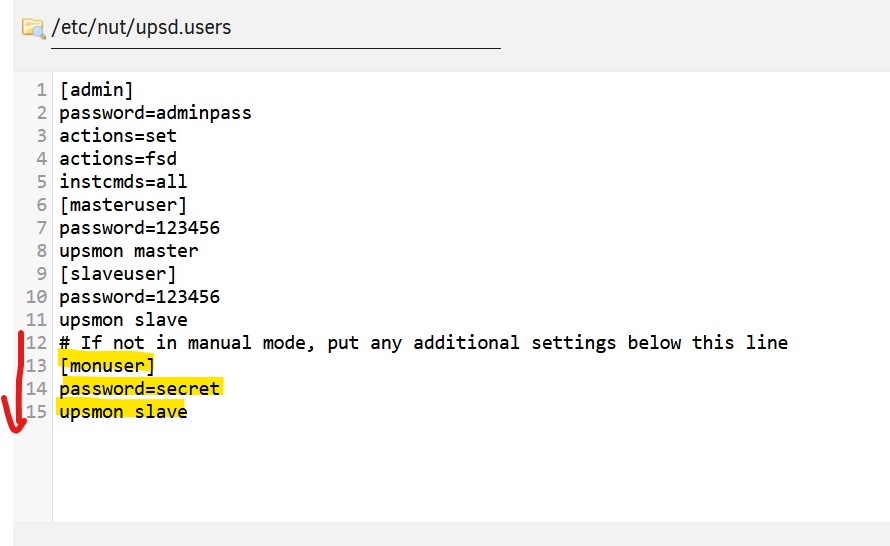
You can add a second user with different credentials like this: Set NUT Monitor Username to something else than "monuser", like "masteruser" Set NUT Slave Username and NUT Slave Password to the username/password your QNAP expects Apply Settings (to save configuration) In NUT Configuration Editor, modify the /etc/nut/upsd.users like this: Save the modified configuration file Start NUT Then on your Synology device you can use the monuser user, and on your QNAP the other user (here slaveuser). Make sure to put the additional user below the line 12 and leave the rest of the settings (as they are configured and overwritten by the GUI settings). I can't guarantee this'll work (don't have QNAP/Synology devices). But in theory it should work like this, unfortunately there's no SNMP server in NUT. 🙂
-
On UNRAID you'd need to set NUT to netserver mode. On QNAP you will then choose "Network UPS Slave" About Synology I'm not sure if it'll work, there's a few topics on Google about it.




