





Rysz
Community Developer
-
Joined
Everything posted by Rysz
-
Great - glad it works for you!! ✌️
-
No - the UNRAID's own UPS settings (the APC daemon) should be set to "No" / "Disabled" 🙂
-
What does it say in the log when you start NUT with the huawei_ups2000 driver?
-
Are you sure the text in "Network UPS Tools Backend" didn't change? Because this is the (older) stable backend which you've selected - so the correct backend is installed (according to your selection). Maybe you were on the (older) stable backend already - which is why your load value wasn't shown and the backend hasn't changed? The new backend is "nut-2.8.0-x86_64-11master.ssl11" or "nut-2.8.0-x86_64-12master.ssl11". In any case the backend definitely switches when reinstalling, so worth trying changing again to: default (recent master) => reinstall plugin => test if it works legacy (2.7.4. stable) => reinstall plugin => test if it works
-
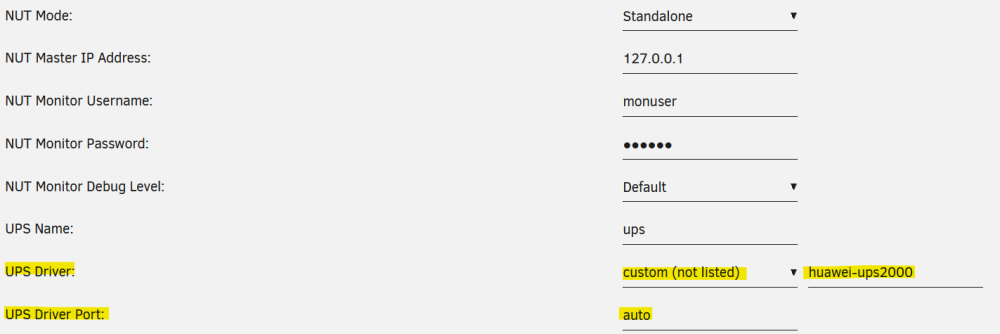
This UPS won't work with the APC modbus driver (which is mostly for APC devices). Instead it even has it's own driver: https://networkupstools.org/docs/man/huawei-ups2000.html You can attempt to set it up as follows:
-
Yes, select the backend you want to switch to and then uninstall and reinstall the plugin. 🙂 You'll see that the backend was changed when the "Network UPS Tools Backend:" says something different than before. I'd try release (2.8.0 stable) first, if that doesn't work then legacy (2.7.4 stable).
-
Can you try with the "legacy (2.7.4)" backend - some UPS don't play well with the newer backends. Please note that if you switch backends you need to either restart your system or re-install the plugin. Otherwise the backend change will not be in effect, so worth attempting to change to 2.8.0 or 2.7.4 with this in mind.
-
What UPS model do you have? Can you please upload another debug package where you are on the current backend? Your debug package is from the (older) stable backend.
-
You have the old backend selected which didn't have this driver yet, you'll need to make sure you are on the latest NUT plugin version and then select the backend "default (recent master)". After either restart the system or reinstall the plugin - then make sure "Network UPS Tools Backend:" now says: "nut-2.8.0-x86_64-12master.ssl11".
-
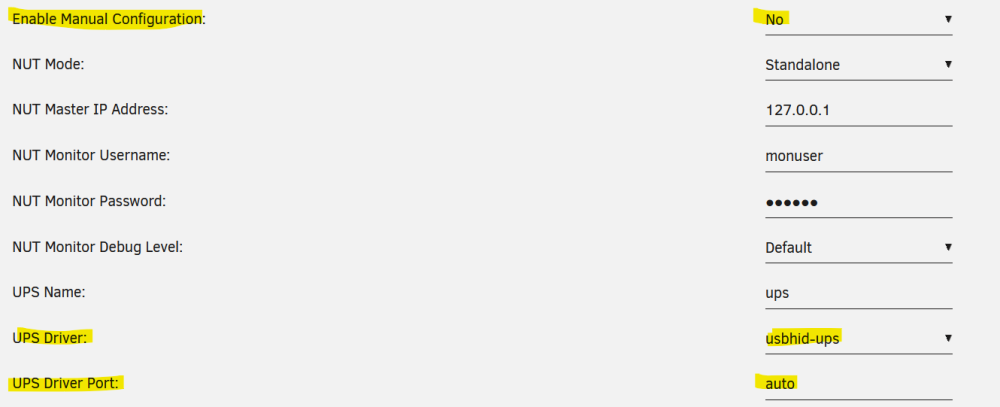
MODBUS is an APC protocol that needs to be specifically activated on the UPS: Note that you will have to enable Modbus communication. In the front panel of the UPS, go to Advanced Menu mode, under Configuration and enable Modbus. If you don't have this/want this activated you should use the driver usbhid-ups instead. The old version of NUT didn't include the MODBUS driver, so you were using usbhid-ups there. You will need to click "Reset Config" first to remove the configuration by the auto-config tool. Then set the NUT settings up as follows: Please let me know if that works for you! 🙂
-
The settings are greyed out because NUT is running (you'd need to stop NUT to change them). Why the load doesn't display I'm not sure, nothing was changed in the backend that would cause this. If reverting back to 2.8.0 also doesn't change this (the load missing), it's likely not caused by the backend, but the UPS - can you try connecting your UPS on a different USB port?
-
Welcome!
-
I've just pushed an update with a fixed backend for your issue. Please do as follows: Stop NUT on your UNRAID if running. Set "Network UPS Tools Backend Switch:" to "default (recent master)" in NUT Settings Click on "Apply" button to save the changed backend setting. Update the NUT plugin to version 2023.10.24 Make sure "Network UPS Tools Backend:" now says: "nut-2.8.0-x86_64-12master.ssl11" Start NUT, should work now. 🙂
-
Nothing was changed on that, do you have the correct CMDSCRIPT directive in your upssched.conf? Anything in the logs, particularly when starting up NUT?
-
I've just identified and been able to reproduce this as a bug in the backend in the relatively rare situation of a not 100% correctly treated ONLINE state in combination with a network loss. I've reported this to the upstream backend developer and hopefully we'll see a fix for this ASAP. In the meantime, you can switch to the release/legacy backend, if those work for you: Sorry for the inconvenience - I'll post here as soon as this is fixed in the "default (recent master)" backend.

-
Thanks for reporting back, this is indeed the battery self test, we've luckily been able to fix the APC shutdown issue in the "default (recent master)" backend also since your report. So you can stay on 2.8.0 stable if it works well for you or update NUT and switch back to "default (recent master)". 🙂
-
Yes, that's the affected series. The old NUT used the legacy 2.7.4 backend (and had a range of problems on its own unfortunately). If you choose the NUT stable or legacy backends you'll only get the GUI updates when updating NUT but the backend will always stay on the chosen backend (if that's what you want 🙂)
-
This is unfortunately a known bug in the NUT backend that happens when some APC devices do their bi-monthly battery self tests. Switching to stable or legacy backend has fixed the problem for the other users affected and a fix for this from the NUT backend developers is on the way. I'm guessing you also have an APC device?
-
POLLFREQ 5 This is what you'd put in upsmon.conf on UNRAID via the NUT configuration editor in the GUI. You might need to "Reset Config" since yours seems broken somehow. The other lines (from the post) are only for the server the UPS is physically connected to.
-
I'd try another USB port and see if the problem persists, such logs have been occurring for other users where USB ports or cables died.
-
See this post for the values:
-
Sorry, no idea about the Docker version of NUT - that one's not maintained by me.
-
"Kill UPS Power" selbst bewirkt nur das Ausschalten der USV (und des Batteriestroms zu den Geräten) nach dem Herunterfahren des Servers. Wenn der Netzstrom wieder da ist, sollte sich die USV dann wieder einschalten und der Server (wenn im BIOS so eingerichtet) wieder hochfahren. Ist also ein Zusammenspiel von mehreren Faktoren mit der grundlegenden Voraussetzung dass die USV selbst das Herunterfahren unterstützt.
-
Die "Kill UPS Power" Funktion wird leider nicht von allen USV Geräten unterstützt, je nach Hersteller und Modell.
-
Nice work and thanks for posting it here - nice to see this working and incorporated into another script. 🙂





