





Rysz
Community Developer
-
Joined
Everything posted by Rysz
-
Did you make any significant changes to the UPS (battery/settings), the physical connection (different USB cable/port) or NUT (changed backend/updated from much older version) recently that could correlate with this issue? If it worked well before then it looks to me like the USB cable or USB port is dying, hopefully not the USB interface on the USB itself. Can you try with another USB cable or USB port and check if the problem resolves? Configuration-wise everything looks good, so I'm thinking it's something with the physical connection that causes these dropouts - especially since the UPS is recognized at first.
-
Exactly, and there's not really all that much runtime on most UPS to do fine-grained selective service shutdowns. Important is that everything is gracefully shutdown as intended by UNRAID, which is why the inbuilt graceful shutdown mechanism is used here.
-
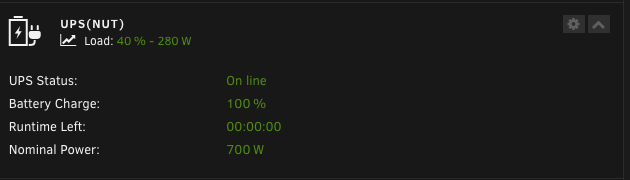
Did you change anything before this stopped working (UPS firmware update, used another USB port or hub, updated from a much older NUT version, changed the NUT backend, ...)? It looks like the UPS either cannot read, estimate or send the runtime information anymore, because NUT itself receives "battery.runtime: 0" from the UPS. Is the battery you changed to new and properly connected inside the UPS, are there any LED indications that something is not working as it should? Another thing you could try is if the runtime is shown when you disable NUT and use the inbuilt APCUPSD service's "UPS Settings" in UNRAID (just for testing), this way we could better determine if this is a software (NUT/NUT driver) or hardware (UPS/UPS connectivity) problem.
-
Hmm, I'm afraid I'm out of my depth with this now. In this case it's probably best to keep those lines then, if the UPS doesn't function otherwise. You could open an issue on GitHub hoping that the NUT driver developers might be able to help you tune your settings some more: https://github.com/networkupstools/nut/issues I'm sorry that I couldn't be of more help here!
-
I see you're using these UPS.CONF settings in your old post: default.battery.voltage.high = 27.50 default.battery.voltage.low = 21.40 default.battery.voltage.nominal = 24.00 If you do this then the driver will guess the battery charge based on the battery voltage. Particularly older batteries cannot hold their maximum voltage well anymore and have sags in voltage (possibly causing frequent re-charges). It's possible this mechanism causes your battery to look as "charging" when fluctuations or changes in voltage occur. It's also possible that when the UPS sees an increased load when you start up your server it'll start topping up the battery from a lower voltage to a higher voltage (to ensure providing as much battery time as possible), as opposed to times when the UPS load is minimal and the battery can rest with a lower voltage. Normally the UPS itself provides information about the battery charge, so these settings are not needed and the charge provided is an estimation at best. Please try removing these settings from the UPS.CONF and see if the UPS then provides the actual and not voltage-based estimation of the UPS battery charge. This is in part related to what this user was warning about here in the old topic:
-
Yes, this is the setting you'll want. By default NUT initiates a graceful stopping of all services and disks before shutdown. Only if you have a lot of services you might need to increase/fine-tune the shutdown timeout setting under Unraid's Disk Settings to give the OS enough time to stop everything gracefully before it proceeds with the shutdown sequence anyway. A too low shutdown timeout can result in a hard shutdown if the services take longer to stop than the timeout is set, though I'd say this rarely happens with normal use cases.
-
I've just pushed the update including more event hooks, check out "array_start_complete.sh". Please test and let me know if that works for your use case, this should run after everything else is done. 🙂 Make sure to delete your previous code from the other script ("array_start.sh") so your array startup doesn't hang as before.
-
In this case it's probably better to use the "User Scripts" plugin and hook into a different array event where both the array and Docker are started already. array_start.sh is just a simple helper script that hooks into the specific event where the disks are mounted (but nothing else is started yet). The reason is because in most cases users probably want their mergerFS filesystem to be up before the other services are starting (and depending on it being there) and not the other way around. So in your case: "User Scripts" plugin would be a better choice. 🙂
-
Does the UPS itself show as 100% charge (on the UPS display/LEDs) when this happens or does it show any indication that it's maybe really charging the battery? This is very very weird, especially that it "charges itself up" over time is usually really only seen when the UPS is in fact charging the battery somehow. I can't picture any programmatic problem that would make the driver increase the charge from 0% to 100% over time unless that's what the UPS also does... 😕
-
Regarding the NUT Statistics Module, it'll also include stale data for a time-point if no new data is available at the time of querying. By your logs everything seems to work as it should NUT-wise, so it'll likely be a problem with HA's data retention and/or polling frequency. I have no idea about APCUPSD as I've never used it myself, but it likely doesn't get updated as often as NUT so maybe it's a protocol-related bug there. I use this quite successfully for monitoring NUT on my PRTG server, maybe there's also a JSON parser option within HA?: https://github.com/dietah/nut-http
-
In the NUT Settings you can raise the "UPS Driver Debug Level" setting to see what's going on in the suspected stale times. Would be interesting to see what the driver is doing between the updates, raising the debug level should bring this clarity. 🙂
-
You can use upscmd inside scripts/the terminal to run commands on the UPS: https://networkupstools.org/docs/man/upscmd.html
-
Das kommt vom NUT Plugin, du hast vermutlich den "NUT Monitor Debug Level" auf "Level 2" (oder höher) eingestellt. Stelle also bitte in den NUT Einstellungen "UPS Driver Debug Level" und "NUT Monitor Debug Level" beides auf "Default" ein. Denn je höher der "Debug Level" umso mehr Nachrichten scheinen im Log auf (für Diagnostikzwecke), daher kommt das Problem. 🙂
-
If you are using "powertop", this is known to cause instabilities with some UPS (changing the auto-hibernation of USB devices). If not, continue reading... USB connectivity problems (data staleness, timeouts, ...) are incredibly hard if not impossible to diagnose remotely. They can stem from a multitude of factors because of the many parts involved in the equation (USB cable, port, bus, driver, implementation, ...). Common reasons have included broken USB cables (could attempt new USB cable), USB ports (could attempt a different USB port), USB buses (either on the host system or the UPS itself) and/or overall instability of the UPS driver in combination with a specific USB bus (could attempt PCIe USB card, could try on another PC). What's also proven to resolve the problem for some is using the serial cable or SNMP network connection instead of USB (where possible and available) for more overall stability and/or playing around with the different available NUT backends (utilizing the "NUT Backend Switch" in "NUT Settings") to resolve any possible driver and/or bus instabilities. See also here: https://networkupstools.org/docs/man/usbhid-ups.html (section "KNOWN ISSUES AND BUGS" regarding "Repetitive timeout and staleness") for the configurational values "pollinterval" and "pollfreq". Please do consult the NUT user manual on their scope and where to apply them in configuration files, when doing so please be advised to put them in the marked safe zones in the respective configuration files (best utilizing the "NUT Configuration Editor" in "NUT Settings") for them not to get overwritten. https://networkupstools.org/docs/user-manual.chunked/index.htmlBitte nutze Textdateien für längere Logs anstatt hier ellenlange Nachrichten zu posten. Das macht es einfach viel schwerer die Übersicht zu behalten und dir zu helfen, also bitte einfach Textdateien hochladen. Hast du deine Festplatten direkt am Board oder an einem PCI(e)-Controller (SATA, HBA...) angeschlossen?In that case I'd definitely go with APC because you'll find them mostly compatible out of the box with Unraid.You seem to have very strong opinions about Eaton, my personal experience with them has been nothing short of great on the other hand. So not really much more to add to that. 🙂Well it's usually the cheaper devices that end up with USB connectivity problems or USB busses crapping out early and other such annoying problems from my personal experience. I mean they have to save money somewhere when producing these cheaper units, so there's that. I personally just don't feel comfortable going budget on a lead acid device that could very well burn down my house (as with any other electronics, of course, but still) but to each their own. Besides to me there's a fine difference between overspending and going budget, it's making a conscious and informed decision.Because some electronic devices can be sensitive to simulated sine wave and if you're already spending that money on a UPS, you might as well get one with decent features. I don't know about Eaton's budget lines, but I'd generally not buy entry-level or budget UPS devices from any vendor - this is not something where I want to spend the least amount of money possible. Eaton has never let me down and their customer service, compatibility and RMA process are all top notch so I'd say they are well worth the investment. But that's just my opinion and experience.From my experience: buy cheap, buy twice - especially when it comes to UPS. Buy the most capacity and features you can afford, e.g. a pure sine wave output is worth it. Personally I can recommend Eaton as a brand, I'm very happy with my Eaton 5P 850 and it works well with NUT.Wishing you the same!Ich bin hier raus, tut mir leid aber so geht's auch nicht... Mit Screenshots vom Handy und 4-Wort-Antworten lässt sich kein Netzwerkproblem eingrenzen oder gar lösen. Bitte setze einmal die sehr sinnvollen Vorschläge von @alturismo um, vielleicht funktioniert es ja dann doch noch...Schaue auch mal ob im Netz sicher kein zweites Gerät die IP 192.168.178.72 hat, damit es hier keine Kollision gibt.DHCP ist bereits eingestellt, das passt also soweit (IPv4 address assignment = Automatic). Hast du einen DNS Server (PiHole o.ä.) auf deinem UNRAID laufen? ... oder warum hast du die IP-Adresse des UNRAID Servers bei "IPv4 DNS Server 1" eingetragen... ? Wenn nein/du nicht weißt was ein DNS Server ist, trage bei "IPv4 DNS Server 1" die IP deines Routers ein. Also in deinem Fall würde das dann wie folgt aussehen: IPv4 DNS Server 1: 192.168.178.1 IPv4 DNS Server 2: 8.8.8.8 Wenn ja, lasse "IPv4 DNS Server 1" gleich aber trage mal bei "IPv4 DNS Server 2" ein: 8.8.8.8 Und probiere es danach nochmals...


