





Rysz
Community Developer
-
Joined
Everything posted by Rysz
-
Mit deinen Einstellungen und Werten wird das sichere Herunterfahren im Falle eines Stromausfalls auf jeden Fall funktionieren. 🙂
-
Eaton USV funktionieren meist sehr gut mit NUT, liegt daran dass NUT einige Zeit von Eaton mitentwickelt und gesponsert wurde. Freut mich aber trotzdem, dass es bei dir gut funktioniert! 🙂
-
Bei UPS Power and Load Display Settings (auf Manual) kannst du die Normwerte deiner USV einstellen. Damit sollten dir dann alle deiner fehlenden Werte außer "Runtime Left" berechnet und angezeigt werden. Obwohl dir auch bereits jetzt die notwendigen Werte für die Funktion von NUT selbst angezeigt werden. Die fehlenden Werte sind primär optischer Natur (im GUI), muss man also nicht zwingend für die NUT-Funktionen haben. Einzig den Shutdown Mode: "Runtime Left" kannst du mangels "Runtime Left" Wert halt nicht verwenden. Der ist aber ohnehin nicht empfehlenswert, also einfach "Battery Level" oder "Time on Battery" verwenden. Dass die Batterieladung immer auf 100% steht ist nicht ungewöhnlich und sollte auch so sein (ist bei mir auch so). Du kannst ja einmal testen ob NUT funktioniert bzw. die Batterieladung fällt wenn du z.B. testweise mal den Strom abstellst. Ansonsten kannst du noch probieren (ob dir dann mehr Werte angezeigt werden): Network UPS Tools Backend Switch: stable (2.8.0 stable) UPS Driver: nutdrv_qx Mach halt vorher einen Screenshot deiner jetzigen Einstellungen, damit du notfalls wieder zum Ist-Zustand kannst.
-
I've just updated the plugin, the new version includes that setting. 🙂
-
Where and how does the NUT server (the one not on UNRAID) show you the wrong runtime? Usually the NUT server just reports back the raw values from the UPS and doesn't interpret them somehow (on other Linux distributions), so where are you seeing the wrong value on your RPi? Regarding UNRAID, since a few users have asked for this already I'll implement a switch between seconds and minutes reported for UPS runtime in the next update.
-
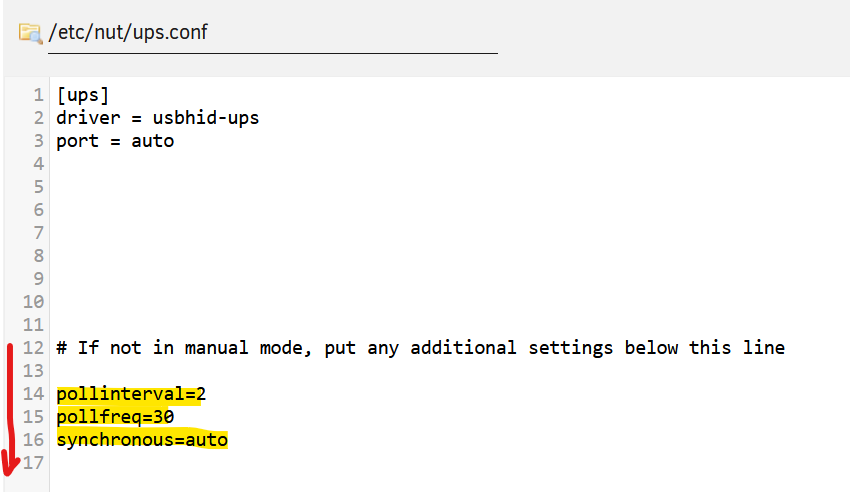
I've read about this a couple of times in the bug tracker of NUT (backend) so far and, as I understood it, this behaviour essentially boils down to the USB driver's implementation in the Linux kernel in combination with that specific USB controller on either the server, the UPS device or both - so this is something that can't really be influenced much from the NUT side of things. What's always worth attempting is changing the USB port or USB cable, some users have reported connection losses and such I/O-errors because they were using a bad USB port or USB cable. Over-polling is indeed sometimes an issue with some UPS, there are some ups.conf settings you can tune: Just make sure to put them in the safe-zone (below line 12, marked with the red arrow): pollinterval = The status of the UPS will be refreshed after a maximum delay which is controlled by this setting. This is normally 2 seconds. This setting may be useful if the driver is creating too much of a load on your monitoring system or network. pollfreq = Set polling frequency for full updates, in seconds. Compared to the quick updates performed every "pollinterval" (the latter option is described in ups.conf(5)), the "pollfreq" interval is for polling the less-critical variables. The default value is 30 (in seconds). synchronous = By enabling the synchronous flag (value = yes), the driver will wait for data to be consumed by upsd, prior to publishing more. This can be enabled either globally or per driver. The default of auto acts like no (i.e. asynchronous mode) for backward compatibility of the driver behavior, until communications fail with a "Resource temporarily unavailable" condition, which happens when the driver has many data points to send in a burst, and the server can not handle that quickly enough so the buffer fills up. I've used the default values in my screenshot, you'll need to play around with different values to see the difference - please let us know if it had any positive effect on your problem.
-
OK die Einstellungen sehen soweit einmal gut aus. Kannst du unter UPS Driver versuchen ob die USV mit blazer_usb statt nutdrv_qx erkannt wird? Ansonsten einfach morgen nochmal beide Treiber (nutdrv_qx und blazer_usb) mit den zwei anderen Backends (legacy 2.7.4 und stable 2.8.0) probieren. Alternativ gerne auch nochmal mit einem anderen USB Port versuchen.
-
Das sind die APC USV Einstellungen, hier musst du "Starte APC UPS Daemon" auf Nein einstellen. NUT und der APC UPS Daemon können nicht gleichzeitig laufen, das sind zwei verschiedene Programme. Wird deine USV jetzt unter "NUT Settings" erkannt und läuft NUT ? Alle Informationen und Einstellungen zur USV laufen dann ausschließlich über die "NUT Settings" Seite.
-
In dem Menü musst du eben den Treiber nutdrv_qx (2te Stelle im Menü auswählen) Du musst das System nicht neustarten, du musst nur in dem UPS Driver Menü nutdrv_qx auswählen. Und dann versuchen NUT zu starten... 🙂


-
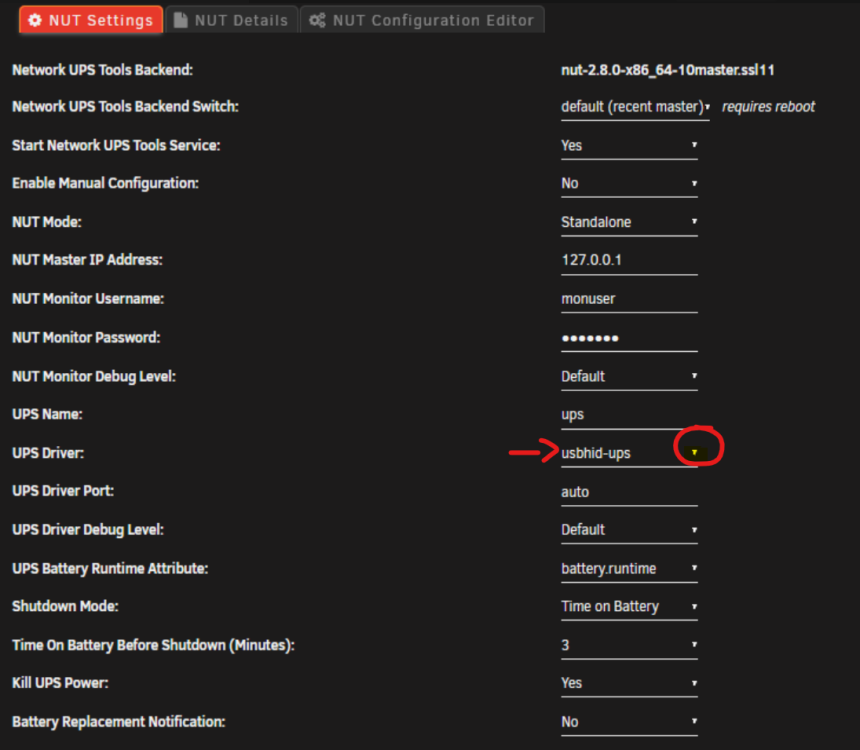
Da muss es ein Dropdown-Menü geben, das wird sogar auf deinem Screenshot angezeigt: Ansonsten mal mit einem anderen Browser versuchen, falls sich da kein Menü ausklappen lässt...
-
Der UPS Driver ist falsch eingestellt, nicht usbhid-ups sondern nutdrv_qx einstellen und versuchen bitte.
-
Ja und im BIOS muss zusätzlich eingestellt sein, dass nach einem Stromverlust immer gestartet werden soll. Wird die USV jetzt von NUT erkannt?
-
Nein, bleibt 127.0.0.1 wenn die USV direkt per USB am UNRAID angeschlossen ist.
-
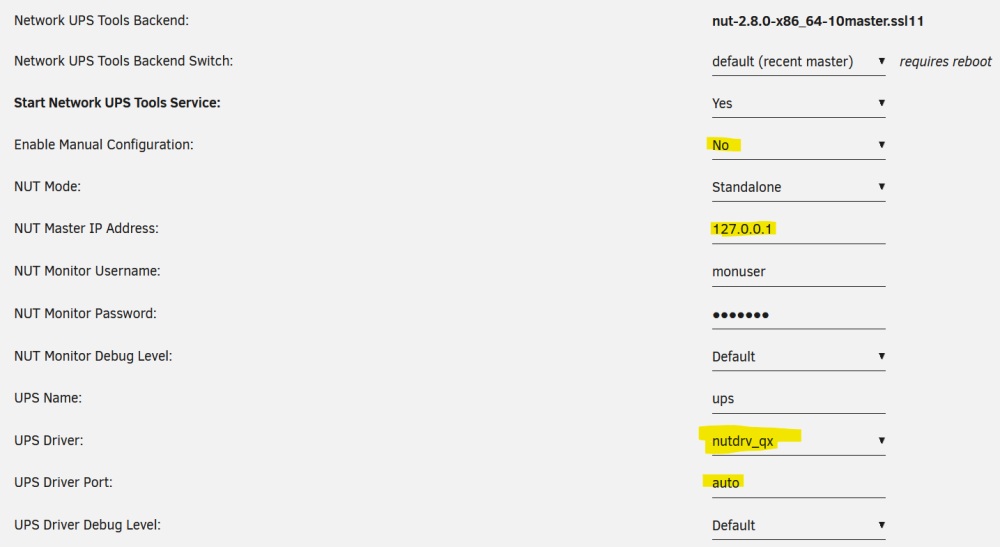
Klicke bitte einmal auf "Reset Config" und dann... Stelle bitte mal so ein und schaue, ob es dann bei dir funktioniert:
-
Danke, die sollte grundsätzlich mit NUT funktionieren, poste bitte mal einen Screenshot deiner NUT Einstellungen.
-
Was hast du denn für eine USV - welchen Hersteller und welches Modell? Poste doch mal einen Screenshot von deinen aktuellen NUT Einstellungen.
-
Thanks for the information, it's very likely the same problem as the user above experienced with that APC series and the two week self test (the time frame fits) - so using the legacy or stable backend should solve the problem for you too. I have reported this issue to the NUT (backend) developers in the meantime so hopefully we will see a fix before too long.
-
Thanks a lot for your testing and patience with this, I'm very glad that this is working for you at last. Unfortunately some UPS don't really play well with the newer backends, but I'll raise an issue with the NUT developers so this can be fixed in newer versions (hopefully). In the meantime you can revert all your settings to your preferred values now, just make sure to keep the backend on one that is working for you and also keep the usernames different for monitor and slave.
-
So I've been able to reproduce the problem on my test server at last, thanks for your patience and testing. The culript is that the UPS seems to send an "OFF" event during the self-testing, which basically says "Hey, I'm offline and no longer providing power to your server" and NUT acts on that and starts a shutdown sequence because it requires at least one functional, online UPS. This is the line where this happens: Oct 8 17:30:11 UNRAID upsmon[26302]: UPS [email protected]: administratively OFF or asleep What's even stranger is the UPS seems to be "OL" (Online) and "OFF" (Offline) at the same time, these two events shouldn't be able to exist at the same time. I'm guessing this is an APC driver issue with NUT and your specific UPS model or series, so I'll have to run this up to the NUT backend developers, the UNRAID plugin is basically just a frontend for the NUT backend (which is developed for more systems than UNRAID). What is curious is that I've found no report from other APC users where this happens, which makes me wonder if this is something that is just happening on your UPS or UPS series. What you can try in the meantime: Change the NUT backend to "legacy (2.7.4)" in NUT Settings -> Reboot -> Test Change the NUT backend to "stable (2.8.0)" in NUT Settings -> Reboot -> Test And please report back if the problem also happens on the different backends. If it doesn't work with the other backends, I might have one more idea you could try. It's not an ideal one, so I'll keep this as a last "solution" in case all else fails for now. Please also let me know the exact UPS vendor and model that you have!
-
OK this is super useful information so thanks for that so far. UPS inverter clicking during self-tests is normal, so that in combination with the other information provided about the UPS hardware's state also makes me think more in direction of a configuration or software issue now. One major problem I've identified with the configuration is that you're using the same usernames for "NUT Monitor Username" and "NUT Slave Username", but those can never be the same because they come with a different set of permissions each. "NUT Monitor Username" is the one the NUT master will use, "NUT Slave Username" is the one your NUT clients will use. Please change your "NUT Monitor Username" to a different username, you won't need to change any settings with the clients. This will make sure the NUT services can distinguish between who is NUT master and who is NUT slave (client), that's really important for functionality. I've read about some UPS only reporting a limited set of variables to NUT during self-tests, so it's possible that during these self-tests the "Runtime Left" variable becomes either unavailable or zero for a few (milli-)seconds while the inverter switches between line power and battery power for testing (that's the clicking you hear). This could (in theory) lead to NUT seeing the UPS on battery power during the testing and at the same time the "Runtime Left" variable unavailable and/or below your configured 15 minutes - resulting in the false shutdown sequence with NUT thinking that it's a power loss scenario. So I'd suggest doing this: Change "NUT Monitor Username" to something else. Change "Shutdown Mode" to "Time On Battery" (for test purposes) Set "Time on Battery before Shutdown (minutes):" to 5-6 minutes (for test purposes) Set "Kill UPS Power" to "No" If you can, trigger a manual self-test of the UPS and see if the problem still occurs. You can also choose "Battery Charge" as "Shutdown Mode", it's still better than "Runtime Left", but "Time On Battery" is mostly independent from UPS-reported variables so it's best for testing now. In general I'd always advise to using either "Battery Charge" or "Time on Battery", rather than "Runtime Left", because "Runtime Left" is the least predictable and trustworthy of the different "Shutdown Mode"s. The reason is reported UPS runtime can fluctuate a lot depending on UPS and UPS battery and many UPS vendors do not have clean implementations of this variable.
-
OK this is quite an advanced setup you've got there, so let's see. Definitely before this happens, some kind of power problem occurs (due to mains power loss or mains power condition like voltage/frequency spike as seen in brownouts) OR your UPS is reporting such a state to NUT falsely (due to defective UPS, driver problem ...). So NUT is receiving information from your UPS that makes it consider your UPS to be in a critical state, triggering an immediate shutdown despite any of your configured NUT settings (e.g. "Runtime Left" as "Shutdown Mode"). Interesting is, your UPS is only reporting a UPS "OFF" event to NUT here: Oct 8 02:35:51 UNRAID upsmon[27897]: UPS [email protected]: administratively OFF or asleep But are there any more log lines before this one indicating that your UPS is going on battery power at some point? Please post any NUT log lines before this one, if there are any. Because this line on its own makes no sense to trigger such a critical situation - your UPS would need to be on battery for a shutdown sequence as below to occur. Before proceeding to initiate a shutdown sequence (FSD) thinking your UPS is critical: Oct 8 02:35:51 UNRAID upsd[27893]: Client [email protected] set FSD on UPS [qnapups] We need to find out why NUT thinks your UPS is critical, this usually only happens when your UPS is both on battery and the UPS battery is almost depleted at the same time. But there's no indication from your logs (just from the inverter clicking sounds) that your UPS is in fact on battery, that's what I don't understand. Plus, for your UPS to reach such a low battery (critical) state faster than your UPS master & clients can shutdown would mean either the UPS battery is severely overloaded (too much power draw) or on the verge of dying (due to old age or defects). Both should be reported by your UPS somehow, so this wouldn't happen out of the blue (unless something was defective). In such a shutdown sequence NUT (by default) waits max. 15 seconds for your clients to shutdown. If your clients don't shutdown within those 15 seconds, it proceeds to continue to shutdown the UNRAID server. Normally this wouldn't have negative effects on your clients shutdown sequences, but you had "Kill UPS Power" set to "Yes". So after UNRAID shutdown is completed, it kills the power to all your clients even if they're not done with their own shutdown sequences yet - this is what caused your unclean shutdowns there. With "Kill UPS Power" set to "Yes" one needs to make sure that the clients start their shutdown sequences earlier than the master and also have sufficient time to shutdown before the master starts shutting down and cuts the power. This is, of course, not possible when your UPS suddenly goes critical for reasons unknown - so we'll need to set this to "No" for now. So where to go from all this information? It's not from updating the plugin, definitely, but rather something happening with your UPS. You hear the inverter clicking, so the UPS hardware is doing something at that stage (which is not NUT-caused). First of all, keep "Kill UPS Power" set to "No" until we figure out what is going on with your UPS. This should at least solve the unclean shutdowns for now, but you'll still see your devices shutting down (though gracefully) when your UPS is going into such a sudden critical state. We need to figure out what's happening with your UPS hardware. So if there's no power outage this could either be your UPS testing its battery, conditioning power (because of voltage/frequency spikes) or your UPS/UPS battery being defective. A battery test or power conditioning should not cause a NUT critical state, unless the battery is almost dead in the first place and does not even survive that short time on battery power in combination with the load connected. Did you see any lights flickering in your house when this was happening? First I would make sure your UPS is not somehow overloaded (too many watts for too little battery). If that's not the case, I'd attempt to switch out the UPS batteries, that being the cheapest solution. Especially if your UPS batteries are already older, changing them can be magic to solving very weird problems. If the problem persists even then I'd consider the UPS defective and have it checked by the vendor. If you're still in warranty for your UPS I'd definitely contact the vendor and get the UPS and UPS battery checked. All of this is, of course, under the assumption that your UPS is generally compatible with NUT. Please do also cross-check with the hardware list on the NUT website for reference. Sometimes searching for your UPS model together with NUT on Google can also reveal some issues other people with the same model were previously having. But overall I do still think something hardware-related is happening (regardless of NUT) because your UPS is also making the clicking (inverter) noises whenever the problem occurs. P.S. Also, I'd generally advise against using "Runtime Left" as "Shutdown Mode" as it's highly dependent on the state of both your UPS battery and UPS reported variables. It's the least reliable out of the three "Shutdown Mode"s, so it might be worth trying with another "Shutdown Mode", especially when you're already having some problems and if your UPS battery is already older.
-
This definitely shouldn't and doesn't happen with my NUT clients. Are your NUT clients somehow configured to shutdown when losing connection to the NUT master? The update routine of the plugin just stops the NUT service (on the master) before updating but definitely does not trigger a shutdown scenario. And no, "Kill UPS Power" just instructs your UPS to cut the battery power to all protected devices after running the shutdown sequence in case of a power outage.
-
In dem Fall würde ich eher zu einer Lösung wie z.B. Syncthing greifen, wo sich die Berechtigungen entsprechend einstellen lassen, dass es auch über SMB keine Probleme gibt.
-
Eaton Geräte haben üblicherweise einen Punkt bei ~20%, wo die USV ein LOWBATT (Niedrige Batterieladung) Event an den UNRAID Server sendet, welches immer (unabhängig von und zusätzlich zur Konfiguration) einen sanften Shutdown auslöst. Gerade wenn die Batterie älter ist, ist "Runtime Left" aber kein so zuverlässiges Kriterium mehr, weil es passieren kann, dass die Batterieladung schneller unter diese 20% fällt als die USV Runtime Left (welche vom "Normalzustand" der Batterie ausgeht) konfiguriert wäre. Bei älteren Batterien würde ich daher eher in Richtung des "Time on Battery before Shutdown" gehen und diesen großzügig und unter Berücksichtigung des Alters der Batterie setzen. Bei einer alten Batterie auf ca 1-2 Minuten max., wenn das Netz in unseren Breiten nicht nach 1-2 Minuten wieder da ist, ist es meist ohnehin länger im Ausfall als die USV es überbrücken könnte. Alternativ könnte man auch "Battery Level" als Kriterium nehmen, dann aber eben mit einem Wert über den 20%, damit es eine Wirkung hat. Wenn die Batterie neuwertig ist, würde ich auch eher ein Kommunikationsproblem mit dem APC Daemon vermuten. Ich würde dir daher auch generell das NUT Plugin empfehlen, welches mehr Einstellungen und Diagnosemöglichkeiten bietet sowie mit Eaton sehr gut funktioniert (NUT wurde einige Zeit von Eaton selbst mitentwickelt).
-
Since it's a commercial product packaging their client software into an UNRAID plugin would very likely be violation of their EULA.





