





xyzeratul
Members
-
Joined
-
Last visited
-
My old NAS motherboard is dying right now, so I decide to upgrade to a new machine, since this will change nearly all the things in my NAS: motherboard, CPU, RAM and even the PSU, only thing I keep is the SSD, HDD and HBA card. I am a little worried about this major upgrade, I read the documents, it said I should be fine as long as it's the same USB stick, and the appdata and system folder backup, So anything else I should do?
-
only able to fix this via a reboot, I'd what's the cause of this, a bug or something not working in my browser?
-
My unraid main page disk info is missing, checking log it shows this error over and over Mar 18 21:52:12 185409 nginx: 2025/03/18 21:52:12 [error] 3836611#3836611: nchan: Out of shared memory while allocating message of size 15145. Increase nchan_max_reserved_memory. Mar 18 21:52:12 185409 nginx: 2025/03/18 21:52:12 [error] 3836611#3836611: *2369758 nchan: error publishing message (HTTP status code 500), client: unix:, server: , request: "POST /pub/disks?buffer_length=1 HTTP/1.1", host: "localhost" Mar 18 21:52:12 185409 nginx: 2025/03/18 21:52:12 [error] 3836611#3836611: MEMSTORE:01: can't create shared message for channel /disks I am on unraid 7.0.1 right now, this never happen in previous version diagnostics-20250318-2149.zip
-
以前用过你这种方案,后来我是直接在翻墙软件里面自定义规则,因为有些docker容器也需要翻墙,还是这样最灵活
-
I am using 127.0.0.1/mnt/.... as icon path, no problem so far, I will test for a few more days to see how it goes. update---------------after using this as the icon path, no more this bug. http://127.0.0.1/mnt/user/
-
I am not using any theme, but I do use CA auto update plugin to handle docker and plugin.
-
I have set the most of the dockers on my unraid using the custom icons path locally, something like: /mnt/user/isos/icons/ANI-RSS.png But I notice every time the dockers upgrade, they lose their the custom icons, the icon files also got deleted, I try to set the icon folder owner root and read-only, still the same, is there a way to prevent this ?
-
updated from 6.12.14, removed my RTL8125B driver plugin 1st, so far all things work, will run a few days to see if I need that driver or counter any problem.
-
holy, 7.0 is out? Still I better hold on to see how the RTL8125B goes in this new version, every since 6.12, each update gives me so many headche with this NIC
-
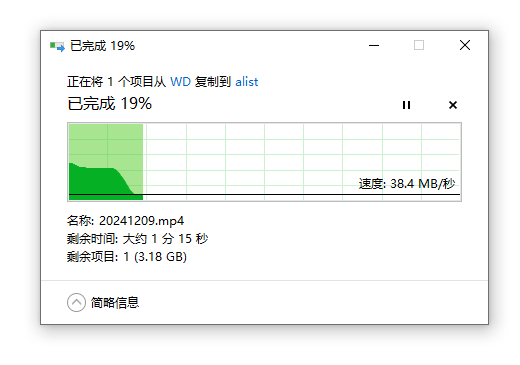
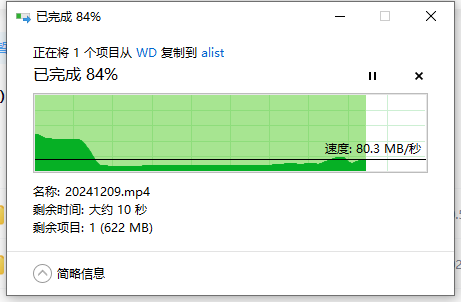
in my windows 10 it look like this, I also feel this is something related to windows explorer
-
sorry, I was checking the windows side, forgot to pull it. 185409-diagnostics-20250104-2210.zip
-
Recently I need to store and pull alot of video files(.mp4) between my laptop and unraid server, these files store at my cache SSD, it's a exclusive share, I noticed slow than usually smb transfer speed, my home network is all 2.5G, that means both NIC, switch and router are all in 2.5G mode. Other big files such as zip, rar and 3dm are totally fine, max out at 249mb/s but when it's a video .mp4 file from my DJI camera or a simiply a moive, it usually at 50 to 100mb/s, I rarely did this before so maybe this problem exist on previous version, this only happen on smb transfer, downloading or uploading the video file tho unraid webui can also reach nearly the max speed, so I guess there should be some settings I need change in windows maybe?
-
Running to a strange issue while upgrading: I had RTL8125B plugin installed in my unraid, so before upgrade I uninstalled it, then upgrade to 6.12.14. Slow smb speed in stock driver(60% less), so I install the plugin again, rebooted. Unraid shows my nic was at 100m mode, uninstalled the plugin again and reboot, network back to 2500m, but still slow smb speed. Checking /config/plugins-error found out there is a RTL8125 plugin in there, deleted it and reinstall the plugin, smb speed back to normal 249mb/s Don't know where did it go wrong, but I somehow fix it?
-
假设你的emby的appdata目录在SSD上面,那把Library---Advanced里面的Metadata path设置为/config/metadata就行了,如果appdata目录不在SSD,那你可以在docker容器里面映射一个新路径,然后把Metadata path设置成这个新路径。 但这样做意义不大,因为emby是在你打开媒体库的时候,周期性的重新读取硬盘上面的实际媒体文件,检查是否更新元数据之类的,所以的确读盘很频繁
-
你说应该是用户自建docker时候留下的模板吧,在/boot/config/plugins/dockerMan/templates-user里面,保留这个就行了 升级7.0还是要小心,毕竟是大版本号而且现在还是beta

