





Jochem
Members
-
Joined
-
Last visited
-
The founder announced yesterday (or 2 days ago) that he was pulling the plug on the entire project unfortunately.
-
Yup same issue here, are you guys also using SD ? First it used to crash my whole unraid server, now i limited the memory but after 20 min it still crashes the container ... Any luck anyone ?
-
Thanks for trying to help me out. After alot of hours of debugging i managed to pinpoint it to a faulty port on my router. Put my UTP cable in another port on the router and all problems resolved for some reason... Thanks once again!
-
Currently updated to 6.12.2 , the same issue remains. Every time i flush the IP pool my Unraid reconnects for a brief moment. Even when i restart the server itself it won't let me connect, only after i flush the IP list.
-
I'll try and update to the latest version but alot of people have networking troubles with the 9.12.x patch so thats whats holding me back. I'll make a backup and try to update. Keep you posted!
-
Hi all, Since a couple of days I'm having troubles reaching my Unraid server through out any connection (web / samba / ssh). This problem came out of nowhere, no updates done. I was just using plex on a docker container. Step I've took so far where below: - Reset my home router, full reset and checked all the network settings. - Disabled Docker on Unraid - Disabled VM's on Unraid The only thing that seems to solve it for a short time is when i flush the IP list on my router and all devices get a new IP. When i do this i can access Unraid for up to a minute before it loses connection once more. When it loses connection and i login to the machine physically and preform an 'ifconfig' i can see its still connected to the given IP address. I'm not sure what to do anymore since all other devices linked to my router seem to work fine without any troubles. Anyone have a clue on how to fix or even debug? Much thanks in advance! ryzen-diagnostics-20230706-0936.zip
-
@ljm42 , Thanks for the reply! Your solution has worked, had to forward it twice.... i'm going to ask my ISP for a modem-only solution since i cant put their router-modem in bridge mode! Thanks for pointing me in the good direction!
-
Ok so far not much progress.. The portforwarding seems to work cause i can vpn through my unraid server again, however swag does not revesere proxy my containers (nextcloud, vaultwarden, etc etc) any idea how i could debug this ?
-
@MAM59, thanks for the reply! Seems the port forwarding worked now (can see them open at canyouseemee) but still can't acces my docker containers. Gonna look abit more into this, keep you posted on the result.
-
Dear, I'm having troubles setting up the new router with port forwarding, those might not be so much of an unraid issue but didn't know where to ask. I'm using unraid with SWAG, to make some unraid containers accessible from the outside. This used to work flawless on my first setup which was a router and modem in one machine (by my provider) and some port forwarding. I recently installed a new router, setup the port forwarding on that one, but i can't seem to be able to connect to any ports. See the specs below. MODEM: Telenet DOCSIS 3.1 WIRELESS Lan ip: 192.168.1.1 Wan ip: 84.195.xxx.xxx Router: Asus RT-AX89X Lan ip: 192.168.0.1 (Different subnet) Wan ip: 192.168.1.201 Unraid IP: 192.168.0.2 I currently only use the modem to get my internet connection and then route the modem to my router for the port forwarding (192.168.1.1 -> 192.168.0.1) Can anyone please point me in the right direction. If needed more info feel free to ask, hope some one can help me since networking is not my strong suite. Kind regards
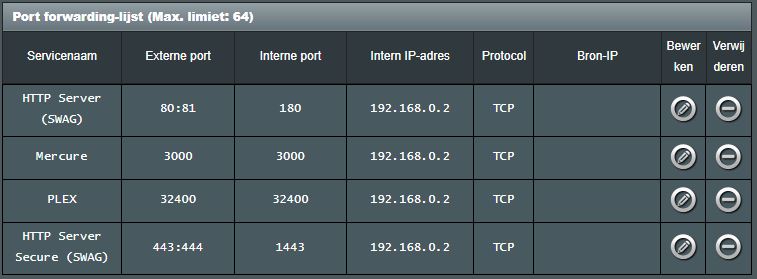
-
Yes, got a Samsung EVO 860 where i store my plex appdata and do the transcoding. See the attachment ^^, but since you mention BTRFS... whats the difference and why should i format it like that ?

-
Hmm i see, in my case it was the formatting of my plex cache ssd in unraid, fomated it to NTFS first but that gave loads of errors while transcoding so had to switch to XFS and all started working flawless... but in this case i think i cant help sorry, this is all i know ^^
-
Are you storing your app data in a cache drive or the unraid array ? I've had this problem before


