





korey_sed
Members
-
Joined
-
Last visited
-
I am not having any luck with local, file://, or https:// urls with 7.3.2. I use homepage as my home dashboard and the same URLs that work for homepage do not work when I use them for the unraid label. when I inspect the dashboard page on unraid, it looks like it is not even attempting to load the icon I specified by the label. it has the src and onerror both set to question.png. Update: Ok, it looks like a reboot of unraid fixed it.
-
Any help here?
-
I am running cadvisor using docker compose as shown below. This gets me the basic info I am looking for but all I see are docker ids and not the labels (com.docker.compose.*) that explain what each ID is, like the container name. I have tried many settings and permission changes but still not getting this to work. any advice? I can see the labels when I run docker inspect on any container or network. cadvisor: image: gcr.io/cadvisor/cadvisor:latest container_name: cadvisor volumes: - /etc/localtime:/etc/localtime:ro - /:/rootfs:ro - /var/lib/docker/:/var/lib/docker:ro - /var/run/docker.sock:/var/run/docker.sock:ro - /sys:/sys:ro - /sys/fs/cgroup:/sys/fs/cgroup:ro - /proc:/host/proc:ro ports: - 9080:8080 networks: - net_205_noc restart: no privileged: true devices: - /dev/kmsg:/dev/kmsg user: 0:281 pid: "host" # Add your flags here command: - '--docker_only=true' - '--housekeeping_interval=10s' - '--logtostderr=true' - '--port=8080' labels: - net.unraid.docker.icon=/mnt/user/appdata/homepage/icons/cadvisor.png
-
Line three in the log is the real clue here. ‘’’ Jun 12 18:29:40 unraid kernel: mce: [Hardware Error]: CPU 26: Machine Check: 0 Bank 2: bea0200004020136 ’’’ I actually ended up contacting Unraid support and they pointed this out. It was the CPU for me, and an updated motherboard firmware fixed it.
-
Posting an update here for anyone else who runs into this. I contacted UNraid support and they mentioned that it was the CPU that was the issue. So, I checked for a motherboard bios update and after that I have not seen the issue happen again. Phew. Thank you Unraid Support.
-
Thanks. anyway I can narrow this down to what could be doing it. Unless all of my RAM modules are bad, I doubt it is that. I have switched both sets out and this still happens. I started pushing the system logs to flash to see if i can capture the error before the crash but not seeing anything there. Just a constant log message that it cannot join my AD
-
Looks like something is crashing my unraid. I woke up to another parity check and now the system shows unclean shutdown again and the logs are from 11 PM last night post whatever caused the crash. I've set the syslog to mirror to flash for now in the hopes i can catch this the next time. Any other way to do that?
-
Update to 6.12.11 complete. Macvlan workaround in place (not ipvlan). Memory tested with Live Memory Tester with no errors. Lets see what happens in next couple of days.
-
I had both the disk check and MCE log event happen yesterday again. diagnostics attached. Any help is appreciated. unraid-diagnostics-20240810-1313 2.zip
-
I have just switched my RAM modules again so waiting for it to do its thing and I will post diagnostics on the next mce log event or parity check.
-
Thanks for the response. The diag files are in the post I linked above. I am switching out RAM modules back and forth to see if I can figure out which module may be the issue. Was not sure if mem test would tell me which module was bad or just that i have an issue. So there is no way to see why parity check was started?
-
Please help!! Unraid is driving me crazy and it was working so well until a few months ago. It is running parity checks out of schedule and no matter what I do, it does not seem to stop doing it. At this rate, my drives will go bad before their time because of this. I have extended the shutdown timer, had clean reboots (no parity starting right after reboot), have completed parity checks successfully, and yet Unraid will start a parity check randomly. If I cancel it, it will just start it again in a few days. if I pause it, it will start it again in a few days. if I disable it, then i keep getting notifications that I do not have a parity check scheduled. This is not a scheduling issue, or should not be, since it is telling me when the next one is scheduled for, and yet it will start one before that in the middle of the day and all the services that I am running will become unresponsive. Where is the config file to see the schedule? What in the logs will tell me why it is starting a random parity check? I do randomly get a mcelog event, and I am trying to isolate if one of my RAM modules is bad but my understanding is if I shut it down and start it up cleanly, it should stick to schedule. is that not true? I did share my diagnostics a little while ago in a different post and the best i got was to check my RAM. I am on 6.12.10, and here is my drive config (attached). Thanks in advance.
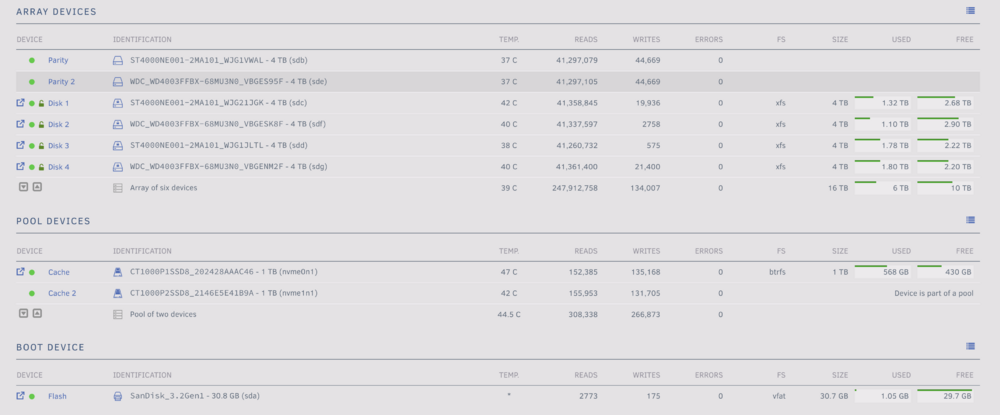
-
I do have AMD and no ECC RAM. From what I read mcelog was needed for older UNRAID versions. aren't the log lines above what mcelog would print out? This seems to happen each time a partiy check starts. I got another one tonight (I had cancelled the parity check last night). Both seem related to CPU 26: Machine Check: 0 Bank 2 Jun 13 21:06:02 unraid kernel: mce: [Hardware Error]: Machine check events logged Jun 13 21:06:02 unraid kernel: mce: [Hardware Error]: CPU 26: Machine Check: 0 Bank 2: bea0200004020166 Jun 13 21:06:02 unraid kernel: mce: [Hardware Error]: TSC 0 ADDR 446a74670 MISC d012000500000000 SYND e0f01d44163a IPID 200b000000000 Jun 13 21:06:02 unraid kernel: mce: [Hardware Error]: PROCESSOR 2:a20f12 TIME 1718327131 SOCKET 0 APIC 15 microcode a20120a
-
Hi, I have recently started seein Machine Check Events detect a problem on my server. I have not had any hardware changes in the past 6 months, neither configuration updates really....a new docker here or there. I am affraid I need some help figuring out what the issue. the relevant syslog lines are lines 836-841: Jun 12 18:29:40 unraid kernel: mce: [Hardware Error]: Machine check events logged Jun 12 18:29:40 unraid kernel: registered taskstats version 1 Jun 12 18:29:40 unraid kernel: mce: [Hardware Error]: CPU 26: Machine Check: 0 Bank 2: bea0200004020136 Jun 12 18:29:40 unraid kernel: mce: [Hardware Error]: TSC 0 ADDR de3566250 MISC d012000200000000 SYND 74f11d442b29 IPID 200b000000000 Jun 12 18:29:40 unraid kernel: Btrfs loaded, crc32c=crc32c-generic, zoned=no, fsverity=no Jun 12 18:29:40 unraid kernel: mce: [Hardware Error]: PROCESSOR 2:a20f12 TIME 1718231339 SOCKET 0 APIC 15 microcode a20120a Diagnotics are attached. Many thanks for you time and assistance. unraid-diagnostics-20240612-1904.zip
-
For anyone else that stumbles on here, I was not getting any agent alerts for power failures until I setup and enabled the email settings and checked those for notification as well. Now I get email and agent alerts (PushOver) when UPS goes on battery.

