



Skip to content
View in the app

A better way to browse. Learn more.

Unraid

A full-screen app on your home screen with push notifications, badges and more.

To install this app on iOS and iPadOS
  1. Tap the Share icon in Safari
  2. Scroll the menu and tap Add to Home Screen.
  3. Tap Add in the top-right corner.
To install this app on Android
  1. Tap the 3-dot menu (⋮) in the top-right corner of the browser.
  2. Tap Add to Home screen or Install app.
  3. Confirm by tapping Install.

the4tress

Members
  • Joined

  • Last visited

  1. I sent a message to them via Alibaba and they replied within minutes. They sent me this chart. I'm not sure what "fans" vs "fan position" is, so I'm just going with the 12S4-4.
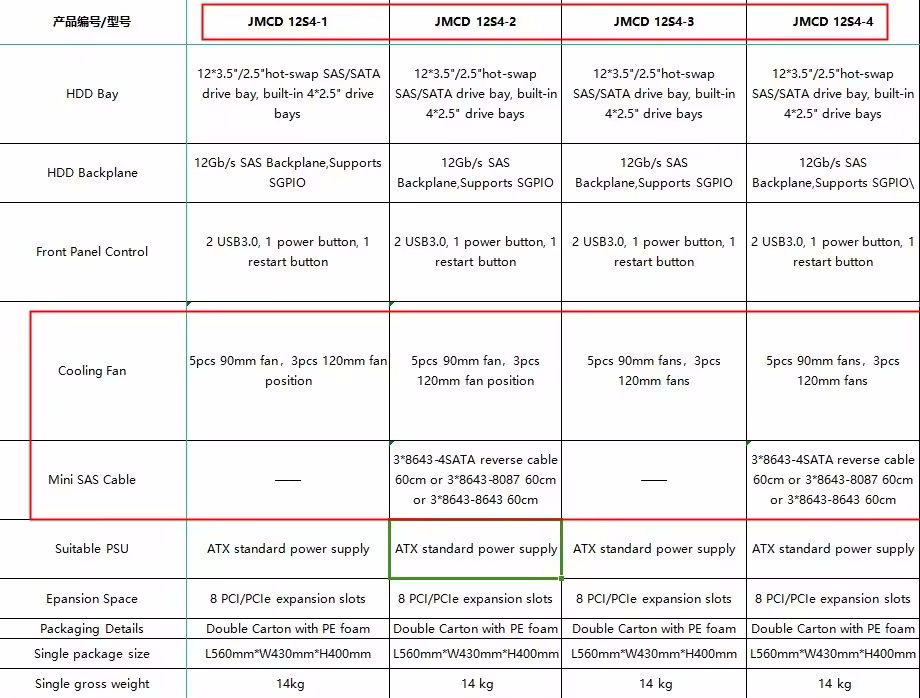
  2. @ItsLouieV, do you know the difference between the JMCD 12S4-1 and the JMCD 12S4-4? I don't see any technical differences, only price. Great review videos as well. I'm sold.
  3. Hello. This is my first time setting up GPU passthrough. You said "Add 2nd graphics card". Does that mean that it is necessary to have 2 GPUs in the server?
Account

Navigation

Search

Search

Configure browser push notifications

Chrome (Android)
  1. Tap the lock icon next to the address bar.
  2. Tap Permissions → Notifications.
  3. Adjust your preference.
Chrome (Desktop)
  1. Click the padlock icon in the address bar.
  2. Select Site settings.
  3. Find Notifications and adjust your preference.