Ryley Robinson
Members
-
Joined
-
Last visited
Everything posted by Ryley Robinson
-
Hi binhex, I found a reproducible permissions issue with the binhex-nzbget container which causes Extension Scripts such as ExtendedUnrar to fail. Environment: - Unraid - Container: binhex-nzbget - NZBGet server process runs as: nobody:users - PUID=99 - PGID=100 - ScriptDir=/config/scripts Normal state: /config/scripts owner: nobody:users (99:100) permissions: 0770 ExtendedUnrar itself is also owned by nobody:users and works correctly in this state. The following command was executed from the Unraid host: docker exec binhex-nzbget /usr/local/share/nzbget/nzbget -c /config/nzbget.conf -L H After this command, the ownership of /config/scripts changes reproducibly from: 99:100 (nobody:users) to: 0:0 (root:root) The permissions remain 0770 and the inode also remains unchanged. Example before: Owner=99:100 Rechte=770 Inode=1554 Immediately after running the command: Owner=0:0 Rechte=770 Inode=1554 Afterwards, the running NZBGet server process can no longer access: /config/scripts/ExtendedUnrar/main.py and ExtendedUnrar fails with: python3: can't open file '/config/scripts/ExtendedUnrar/main.py': [Errno 13] Permission denied NZBGet then reports: Post-process-script ExtendedUnrar ... failed (terminated with unknown status) I restored the directory manually with: chown 99:100 /mnt/cache_nvme/appdata/binhex-nzbget/scripts and confirmed that the NZBGet user could access main.py again. For verification I then repeated exactly the same docker exec command. The ownership immediately changed back from 99:100 to 0:0 again. Therefore the behaviour is reproducible. Important: - /config/scripts is not recreated; the inode remains the same. - permissions remain 0770. - only owner/group changes. - no container restart occurs. - no corresponding event appears in the Unraid syslog or supervisord.log. - the running NZBGet service itself runs as nobody:users. Could you please check whether executing the NZBGet CLI as root inside the container is expected to change the ownership of ScriptDir, or whether this is an issue with the container/NZBGet startup or CLI handling? Thanks!
-
Upgraded from 6.8.3 to RC1 and have now the following problem: After the VM is started and the VNC Remote button is pressed this window appears. Changed the virtio-net like mentioned in the @SpaceInvaderOne Video. </controller> <interface type='bridge'> <mac address='52:54:00:32:c1:25'/> <source bridge='br0'/> <model type='virtio-net'/> hier stand vorher: 'virtio' <address type='pci' domain='0x0000' bus='0x00' slot='0x03' function='0x0'/>
-
Ich habe alles gemacht wie beschrieben, leider hat sich nichts geändert englisch: I did everything as described, unfortunately nothing has changed
-
Danke für die Antwort, ich werde das mal versuchen 🙂
-
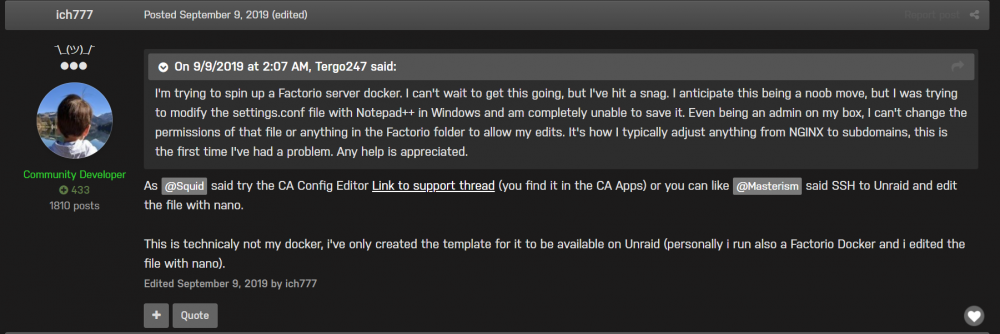
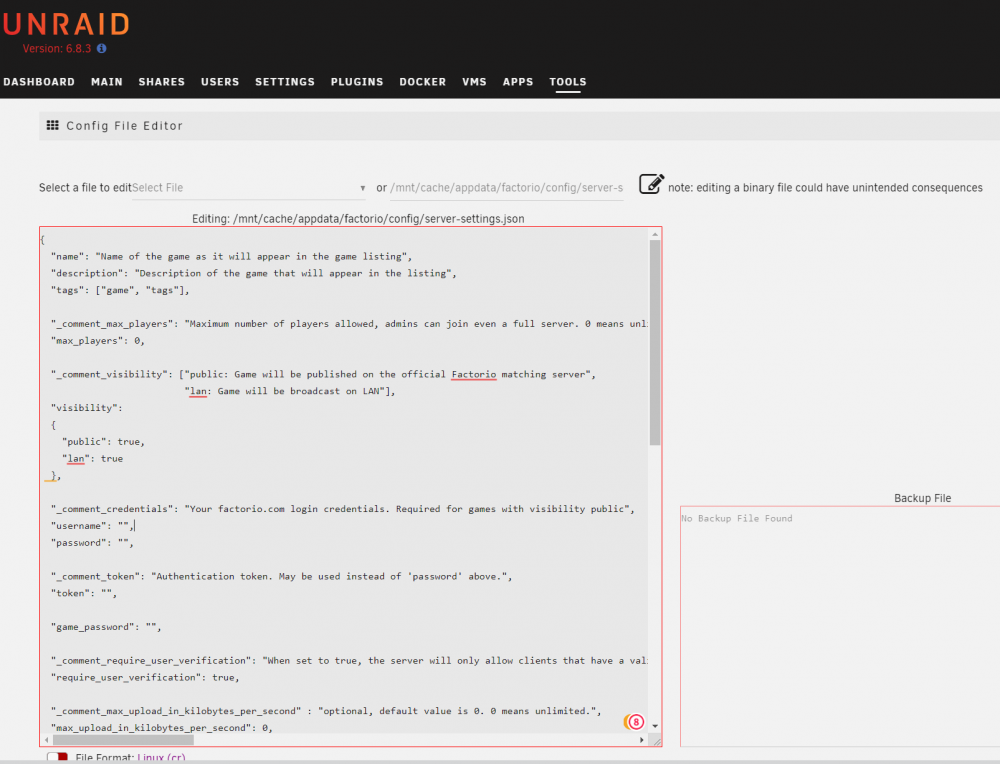
thanks for your quick answer, then it was good that I haven't changed anything. if I start factorio in Steam and then go to multiplayer, I can connect to the IP 192.168.1.27:34197 then a game is started with a new card, without an error message on Steam, but I cannot invite anyone to this card. If I go to multiplayer in Stem and then host a new game, that works too, but I can't invite anyone here either. My server cannot be found in the Steam list of servers and also not in the LAN list of available servers. Please excuse my ignorance, I'm a complete newbie to Unraid + Docker + Linux and the command line. Therefore, a very big THANK YOU for any help this is the log file ### Complement: as requested by you, I looked at this post from you: it says as far as I understand that I should edit the "settings.conf" file with the "CAConfig Editor". did I understand that correctly ???? If so, what should I enter or change where where can I find this file that I should edit is the date on the screen section the right one ???? if so, what do I have to enter or change Thank you again very much for any help from you Log for_ Factorio_2020_11_17.html
-
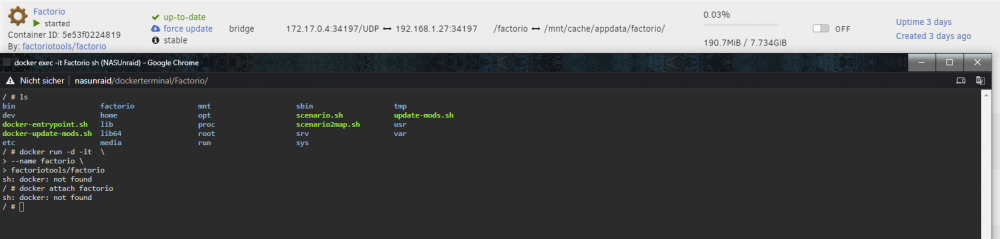
I have installed the "factorio docker" and it is running, but what happens next on the page: https://hub.docker.com/r/factoriotools/factorio/ it says that I should execute some commands in the console ==> none of them works, mostly I get the message "sh: docker: not found " Please help how do I get the factorio server to run in my own LAN. So that I can see him in the STEAM too.