





Everything posted by Nanuk_
-
I don't know if this helps, but I recently upgraded my PSU to a RM1000x SHIFT 80 PLUS Gold Fully Modular ATX Power which uses those smaller Type 5 SATA cables. should I not run as many HDDs on one SATA power cable with those?
-
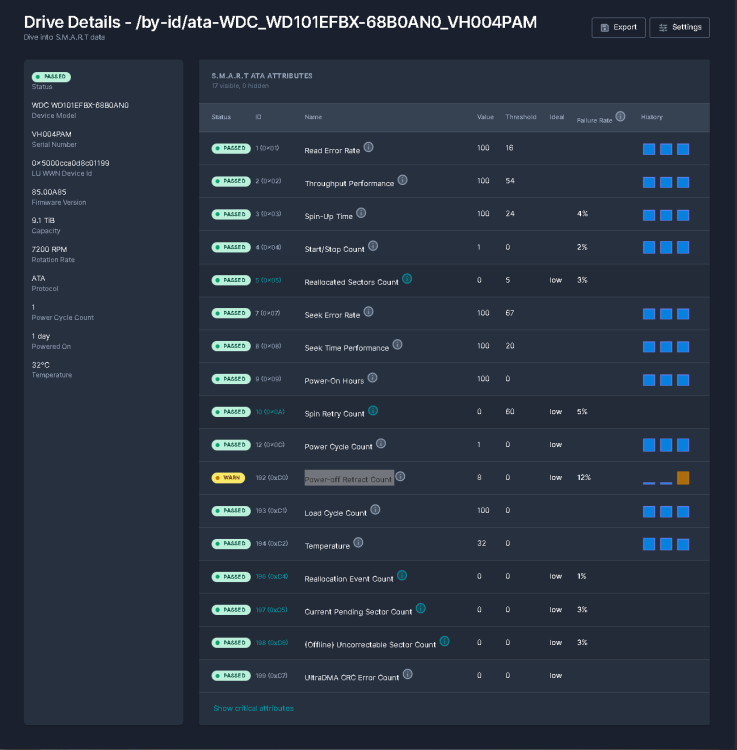
So I replaced a WD Red HDD in my unraid setup after a HDD went bad and had to be RMA'd. I left the system doing the Unraid Data-Rebuild and went to sleep. When I woke up the next day it seems that halfway (55.8%) through the rebuild it stopped and the new drive had the status "Device Disabled, Content's Emulated". Since this was the status of the new HDD(68B0AN0_VH004PAM) that I was replacing with the new drive I checked Alerts/Warnings/Notices and found this under warning: Event - Unraid array errors Disk 2 - WDC_WD101EFBX-68B0AN0_VH004PAM (sdf) (errors 1024) Subject - Warning [TROJANCARABAO] - Description - array has errorsArray has 1 disk with read errors Importance - warning Also I check Scrutiny which I had running and it said that the HDD was throwing this Power-off Retract Count 12% I tried checking running as short SMART Self Test on the HDD but it wouldn't start. Since the error was Power-off Retract Count I tried replugging the SATA power (sorry was panicking at this point). This allowed the new HDD to show up on the Unassigned Devices "68B0AN0_VH004PAM" but clicking the mount button would spin it up. I'd hear the drive start to spin up, but then fail to start and the mount button would refresh to the mount state. I'm currently at a loss as my Data Rebuild can't continue at this rate and I've never had to to a restart, etc. during a Data rebuild or do a Data Rebuild for that matter this is my first time. Total size:10 TB Elapsed time:21 minutes (paused) Current position:5.58 TB (55.8 %) Estimated speed:--- Estimated finish:Unknown Read errors corrected:0 Since I can't do a SMART self test I'll attach my Diagnostics and the screenshot of the drive stats from scrutiny and then just pray someone replies soon. trojancarabao-diagnostics-20230718-1218.zip
-
Sooo... I think I figured out what the issue was with my disappearing shares and it seems to have been related to my HBA card (LSI SAS2308 PCI-Express Fusion-MPT SAS-2). It turns out the Noctua NF-A4x10 I mounted on it a while back stopped working and I believe that the card was over heating. I also replaced the Fractal 140mm fans on the front of the case with Noctua NF-A15 and since I couldn't get the Dynamix Auto Fan Control to detect my mobo fan control I decided to have the mobo bios control the fans manually. This dropped HDD temps from the mid 45s down to 35/38s degrees. The other thing I tried was the following. 1.) I first removed the heatsink, cleaned it, re-applied the thermal paste, this did not fix the udma errors 2.) I replaced the cables, but this did not work. 3.) attached the HDDs directly to the SATA ports on the mobo and this seemed to fix the issue. Either the new cables I got were borked or the HBA needs to be replaced. I did keep some old 3x2tb attached to the HBA card to see if the new cables and the reapplyed thermal past + new fan would fix it. But sadly the "udma crc error count" just kept climbing. Currently over 150k instances. I'm considering getting a new LSI SAS2308 card.
-
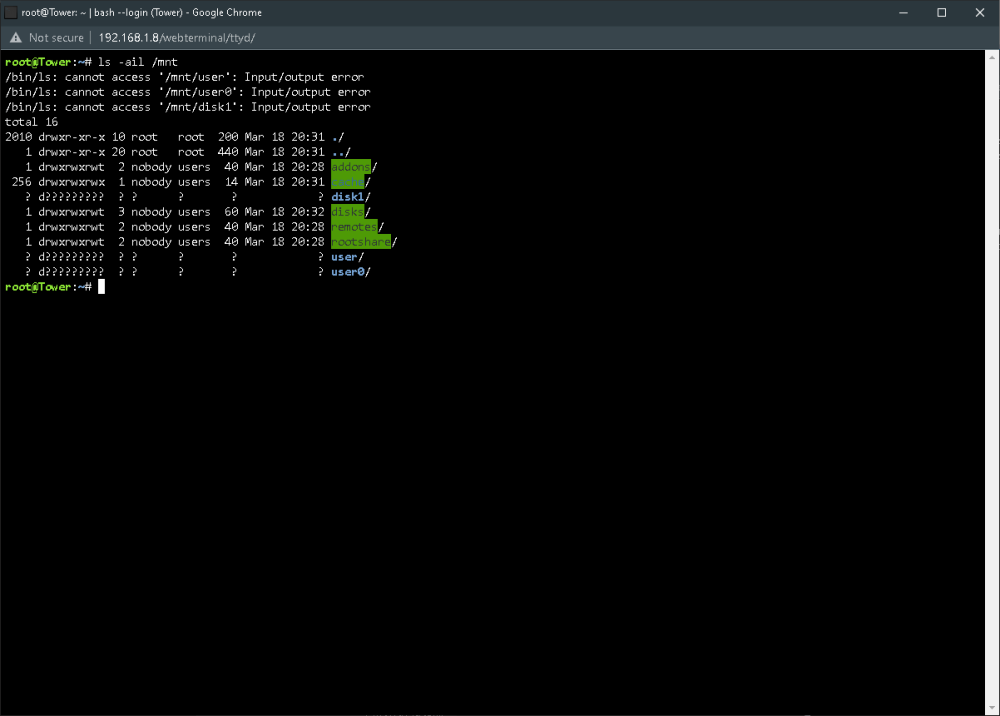
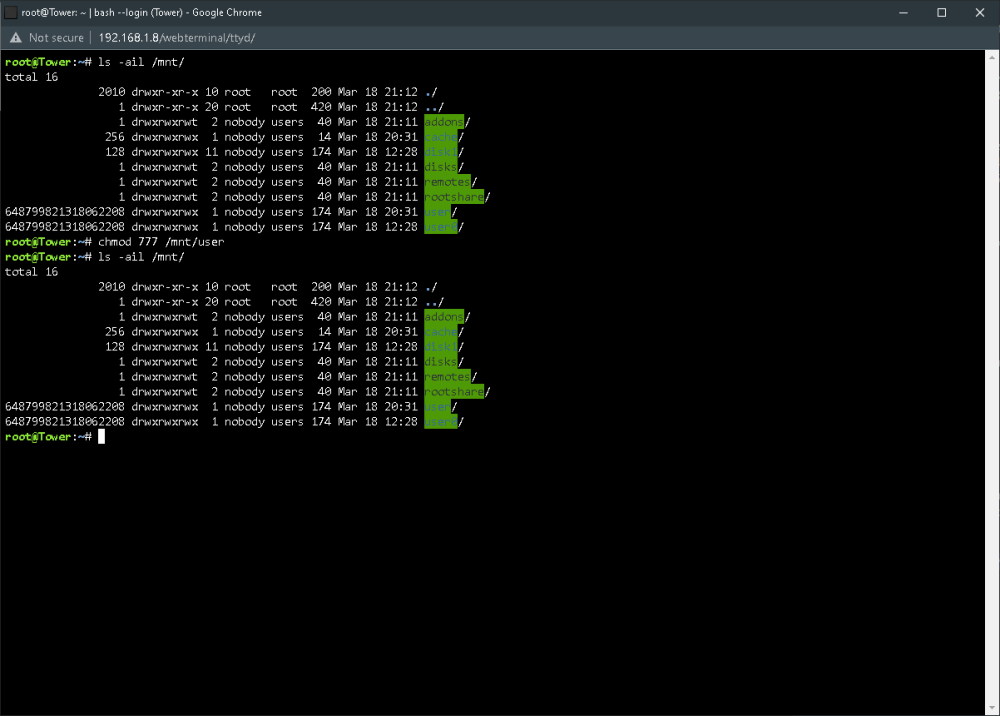
Hello, First time user that's having the same issue. Mine is triggered during a batch copy of a mounted disk to the array using krusader. Part way through the copy the shares will disappear and the copying will stop. This is what happens. Here is the diagnostic. tower-diagnostics-20230319-1159.zip One thing I did notice after the first occurrence is that the server name changed, from what I assigned it; to the default "Tower". After a several reboots they came back, but after starting a copy on krusader they disappear again and the copying stops. Tried the chmod fix after a reboot and I'm hoping this helps. Also switch the USB from the NZXT internal USB slot to one on the mobo. Here's hoping someone has an idea what to do. I'm a first time user and so far I've bricked 4 SSDs (they were in a pool and when I tried to remove them they disappeared and even windows 10 and the bios doesn't see them anymore) trying Unraid.
-
Hi, Total unRaid n00b here! Just signed up yesterday and this is my first post. Been sifting and drooling over all the different builds. Been eyeing the Define 7 XL since I saw the video of Jaystwocents and linus. Actually had a 4 bay Buffalo years ago and I was leaning towards a prebuilt for a year like QNAP until I saw the video from Gamers Nexus that show how bad/impossible it was to fix one, because you can't get the parts. And since I live in the Philippines doing an RMA is out of the question. So here I am in your forums and eyeing the beautiful build you did with your Define 7. Can't wait to start my own. I pulled the trigger on the parts, but holding off on the case until I have enough drives to populate it.


