





CrazyBoyS
Members
-
Joined
-
Last visited
Everything posted by CrazyBoyS
-
This is resolved. Ben a few days and everything is working as expected finally. Appreciate all the help.
-
This seems to of worked. Removed the plugin, shut down dockers, shut down docker service in settings and then hit movers and it took a bit to move the docker and stuff from the 2hds that was sitting in the array and is done now. Starting everything back up and will monitor it now. Also dockers loaded up super fast now so seems it moved.
-
Ya I figure it was more a niche thing.
-
Is it worth using once again when i get this issue resolved or is it more of just an addon?
-
Ok that makes more sense. I only stopped the dockers and tried the mover and it just sat there for 20 seconds and nothing. I will try this tonight after work by stopping all the dockers settings.
-
So once I disable docker in my settings I go to the main tab and hit mover? Tried this and nothing moved for me. Where would I find these files on the array per say and move manually, I just go through my drives and find the appdata and system folders and move manually to the cache folder? ** I got what you mean i have fixed it to move from array to cache but need to shut down my dockers to now force the mover. Will keep you updated when i do this.
-
So here is my dilemma, My hard drives are always reading randomly and causing them to not stay spun down when not needed. I have installed the Disk Viewer plugin, Active Streams etc. Its always reading the drives with 2.2mb to alot higher. I have disabled alot of plugins to test and does not change anything. I have uploaded my logs and wondering if any one can help. I have read alot of the posts about this and still does not fix my issue. Thanks.
-
Appreciate the work. Waiting to see how the multi gpu one works. Also plex now shows (HD) when transcoding perfect.
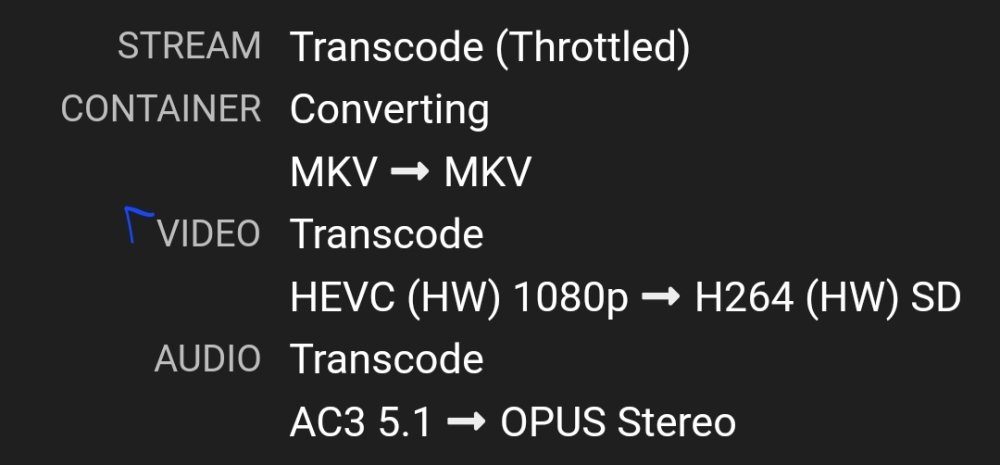
-
And there we go its working.
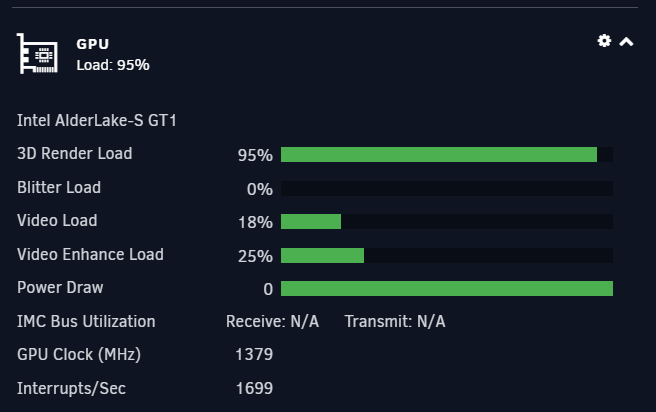
-
Yup realized that when I was writing the last comment. 😅 Forgot to enable VT ugh. Can't reboot atm wife on plex. I'll post as soon as I make the change.
-
So my system does not have check box options ( used to in older versions on unraid ) I modified the Config file ( FYI path is wrong you gave me, you ment plugins/ ) and added the 0000:00:02.0
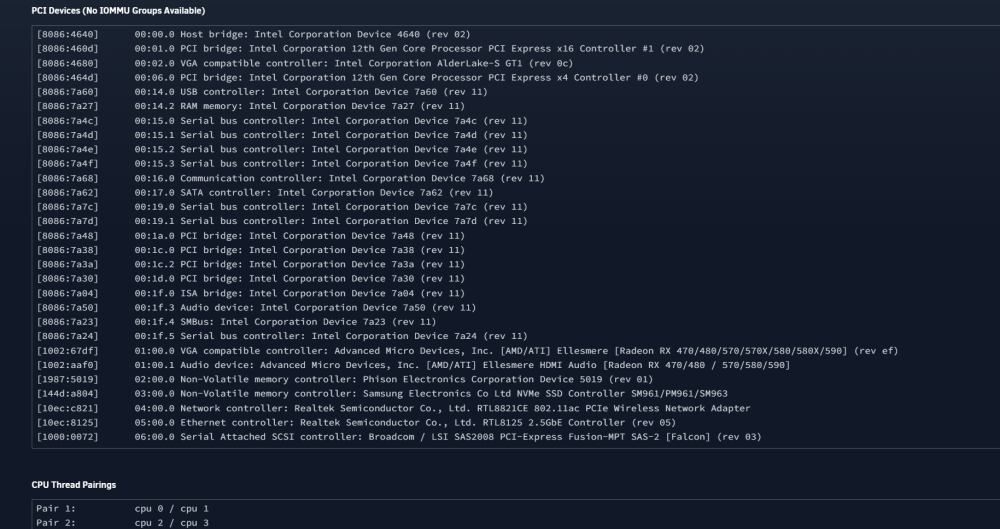
-
Added it for VM testing etc not for transcoding as I had a P400 for that which i removed. How can i bind the Intel?
-
No still N/A root@KiNG-KOOPA:~# cat /tmp/gpujson2 Time = Sun, 19 Mar 2023 09:46:55 -0400 {"clock":"N\/A","fan":"N\/A","memclock":"N\/A","memutil":"N\/A","memused":"N\/A","power":"N\/A","powermax":"N\/A","rxutil":"N\/A","txutil":"N\/A","temp":"N\/A","tempmax":"N\/A","util":"N\/A","error":[{"code":301,"message":"Vendor command returned no data.","extra":""}]}
-
I removed GPT-g first then ran the command and got that output. Here is a new run. intel_gpu_top -J -s 250 -d pci:slot=0000:00:02.0 { "period": { "duration": 12.701464, "unit": "ms" }, "frequency": { "requested": 0.000000, "actual": 0.000000, "unit": "MHz" }, "interrupts": { "count": 0.000000, "unit": "irq/s" }, "rc6": { "value": 99.999551, "unit": "%" }, "engines": { "Render/3D/0": { "busy": 0.000000, "sema": 0.000000, "wait": 0.000000, "unit": "%" }, "Blitter/0": { "busy": 0.000000, "sema": 0.000000, "wait": 0.000000, "unit": "%" }, "Video/0": { "busy": 0.000000, "sema": 0.000000, "wait": 0.000000, "unit": "%" }, "Video/1": { "busy": 0.000000, "sema": 0.000000, "wait": 0.000000, "unit": "%" }, "VideoEnhance/0": { "busy": 0.000000, "sema": 0.000000, "wait": 0.000000, "unit": "%" } }, "clients": { }
-
GVT-g was installed so removed it. }^Croot@KiNG-KOOPA:~# intel_gpu_top -Jo - -d pci:slot=0000:00:02.0 { "period": { "duration": 14.966672, "unit": "ms" }, "frequency": { "requested": 0.000000, "actual": 0.000000, "unit": "MHz" }, "interrupts": { "count": 0.000000, "unit": "irq/s" }, "rc6": { "value": 100.000000, "unit": "%" }, "engines": { "Render/3D/0": { "busy": 0.000000, "sema": 0.000000, "wait": 0.000000, "unit": "%" }, "Blitter/0": { "busy": 0.000000, "sema": 0.000000, "wait": 0.000000, "unit": "%" }, "Video/0": { "busy": 0.000000, "sema": 0.000000, "wait": 0.000000, "unit": "%" }, "Video/1": { "busy": 0.000000, "sema": 0.000000, "wait": 0.000000, "unit": "%" }, "VideoEnhance/0": { "busy": 0.000000, "sema": 0.000000, "wait": 0.000000, "unit": "%" } }, "clients": { } } { "period": { "duration": 1011.490547, "unit": "ms" }, "frequency": { "requested": 0.000000, "actual": 0.000000, "unit": "MHz" }, "interrupts": { "count": 0.988640, "unit": "irq/s" }, "rc6": { "value": 100.000000, "unit": "%" }, "engines": { "Render/3D/0": { "busy": 0.000000, "sema": 0.000000, "wait": 0.000000, "unit": "%" }, "Blitter/0": { "busy": 0.000000, "sema": 0.000000, "wait": 0.000000, "unit": "%" }, "Video/0": { "busy": 0.000000, "sema": 0.000000, "wait": 0.000000, "unit": "%" }, "Video/1": { "busy": 0.000000, "sema": 0.000000, "wait": 0.000000, "unit": "%" }, "VideoEnhance/0": { "busy": 0.000000, "sema": 0.000000, "wait": 0.000000, "unit": "%" } }, "clients": { } }^Croot@KiNG-KOOPA:~#
-
root@KiNG-KOOPA:/tmp# intel_gpu_top -L card0 1002:67df pci:vendor=1002,device=67DF,card=0 └─renderD128 card1 Intel Alderlake_s (Gen12) pci:vendor=8086,device=4680,card=0 └─renderD129 Also Running 13500 CPU and X790 Chipset Motherboard. Also attached Diagnostic for Ich777 king-koopa-diagnostics-20230319-0906.zip
-
Sounds good. Keep up the good work.
-
root@KiNG-KOOPA:/tmp# timeout -k .500 .600 intel_gpu_top -J -s 250 root@KiNG-KOOPA:/tmp# cat gpujson2 Time = Sat, 18 Mar 2023 18:52:38 -0400 {"clock":"N\/A","fan":"N\/A","memclock":"N\/A","memutil":"N\/A","memused":"N\/A","power":"N\/A","powermax":"N\/A","rxutil":"N\/A","txutil":"N\/A","temp":"N\/A","tempmax":"N\/A","util":"N\/A","error":[{"code":301,"message":"Vendor command returned no data.","extra":""}]}
-
root@KiNG-KOOPA:/tmp# cat gpujson2 Time = Sat, 18 Mar 2023 18:41:43 -0400 {"clock":"N\/A","fan":"N\/A","memclock":"N\/A","memutil":"N\/A","memused":"N\/A","power":"N\/A","powermax":"N\/A","rxutil":"N\/A","txutil":"N\/A","temp":"N\/A","tempmax":"N\/A","util":"N\/A","error":[{"code":301,"message":"Vendor command returned no data.","extra":""}]}
-
Thought so but wanted to make sure. SO a little change has shown after. I also see in the Intel settings I have GPU / Packages / Mix of Both as a option but its on GPU right now.
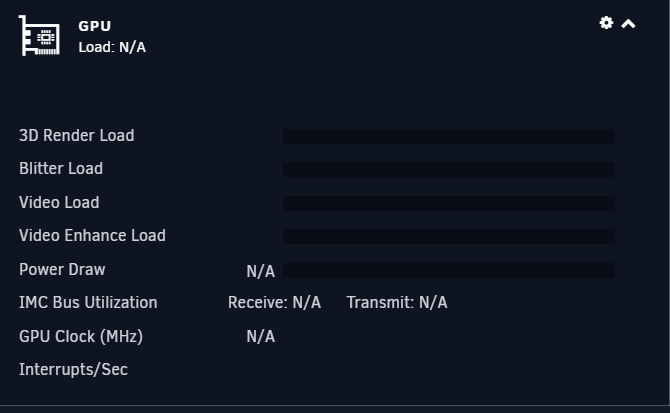
-
Ok so how should I run this in the cmd line? Sorry plugins usually are install and go so little extra work. Sorry to be a newb. Also side note this always worked for my P400 until i swapped all my hardware today. NVidia just worked. I like the plugin have been using it since you released it officially.
-
Will this work with my version as I am on the stable version and not rc 6.12?
-
did all this and still the same issue. I just dont get it. Uninstalled GPU Statistics and rebooted server -> Reinstalled GPU Statistics and still same issue.
-
Where would I go to do that?
-
Newest one. 2022.11.30a



