





bptillman
Members
-
Joined
-
Last visited
-
Looking at the Linkwarden source code I can see it spins up Chromium processes for one of its features that I was using. And the 30th is also the day I installed and configured it and saw high CPU usage on the server afterwards. I'll reboot now since I have since cleared the data for the app since something I added caused that spike in CPU usage and went away once I cleared the data for the container.
-
Fix Common Problems recently said that there was an out of memory error on my server but when looking at memory usage on the dashboard I did not see it maxed out at the time I saw the notification, but I did recently install a new app, Linkwarden. I spotted some lines in my syslogs that mention that container's id, so I wanted to check and see if that was culprit. Any help is appreciated. allthethings-diagnostics-20241104-1152.zip
-
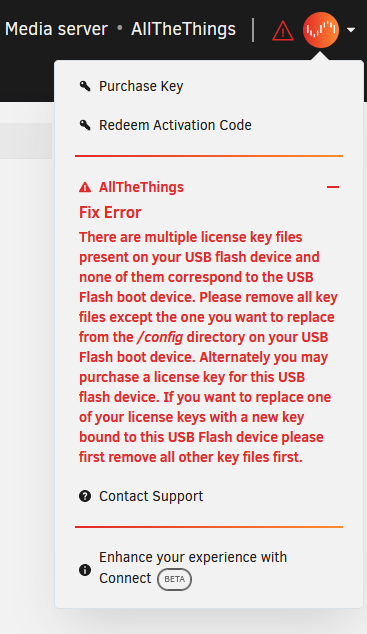
Got this solved on my own. I noticed the attached warning in the top right of the screen, and when I looked in the content of the flash drive, there was a basic, trial, and plus key files. I assume all three were in there since I started with a trial, then moved to basic and eventually plus. Once I removed the trial and basic key files then I was able to replace the flash drive without issue. Hope this helps anyone else that might have run into this issue.
-
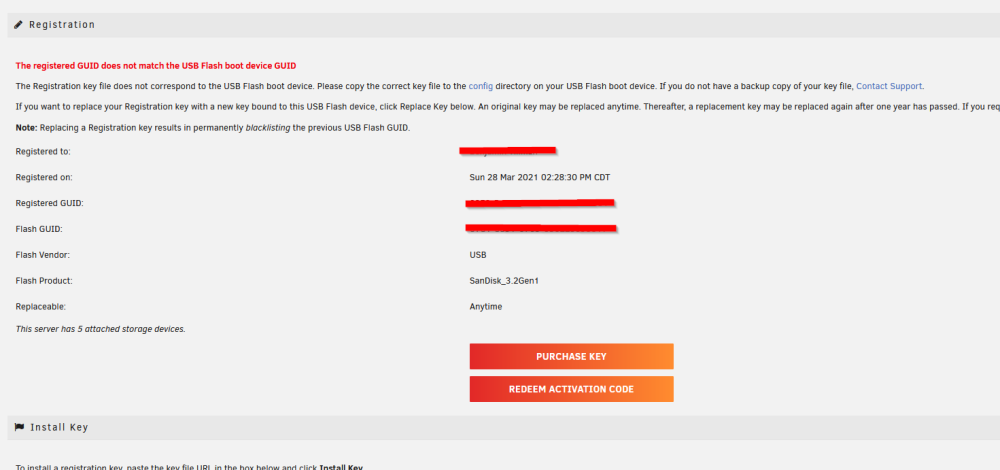
I purchased a new flash drive to replace the one in my system, and followed the steps outlined here but when I got to to the step on the Flash drive page to Replace the key, there is no Replace Key button present as you can see in the attached image? This is my first time to ever try and replace the flash drive so I am not sure why I am not given the option to replace it.
-
After the latest update to tt-rss was applied and the schema was migrated, I am now getting an error when loading my tt-rss instance. The first error seen was: E_URL_SCHEME_MISMATCH URL scheme reported by your browser (https) doesn't match server-configured SELF_URL_PATH (http), check X-Forwarded-Proto. Additional information: SELF_URL_PATH: http://tinyrss.mydomainhere.com CLIENT_LOCATION: https://tinyrss.mydomainhere.com/ For reference before this, I was able to go to https://tinyrss.mydomainhere.com to hit my ttrss instance behind a reverse proxy, so the error made sense to me since http was specified in my config.php. From seeing that error I changed the config.php from being http like this: putenv('TTRSS_SELF_URL_PATH=http://tinyrss.mydomainhere.com/'); to being https like this: putenv('TTRSS_SELF_URL_PATH=https://tinyrss.mydomainhere.com/'); After doing that and restarting the container, now when I visit https://tinyrss.mydomainhere.com , instead of the fatal error I am seeing: Startup failed Please fix errors indicated by the following messages: Please set SELF_URL_PATH to the correct value detected for your server: http://tinyrss.mydomainhere.com (you're using: https://tinyrss.mydomainhere.com) After that I also tried renaming the existing config.php and replacing all of the needed config values with docker environment variables that all start with TTRSS_ per the newest changes and am still seeing the "startup failed" message from directly above. So I'm not sure what other configuration issue it could be causing this.
-
Answered my own question. Looks like the config also changed variable names so if anyone else sees issues you've got to change your config.php like so: define("DB_TYPE=mysql") to putenv('TTRSS_DB_TYPE=mysql') I had to make this change to DB_TYPE, DB_HOST, DB_USER, DB_NAME, DB_PASS, DB_PORT, SELF_URL_PATH. Once I made the changes to all those it worked.
-
It looks like after the latest update to the tt-rss container it's looking for config values in environment variables instead of using what is in config.php. What does the migration path look like for someone with an existing instance to get this working?


