





DaFr0n
Members
-
Joined
-
Last visited
Everything posted by DaFr0n
-
Does anyone know how to rebuild the mysql database, i have tried NO_START_ZM="1", but this only states [fail] with no error codes after running service mysql start. Fresh instal doesnt fix this so assume there is left over files i need to remove. Thanks for all your support:)
-
Hi, i think the issue was actually a setting in the disk share (Enable user share assignment: YES), i assume this automatically creates a share for all folders within that disk, hence the cache, events, images and temp share being created. I just need to resolve the latest mysqld error then hopefully all will be good.
-
I think i may have sorted the issue, will post what i changed once zoneminder is up and running, currently getting error: ~ Starting MariaDB database server mysqld ...fail!
-
Hi This is prior to reinstalling, i wont post the User shares but there is currently no cache share: Once i install Zoneminder, the below is created in user shares using /mnt/zoneminderpool for the data as per recommendation: This cause the below error:



-
I believe its due to Unraid having two share folders both named cache, one default for Unraid and the other created by Zoneminder. Both appear in 'Shares'
-
As requested, FYI i have manually deleted the created shares awaiting a recommended install setting
-
Hi thats strange, as this is how i have it setup & it created the cache share folder: Actually after installing, Zoneminder creates a share folder for cache, temp, images & events. Its the cache folder it creates that causes the system conflict. The setup is exactly how you have described but it still causes issues. A 1TB disk in its own pool called 'zoneminderpool' through disk share, then setup using /mnt/zoneminderpool. Once its rank all the above folders are created & i have no option to stop this.

-
OK, so i have disk shares enabled in global disk settings, the disk is then named 'zoneminderpool' , as this is a disk share that i want fully allocated to zoneminder i.e all recordings to be saved on this disk only, how would you suggest this is mapped correctly to avoid issues. If i map this as /mnt/user/appdata/zoneminderpool, wont it save recordings to my 'default' pool and not the dedicated disk share i have created?
-
Sorry, how would i allocate this to my zoneminderpool, without going through /mnt ? Thanks for the support
-
Hi, see below:

-
Hi, if i create a disk share dedicated to Zoneminder it automatically creates a cache share, this conflicts with the default UnRaid cache. I have tried renaming this and it doesnt seem to affect anything, however after a update it will recreate the 'cache share' below.


-
Does anyone know if there is a way to stop Zoneminder creating a cache share folder, it conflicts with the UnRaid cache share. Just to be clear i use Zoneminder with a 1TB HHD running through a disk share.
-
Cheers Assume its required then as its the only disk directly assigned to the VM
-
My Ubuntu VM uses the HDD directly, assume this is why it has bootable partitions? /dev/disk/by-id.......... etc
-
Well i reformatted and managed to copy my cached games before formatting, formatted as ext4 and created a new VM. After VM restart its changed back to vfat with a ext4 partition. Never used to do this?

-
Ok, will do. Cheers. Is there anyway to pull the data first so i dont lose all the cached downloads? Edit.... Got it sorted with: cp -avr /mnt/disks/ST1000DM003-1CH162_S1DETV80-part2/home/david/lancache /mnt/user/LANCACHE Once complete i will format to XFS and resetup the VM & Lancache Cheers for the quick advise
-
Sill get the same issue: FS: ext4 /sbin/fsck.ext4 -v -f -p /dev/sdc2 2>&1 /dev/sdc2: UNEXPECTED INCONSISTENCY; RUN fsck MANUALLY. (i.e., without -a or -p options) I only use this VM for Lancache, if i need to reformate due to the above error i will correct, i cant remember setting this originally.
-
Hi See attached, Cheers
-
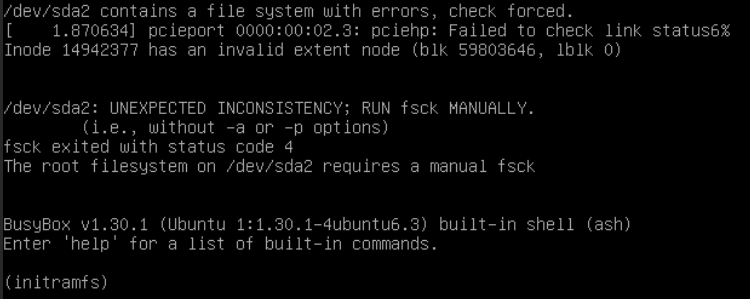
Does anyone know why my VM using 'Unassigned devices' will no longer work after the most recent 6.9.1 update? Disk is pushed using: /dev/disk/by-id/ The error is keeps referring to /dev/sda2, even though the unassigned disk is /dev/sdc. Running fsck states /dev/sda2 is not existent
-
Create IQN Create Volume Create LUNS Create ACL ***EDIT*** Thanks @ich777 i have now fixed the issue, i was creating a custom acl name, reset WIN10 to default and used that for the ACL initiator. Connected without issues Cheers
-
Has anyone managed to get iSCSI Target working? I get a Authorization Error in windows, however don't be believe there is any auth set during iSCSI creation? unRAID Beta35


