





rcketscientist
Members
-
Joined
-
Last visited
Everything posted by rcketscientist
-
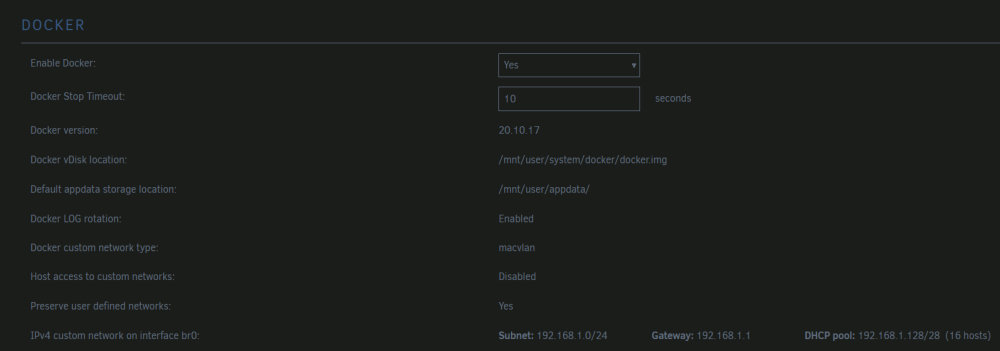
Been a while, but you can get any number of servers visible with a little network juggling. The main issue is that xbox has no network discovery configuratbility. It's :19132 or bust. So each server needs an ip on the network and the :19132 port. Here's how I have it setup, there's two strategies to getting the ip. In both situation the router doesn't know about the ip that docker hands out, so I'm thinking static is probably better. For the first one I setup the docker network to grab an ip range on br0: Alternatively, you can set an available static ip:


-
I'm seeing the same error. There's no 'ALLOWED_ORIGINS' in the api report.
-
For anyone looking to ignore an unassigned drive in fan control, here's how you can manually exclude it. First get the id of the drive (sdx, etc.). Then edit the plugin config like so: Note the `...` represents a long line of options, but at the end I added `sdh` which is my unassigned drive to the `-e` parameter. It will not show up in the gui menu, but it will be excluded. Restart or uninstall/reinstall the plugin. It was back to only using the spinning disks for temp checks.

-
Well, if that isn't the oddest, most mind-boggling business decision I've ever seen... BTW, the docker description does say "alpha", which is why I thought it was an issue with the image. If this is just a one-off bonkers decision by Mojang, maybe update the docker description?
-
Any particular reason this image pulls alpha while the original uses stable? It was reliable for me; didn't even realize that for a while. But now that clients and servers went out-of-sync, I'm left wondering if there's other risks mixing alpha servers and stable clients, even when they're "compatible".
-
Probably too late for you, but here's how to get it off an xbox. Owner (xbox): Start a realms account. Create a new world. In the created world settings, upload your local world to the newly created world. Owner (pc): Download your world from realms. Export your world (save to the PC) Unraid: TDB, working on this as I speak EDIT: Found a website with what I just figured out on my own... sigh https://shockbyte.com/billing/knowledgebase/175/How-to-Export-and-Upload-a-Custom-World-to-Your-Bedrock-Server.html


